How to join two files by key with awk
Small inventory exports often share an ID but keep different fields in separate files. awk can load a key-to-owner file into an associative array and append the matching owner to rows from the main export without opening a database or spreadsheet.
The example uses simple comma-delimited files where the first field is the key. The lookup file has no header, the main file has a header, and rows with keys missing from the lookup file are omitted so unmatched records do not look assigned.
Use this pattern for plain delimited text such as host inventories, username maps, or small reports. If the data is quoted CSV with embedded commas or newlines, use a CSV-aware tool before relying on awk -F, because field splitting by comma alone cannot parse quoted records.
Related: How to filter rows by a column with awk
Related: How to print selected columns with awk
Related: How to convert delimiters with awk
Steps to join two files by key with awk:
- Create the lookup file with the shared key in the first field and the value to append in the second field.
web-01,apps-team
db-01,data-team
cache-01,platform-team
The lookup file is intentionally headerless so every row can be loaded into the owner array without a header-skip condition.
- Create the main file with the same key in its first field.
host_id,env,role
web-01,prod,nginx
db-01,prod,postgres
batch-01,staging,worker
The batch-01 row has no matching key in owners.csv, which makes the join behavior visible in the final output.
- Run awk with the lookup file first and the main file second.
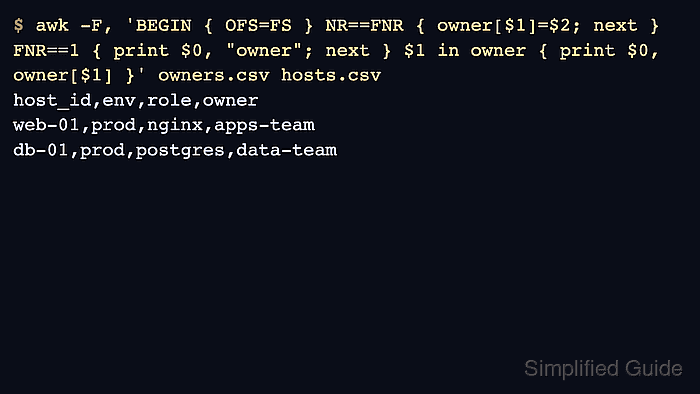
$ awk -F, 'BEGIN { OFS=FS } NR==FNR { owner[$1]=$2; next } FNR==1 { print $0, "owner"; next } $1 in owner { print $0, owner[$1] }' owners.csv hosts.csv
host_id,env,role,owner
web-01,prod,nginx,apps-team
db-01,prod,postgres,data-team
NR==FNR is true only while awk is reading the first file, so those rows build the owner lookup array. After next skips the rest of the rule set for the first file, the second file is printed only when its key exists in that array.
- Confirm that the output includes the new owner column and only the rows with keys found in both files. The missing batch-01 row proves that the command is doing an inner join rather than assigning a blank owner.
- Adjust the key and output fields for real files by changing the field numbers in the array assignment and the membership test. For example, use owner[$2]=$4 when the lookup key is field 2 and the value to append is field 4.
Keep the lookup file before the main file on the command line. Reversing the file order builds the array from the wrong data and changes the join result.