How to add a secret to a Logstash keystore
Keeping Elasticsearch passwords, API tokens, and similar secrets out of Logstash pipeline files reduces the chance of leaking them through copied configs, repository commits, backups, or troubleshooting bundles. A Logstash keystore stores the sensitive value separately so the pipeline keeps only a placeholder instead of the plain-text secret.
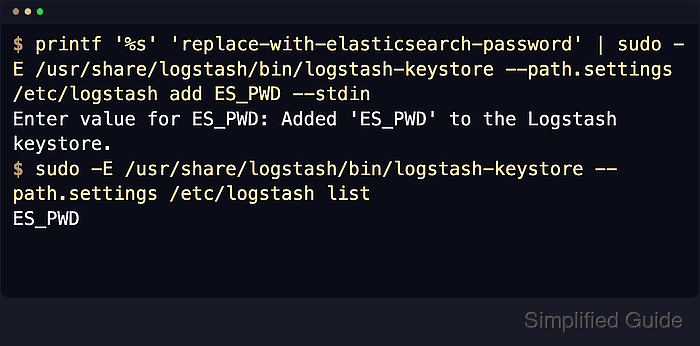
The keystore lives in the directory defined by path.settings, which is typically /etc/logstash on DEB and RPM installs. Each entry uses a key name such as es_pwd, and Logstash resolves ${key} references from the keystore before falling back to environment variables when it parses logstash.yml or pipeline configuration files.
Add entries against the same path.settings directory used by the running service, or the service reads a different keystore file. If the keystore is password-protected, LOGSTASH_KEYSTORE_PASS must be available to both the logstash-keystore command and the running logstash service. Keystore references do not work in pipelines.yml or inline configs passed with logstash -e.
Related: How to create a Logstash keystore
Steps to add a secret to a Logstash keystore:
- Add the secret to the keystore with the key name to reference in the pipeline.
$ sudo -E /usr/share/logstash/bin/logstash-keystore --path.settings /etc/logstash add es_pwd
Using bundled JDK: /usr/share/logstash/jdk

Enter value for es_pwd: Added 'es_pwd' to the Logstash keystore.
Keep --path.settings /etc/logstash aligned with the running service so the command updates the same keystore that Logstash reads at startup. If the keystore is password-protected, export LOGSTASH_KEYSTORE_PASS before running the command and preserve it with sudo -E.
- List the stored keys to confirm the new entry exists.
$ sudo -E /usr/share/logstash/bin/logstash-keystore --path.settings /etc/logstash list
Using bundled JDK: /usr/share/logstash/jdk

es_pwd
logstash-keystore list prints key names only and does not reveal the secret value.
- Return the keystore file to the logstash service account.
$ sudo chown logstash:root /etc/logstash/logstash.keystore
Elastic's keystore docs call out this ownership model because the file must stay protected while remaining readable to the logstash user.
- Restrict the keystore file to owner-only access.
$ sudo chmod 0600 /etc/logstash/logstash.keystore
- Verify the keystore file path, owner, and mode.
$ sudo ls -l /etc/logstash/logstash.keystore
-rw------- 1 logstash root 897 Jun 18 20:18 /etc/logstash/logstash.keystore
The exact file size and timestamp vary by release, but the path, owner, and 0600 mode should match the service account and the active path.settings directory.
- Replace the plain-text secret in the pipeline configuration with the keystore placeholder, then review the final snippet for any remaining credential-like values before sharing or committing it.
output {
  elasticsearch {
    hosts => ["https://es.example.net:9200"]
    user => "logstash_writer"
    password => "${es_pwd}"
  }
}
The placeholder should match the key name shown by logstash-keystore list. Keystore substitution works in pipeline configuration and logstash.yml, but not from pipelines.yml or the logstash -e command-line config string.
Related: How to configure Logstash pipelines
Tool: Secret Pattern Sample Checker - Test the pipeline configuration before restarting Logstash.
$ sudo -u logstash /usr/share/logstash/bin/logstash --path.settings /etc/logstash --path.data /tmp/logstash-configtest --config.test_and_exit
Using bundled JDK: /usr/share/logstash/jdk
Sending Logstash logs to /var/log/logstash which is now configured via log4j2.properties
##### snipped #####
Configuration OK
[2026-06-18T20:16:58,220][INFO ][logstash.runner          ] Using config.test_and_exit mode. Config Validation Result: OK. Exiting Logstash
Current releases default allow_superuser to false, so run package-based tests as the logstash user instead of root unless that setting has been changed.
- Remove the temporary validation data path.
$ sudo rm --recursive --force /tmp/logstash-configtest
- Restart the Logstash service so it reloads the updated keystore.
$ sudo systemctl restart logstash
Keystore changes are read at startup, so the running service keeps using the previous value until the next clean start.
- Check the service state and recent startup result.
$ sudo systemctl status logstash --no-pager --full
● logstash.service - logstash
     Loaded: loaded (/usr/lib/systemd/system/logstash.service; enabled; preset: enabled)
     Active: active (running) since Thu 2026-06-18 20:19:31 UTC; 11s ago
   Main PID: 58211 (java)
      Tasks: 101 (limit: 28486)
     Memory: 1.1G (peak: 1.1G)
        CPU: 34.102s
     CGroup: /system.slice/logstash.service
             └─58211 /usr/share/logstash/jdk/bin/java ##### snipped #####
If the service does not return to active (running), inspect the recent journal for keystore-path, permission, or invalid-setting errors with sudo journalctl -u logstash -n 50 --no-pager.