How to configure a Logstash file output
Writing Logstash events to a local file creates an on-disk copy of pipeline output for archiving, inspection, or downstream handoff. It is useful when a pipeline needs a plain JSON Lines file beside a remote output, or when filter changes need a visible event record before the data leaves the host.
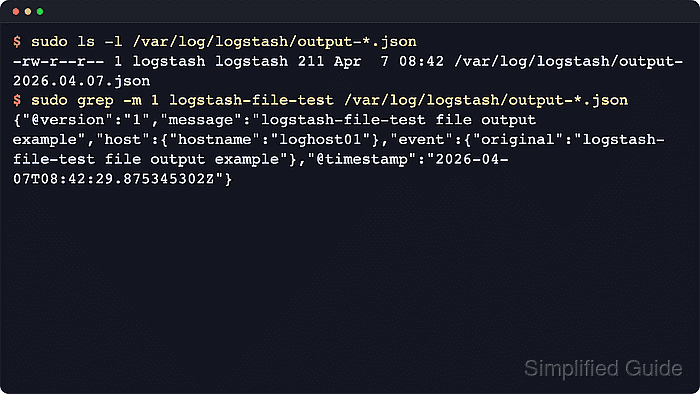
The file output plugin writes each event to the configured path and uses the json_lines codec by default, so every event becomes one JSON object per line. The output path can include event fields and the event timestamp, which supports dated file names without moving rotation logic into another plugin.
File outputs append by default and recreate a deleted target file when the next event arrives, but they do not manage retention, compression, or free space. Use a dedicated writable directory, monitor the filesystem, and run package-based configuration tests as the logstash service account unless allow_superuser was deliberately changed.
Steps to configure a Logstash file output:
- Create dedicated input and output directories for the pipeline.
$ sudo install -d -o logstash -g logstash -m 0750 \
  /var/lib/logstash/examples \
  /var/log/logstash/file-output
File output keeps appending events until disk space or filesystem quotas stop it, so place the directory on monitored storage with a separate retention or rotation policy.
- Create an example source file that the logstash service account can read.
$ sudo install -o logstash -g logstash -m 0640 /dev/null \
  /var/lib/logstash/examples/file-output.log
- Create 40-file-output.conf under /etc/logstash/conf.d.
input {
  file {
    path => ["/var/lib/logstash/examples/file-output.log"]
    start_position => "end"
    sincedb_path => "/var/lib/logstash/file-output-demo.sincedb"
  }
}

output {
  file {
    id => "local_file_archive"
    path => "/var/log/logstash/file-output/output-%{+YYYY.MM.dd}.json"
    codec => json_lines
  }
}
The daily suffix in path comes from the event timestamp, so delayed or backfilled events can land in an older dated file. The absolute output path starts with a fixed directory because current Elastic documentation rejects absolute paths that begin with a dynamic field.
- Test the pipeline configuration with the packaged settings directory and a temporary data path.
$ sudo -u logstash /usr/share/logstash/bin/logstash \
  --path.settings /etc/logstash \
  --path.data /tmp/logstash-configtest \
  --config.test_and_exit
Using bundled JDK: /usr/share/logstash/jdk
Sending Logstash logs to /var/log/logstash which is now configured via log4j2.properties
##### snipped #####
Configuration OK
[2026-06-18T15:19:01,422][INFO ][logstash.runner          ] Using config.test_and_exit mode. Config Validation Result: OK. Exiting Logstash
The temporary --path.data directory must be writable by the logstash user and keeps the check away from the live service data directory. Logstash defaults allow_superuser to false, so package-based tests should not run as plain root unless that setting was changed intentionally.
Related: How to test a Logstash pipeline configuration - Restart the Logstash service to load the new pipeline.
$ sudo systemctl restart logstash
Restarting Logstash restarts every active pipeline in the service, which can briefly pause ingestion while inputs and outputs reopen.
- Confirm the Logstash service is running after the restart.
$ sudo systemctl status logstash --no-pager ● logstash.service - logstash Loaded: loaded (/usr/lib/systemd/system/logstash.service; enabled; preset: enabled) Active: active (running) since Thu 2026-06-18 15:19:06 UTC; 8s ago Main PID: 20457 (java) Tasks: 101 (limit: 28486) Memory: 1.1G (peak: 1.1G) CPU: 31.262s ##### snipped ##### - Append a test line after the service is running.
$ printf 'logstash-file-test file output example\n' | sudo tee -a /var/lib/logstash/examples/file-output.log
logstash-file-test file output example
Because start_position is set to end, append the test line after Logstash starts so the file input treats it as new data.
- Verify the file output produced a dated JSON file.
$ sudo ls -l /var/log/logstash/file-output/
total 4
-rw-r--r-- 1 logstash logstash 247 Jun 18 15:19 output-2026.06.18.json
The file output plugin uses append mode by default and recreates the target file automatically if it is deleted before the next event arrives.
- Confirm the output file contains a valid JSON Lines test event.
$ sudo grep -m 1 logstash-file-test \
  /var/log/logstash/file-output/output-2026.06.18.json | python3 -m json.tool
{
    "@version": "1",
    "@timestamp": "2026-06-18T15:19:09.559049967Z",
    "event": {
        "original": "logstash-file-test file output example"
    },
    "host": {
        "name": "loghost01"
    },
    "log": {
        "file": {
            "path": "/var/lib/logstash/examples/file-output.log"
        }
    },
    "message": "logstash-file-test file output example"
}
Use the dated file name produced on your host. If the grep returns no match or the parser reports invalid JSON, append another line and inspect journalctl –unit logstash –since “5 minutes ago” –no-pager for permission errors, path mistakes, or pipeline startup failures.
Tool: JSON Validator - Remove the temporary configuration-test data path.
$ sudo rm -rf /tmp/logstash-configtest