How to enable Filebeat load balancing for Logstash output
Sending every Filebeat event to one Logstash listener ties log delivery to a single TCP path and one maintenance window. Enabling load balancing in the Logstash output keeps Filebeat connected to multiple Logstash endpoints so publishing can continue through the remaining hosts when one endpoint is restarted or unreachable.
The setting belongs in the output.logstash block in /etc/filebeat/filebeat.yml. Elastic documents loadbalance: false as the default for the Logstash output; when loadbalance: true is set, Filebeat connects to all configured hosts in parallel, and worker or workers controls how many publishing connections are created for each host.
Every listed Logstash host should expose the same beats input and accept the same TLS, proxy, and authentication settings. Packaged Linux installs normally use /etc/filebeat/filebeat.yml for the main config and a systemd service named filebeat, so the saved YAML, the connection test, and the service restart all need to agree before traffic is handed back to the live shipper.
Steps to enable Filebeat load balancing for Logstash output:
- Open the Filebeat configuration file.
$ sudo nano /etc/filebeat/filebeat.yml
YAML indentation is significant; keep nested keys aligned and use spaces instead of tabs.
- Configure multiple hosts in the Logstash output block and enable load balancing.
output.logstash:
  hosts:
    - "logstash-1.example.net:5044"
    - "logstash-2.example.net:5044"
  loadbalance: true
  worker: 2
Only one output.* block can be enabled in /etc/filebeat/filebeat.yml. Keep existing ssl.*, proxy_*, and authentication keys in the same output.logstash block so every listed host uses the same transport settings.
Related: How to configure Filebeat output to Logstashworker: 2 with two hosts creates four publishing connections. Start with a conservative value unless the Logstash inputs, network path, and downstream pipeline can absorb the extra parallelism.
- Test the configuration syntax before restarting the service.
$ sudo filebeat test config -c /etc/filebeat/filebeat.yml
Config OK
Current 9.x builds can fail this check when no inputs or modules are enabled, even if the output.logstash syntax is valid. Keep one real input enabled while validating a production config.
Related: How to test a Filebeat configuration - Test the saved Logstash output settings against every configured host.
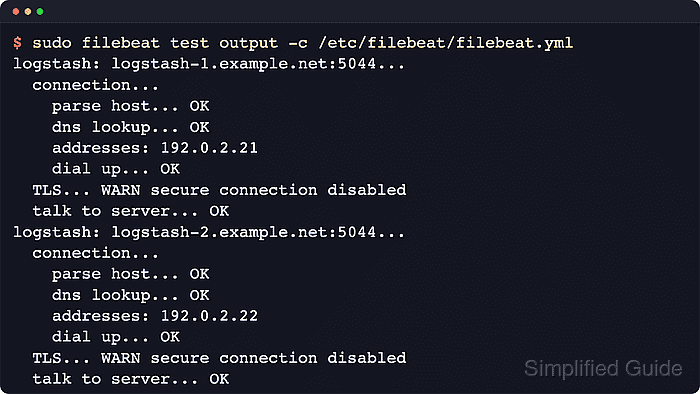
$ sudo filebeat test output -c /etc/filebeat/filebeat.yml
logstash: logstash-1.example.net:5044...
  connection...
    parse host... OK
    dns lookup... OK
    addresses: 192.0.2.21
    dial up... OK
  TLS... WARN secure connection disabled
  talk to server... OK
logstash: logstash-1.example.net:5044...
  connection...
    parse host... OK
    dns lookup... OK
    addresses: 192.0.2.21
    dial up... OK
  TLS... WARN secure connection disabled
  talk to server... OK
logstash: logstash-2.example.net:5044...
  connection...
    parse host... OK
    dns lookup... OK
    addresses: 192.0.2.22
    dial up... OK
  TLS... WARN secure connection disabled
  talk to server... OK
logstash: logstash-2.example.net:5044...
  connection...
    parse host... OK
    dns lookup... OK
    addresses: 192.0.2.22
    dial up... OK
  TLS... WARN secure connection disabled
  talk to server... OK
With worker: 2, current Filebeat releases repeat each host once per worker connection in the output test. The connection test should reach talk to server... OK for every listed host.
Related: How to test Filebeat output connectivity - Restart the Filebeat service to apply the updated output settings.
$ sudo systemctl restart filebeat
- Confirm the service returned to an active state.
$ sudo systemctl is-active filebeat
active
If the command returns failed or inactive, inspect the full service status and journal output before retrying the restart.
Related: How to manage the Filebeat service with systemctl in Linux