How to load Filebeat dashboards into Kibana
Loading the packaged Filebeat dashboards into Kibana imports the saved objects that make Filebeat module data visible as dashboards, searches, and a filebeat-* data view. It is a one-time setup task for new stacks, rebuilt Kibana spaces, or Filebeat upgrades where dashboards are missing even though events are already arriving.
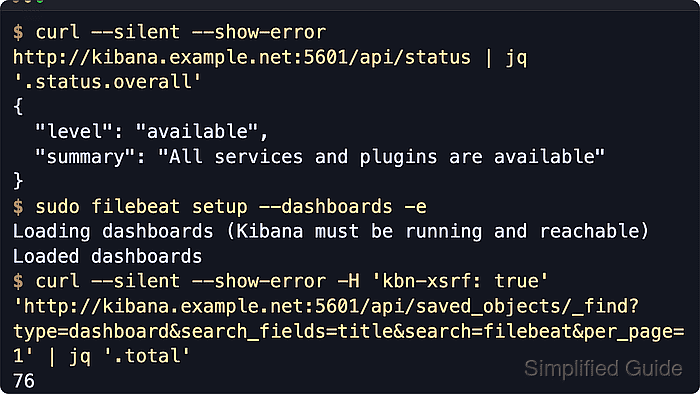
Filebeat sends the dashboard bundle to Kibana through the setup.kibana endpoint and still checks Elasticsearch during setup. The host running Filebeat therefore needs access to both Kibana and Elasticsearch, plus credentials that can create Kibana saved objects and read Elasticsearch version information.
Dashboard loading is disabled by default. Enabling setup.dashboards.enabled makes Filebeat import dashboards every time it starts and stop when Kibana is unavailable, so an explicit filebeat setup –dashboards run is safer for existing service hosts.
Steps to load Filebeat dashboards into Kibana:
- Set the Kibana endpoint in /etc/filebeat/filebeat.yml.
setup.kibana:
  host: "https://kibana.example.net:5601"
  username: "filebeat_setup"
  password: "${KIBANA_PASSWORD}"
  space.id: "observability"
  ssl.certificate_authorities: ["/etc/filebeat/certs/kibana-ca.crt"]
Omit space.id when dashboards should load into the default Kibana space. setup.kibana.username and setup.kibana.password can be omitted when the output.elasticsearch account is also allowed to import Kibana saved objects.
Related: How to add a secret to a Filebeat keystore - Test the Filebeat configuration before importing dashboards.
$ sudo filebeat test config -c /etc/filebeat/filebeat.yml
Config OK
Related: How to test a Filebeat configuration
- Confirm the target Kibana endpoint is available.
$ curl --silent --show-error --user filebeat_setup --cacert /etc/filebeat/certs/kibana-ca.crt "https://kibana.example.net:5601/api/status"
{
  "name": "kibana-01",
  "version": {
    "number": "9.4.2"
  },
  "status": {
    "overall": {
      "level": "available",
      "summary": "All services and plugins are available"
    },
##### snipped #####
  }
}
Use the same scheme, host, base path, credential, and CA file that setup.kibana.host uses.
Related: How to check Kibana status - Run the one-time dashboard import with the active Elasticsearch output.
$ sudo filebeat setup --dashboards -e -c /etc/filebeat/filebeat.yml
Loading dashboards (Kibana must be running and reachable)
Loaded dashboards
Filebeat overwrites matching dashboards, visualizations, searches, and the filebeat-* data view when imported saved object IDs already exist.
- Use temporary Elasticsearch output overrides instead when Filebeat normally publishes through Logstash.
$ sudo filebeat setup --dashboards -e -c /etc/filebeat/filebeat.yml \
  -E output.logstash.enabled=false \
  -E output.elasticsearch.hosts='["https://es.example.net:9200"]' \
  -E output.elasticsearch.username=filebeat_setup \
  -E output.elasticsearch.password="${ES_SETUP_PASSWORD}" \
  -E setup.kibana.host=https://kibana.example.net:5601
Loading dashboards (Kibana must be running and reachable)
Loaded dashboards
Skip this variant when output.elasticsearch is already the active Filebeat output. Filebeat still needs Elasticsearch access during dashboard loading because it checks cluster version information before importing saved objects.
Related: How to configure Filebeat output to Logstash - Confirm that Filebeat dashboards exist in the target Kibana space.
$ curl --silent --show-error --user filebeat_setup --cacert /etc/filebeat/certs/kibana-ca.crt -H 'kbn-xsrf: true' "https://kibana.example.net:5601/s/observability/api/saved_objects/_find?type=dashboard&search_fields=title&search=filebeat&per_page=1"
{
  "page": 1,
  "per_page": 1,
  "total": 76,
  "saved_objects": [
    {
      "type": "dashboard",
      "id": "9c09cd20-7399-11ea-a345-f985c61fe654",
      "attributes": {
        "title": "[Filebeat AWS] CloudTrail"
      }
    }
  ]
}
Omit /s/observability from the path when space.id was not set. A nonzero total and a Filebeat dashboard title confirm the saved objects were imported.
- Confirm that the filebeat-* data view exists.
$ curl --silent --show-error --user filebeat_setup --cacert /etc/filebeat/certs/kibana-ca.crt -H 'kbn-xsrf: true' "https://kibana.example.net:5601/s/observability/api/saved_objects/_find?type=index-pattern&search_fields=title&search=filebeat&per_page=1"
{
  "page": 1,
  "per_page": 1,
  "total": 1,
  "saved_objects": [
    {
      "type": "index-pattern",
      "id": "filebeat-*",
      "attributes": {
        "title": "filebeat-*"
      }
    }
  ]
}
The Saved Objects API still uses index-pattern for data views. In the Kibana UI, the same dashboards should appear under Analytics → Dashboards after searching for filebeat.