How to configure Elasticsearch recovery throttling
Recovery throttling in Elasticsearch limits how much network and disk bandwidth shard recoveries can use while replicas, relocated shards, or restored snapshots copy data. It is useful after node maintenance, node loss, allocation changes, or snapshot restore when recovery traffic competes with search and indexing work.
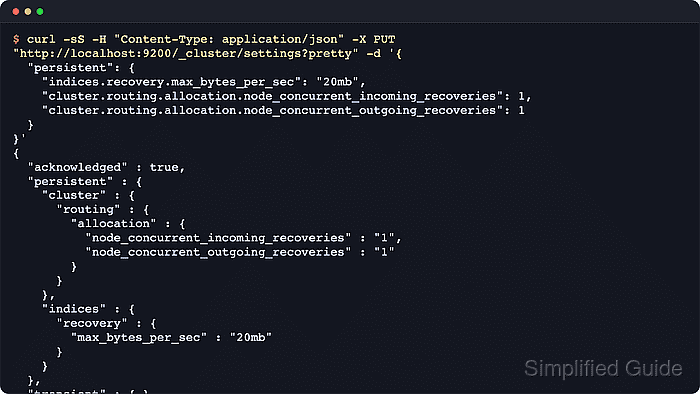
The dynamic setting indices.recovery.max_bytes_per_sec caps total inbound and outbound recovery traffic per node. Elastic documents 40mb as the default for most nodes, with higher memory-based defaults on dedicated cold and frozen nodes. Recovery concurrency has separate expert settings, but Elastic recommends leaving the default concurrency at 2 unless testing shows that a different value helps the cluster.
Use the /_cluster/settings API for a cluster-wide throttle when every node should receive the same dynamic limit. Prefer persistent settings for routine operations because Elastic no longer recommends transient overrides for stable configuration. Secured clusters need the https endpoint, authentication, CA trust, and a credential with cluster monitor privilege for reads or cluster manage privilege for updates.
Steps to configure Elasticsearch recovery throttling:
- Review the current recovery bandwidth throttle before setting an override.
$ curl --silent --show-error --fail --get "http://localhost:9200/_cluster/settings" \
  --data-urlencode "include_defaults=true" \
  --data-urlencode "filter_path=defaults.indices.recovery.max_bytes_per_sec,"\
"persistent.indices.recovery.max_bytes_per_sec,"\
"transient.indices.recovery.max_bytes_per_sec" \
  --data-urlencode "pretty=true"
{
  "defaults" : {
    "indices" : {
      "recovery" : {
        "max_bytes_per_sec" : "40mb"
      }
    }
  }
}
GET /_cluster/settings returns only explicit overrides by default, so include_defaults=true exposes the fallback values. Dedicated cold and frozen nodes can report a higher recovery bandwidth default based on available memory.
- Apply a persistent recovery bandwidth limit.
$ curl --silent --show-error --fail --request PUT "http://localhost:9200/_cluster/settings?pretty" --header "Content-Type: application/json" --data '{
  "persistent": {
    "indices": {
      "recovery": {
        "max_bytes_per_sec": "20mb"
      }
    }
  }
}'
{
  "acknowledged" : true,
  "persistent" : {
    "indices" : {
      "recovery" : {
        "max_bytes_per_sec" : "20mb"
      }
    }
  },
  "transient" : { }
}
Lower bandwidth limits reduce pressure on busy nodes but extend replica catch-up, relocation, and restore time. Raising the limit can increase disk, CPU, and network contention during recovery.
- Read back the explicit cluster overrides to confirm the new throttle is active.
$ curl --silent --show-error --fail "http://localhost:9200/_cluster/settings?pretty"
{
  "persistent" : {
    "indices" : {
      "recovery" : {
        "max_bytes_per_sec" : "20mb"
      }
    }
  },
  "transient" : { }
}
This plain read keeps the confirmation concise because it returns only persistent and transient overrides, not the full defaults tree.
Related: How to monitor shard recovery in Elasticsearch - Remove the persistent overrides to return to the node defaults or any value supplied from elasticsearch.yml.
$ curl --silent --show-error --fail --request PUT "http://localhost:9200/_cluster/settings?pretty" --header "Content-Type: application/json" --data '{
  "persistent": {
    "indices": {
      "recovery": {
        "max_bytes_per_sec": null
      }
    }
  }
}'
{
  "acknowledged" : true,
  "persistent" : { },
  "transient" : { }
}
Assigning null removes the explicit override instead of setting the literal string null. Restore the recorded pre-maintenance values instead when the cluster already had intentional recovery settings.
- Confirm the cluster has fallen back to the default recovery bandwidth throttle.
$ curl --silent --show-error --fail --get "http://localhost:9200/_cluster/settings" \
  --data-urlencode "include_defaults=true" \
  --data-urlencode "filter_path=defaults.indices.recovery.max_bytes_per_sec,"\
"persistent.indices.recovery.max_bytes_per_sec,"\
"transient.indices.recovery.max_bytes_per_sec" \
  --data-urlencode "pretty=true"
{
  "defaults" : {
    "indices" : {
      "recovery" : {
        "max_bytes_per_sec" : "40mb"
      }
    }
  }
}