Monitoring shard recovery in Elasticsearch shows whether replicas, relocated shard copies, or restored indices are still moving data after node maintenance, node loss, disk rebalancing, or snapshot restore. A cluster can answer requests while copy, translog, or validation work is still running, so the recovery counters matter before declaring the maintenance window finished.
Use the cluster health API for the recovery counters that summarize the whole cluster. Use /_cat/recovery for a compact human table of active shard copies, and use /<index>/_recovery when one index needs file, byte, translog, throttle, and timing detail.
Local curl requests can target http://localhost:9200 when the node listens without TLS. Secured clusters normally need the same https:// endpoint, credentials, and CA trust used by the operations path. CAT APIs are meant for command-line triage rather than application monitoring, so scripts should prefer the JSON cluster health and index recovery APIs.
Steps to monitor shard recovery in Elasticsearch:
- Check the cluster-wide recovery counters.
$ curl --silent --show-error --fail "http://localhost:9200/_cluster/health?filter_path=cluster_name,status,number_of_nodes,number_of_data_nodes,relocating_shards,initializing_shards,unassigned_shards,number_of_pending_tasks,active_shards_percent_as_number&pretty"
{
  "cluster_name" : "es-cluster",
  "status" : "yellow",
  "number_of_nodes" : 3,
  "number_of_data_nodes" : 3,
  "relocating_shards" : 2,
  "initializing_shards" : 1,
  "unassigned_shards" : 3,
  "number_of_pending_tasks" : 0,
  "active_shards_percent_as_number" : 98.8
}
Nonzero relocating_shards or initializing_shards means shard recovery is still active. Persistent unassigned_shards after those counters reach zero usually needs allocation diagnosis instead of more polling.
- Use the CAT health view for a one-line operator snapshot during long recovery windows.
$ curl --silent --show-error --fail "http://localhost:9200/_cat/health?v=true&h=cluster,status,node.total,node.data,shards,pri,relo,init,unassign,pending_tasks,active_shards_percent"
cluster    status node.total node.data shards pri relo init unassign pending_tasks active_shards_percent
es-cluster yellow          3         3    256 128    2    1        3             0                 98.8%
The CAT health API is useful beside logs during long recoveries, but applications should call /_cluster/health instead.
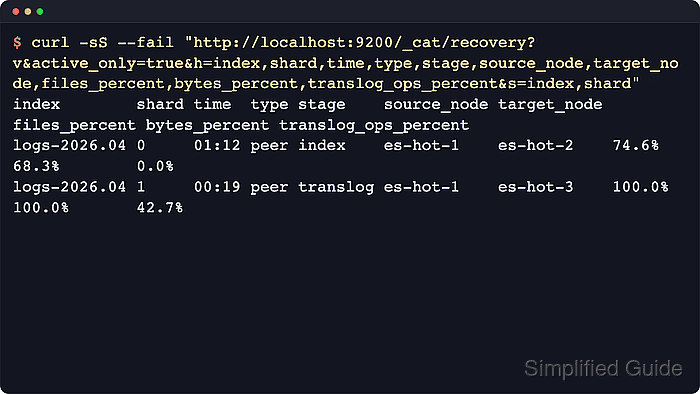
- List active shard recoveries with stage and progress columns.
$ curl --silent --show-error --fail "http://localhost:9200/_cat/recovery?v=true&active_only=true&h=index,shard,time,type,stage,source_node,target_node,files_percent,bytes_percent,translog_ops_percent&s=index,shard"
index        shard time  type stage    source_node target_node files_percent bytes_percent translog_ops_percent
logs-2026.04 0     01:12 peer index    es-hot-1    es-hot-2    74.6%         68.3%         0.0%
logs-2026.04 1     00:19 peer translog es-hot-1    es-hot-3    100.0%        100.0%        42.7%
No rows from active_only=true means no shard recoveries are active at that moment. Remove active_only=true when completed recoveries are needed for context.
- Refresh the active recovery view during a maintenance window.
$ watch -n 2 'curl --silent --show-error --fail "http://localhost:9200/_cat/recovery?v=true&active_only=true&h=index,shard,time,stage,source_node,target_node,bytes_percent,translog_ops_percent&s=index,shard"'
Every 2.0s: curl --silent --show-error --fail "http://localhost:9200/_cat/recovery?v=true&active_only=true&h=index,shard,time,stage,source_node,target_node,bytes_percent,translog_ops_percent&s=index,shard"  Thu Apr  2 16:30:01 2026

index        shard time  stage    source_node target_node bytes_percent translog_ops_percent
logs-2026.04 0     01:14 index    es-hot-1    es-hot-2    71.1%         0.0%
logs-2026.04 1     00:21 translog es-hot-1    es-hot-3    100.0%        48.9%
Press Ctrl+C to stop watch. Percentages that stay flat across several refreshes usually point to throttling, disk pressure, or allocation rules.
- Inspect detailed recovery metrics for the affected index.
$ curl --silent --show-error --fail "http://localhost:9200/logs-2026.04/_recovery?active_only=true&detailed=true&human&pretty"
{
  "logs-2026.04" : {
    "shards" : [
      {
        "id" : 0,
        "type" : "PEER",
        "stage" : "TRANSLOG",
        "primary" : false,
        "source" : {
          "name" : "es-hot-1"
        },
        "target" : {
          "name" : "es-hot-2"
        },
        "index" : {
          "files" : {
            "total" : 152,
            "recovered" : 152,
            "percent" : "100.0%"
          },
          "size" : {
            "total" : "100mb",
            "recovered" : "100mb",
            "percent" : "100.0%"
          },
          "source_throttle_time" : "0s",
          "target_throttle_time" : "0s"
        },
        "translog" : {
          "recovered" : 489,
          "total" : 1000,
          "percent" : "48.9%",
          "total_time" : "4.2s"
        },
        "verify_index" : {
          "check_index_time" : "0s"
        }
      }
##### snipped #####
    ]
  }
}
The index recovery API reports ongoing and completed recovery information for shard copies that currently exist in the cluster. Use active_only=true when the page should show only work still in progress.
- Check the affected shards for their final state.
$ curl --silent --show-error --fail "http://localhost:9200/_cat/shards/logs-2026.04?v=true&h=index,shard,prirep,state,node,unassigned.reason&s=shard,prirep"
index        shard prirep state   node      unassigned.reason
logs-2026.04 0     p      STARTED es-hot-1
logs-2026.04 0     r      STARTED es-hot-2
logs-2026.04 1     p      STARTED es-hot-1
logs-2026.04 1     r      STARTED es-hot-3
For shards that remain UNASSIGNED, unassigned.reason records the last state-change reason, not necessarily the current allocation blocker. Use allocation explain when the shard does not move after the recovery counters settle.
- Wait for relocation and initialization to drain before treating recovery as finished.
$ curl --silent --show-error --fail "http://localhost:9200/_cluster/health?wait_for_no_relocating_shards=true&wait_for_no_initializing_shards=true&timeout=60s&filter_path=cluster_name,status,relocating_shards,initializing_shards,unassigned_shards,active_shards_percent_as_number,timed_out&pretty"
{
  "cluster_name" : "es-cluster",
  "status" : "green",
  "timed_out" : false,
  "relocating_shards" : 0,
  "initializing_shards" : 0,
  "unassigned_shards" : 0,
  "active_shards_percent_as_number" : 100.0
}
A yellow result can still be expected when replicas are intentionally unavailable or cannot be placed, but recovery is not finished while relocating_shards or initializing_shards remains above zero.

Mohd Shakir Zakaria is a cloud architect with deep roots in software development and open-source advocacy. Certified in AWS, Red Hat, VMware, ITIL, and Linux, he specializes in designing and managing robust cloud and on-premises infrastructures.


