How to simulate an Elasticsearch ingest pipeline
Simulating an Elasticsearch ingest pipeline shows how each processor changes a document before the document reaches an index. It is the safest first check for grok patterns, field names, processor order, and failure handling because the sample document is transformed without being stored.
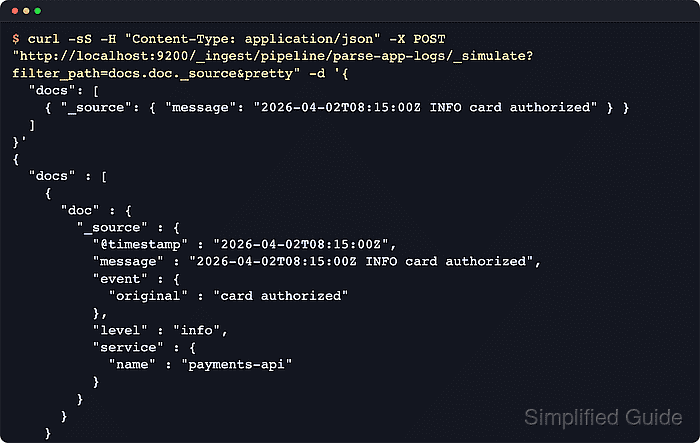
The simulate API can test a stored pipeline by ID or an inline pipeline definition in the request body. Adding verbose=true returns the output after each processor, which helps isolate the exact processor that changed a field or raised an error.
Simulation does not apply index mappings, analyzers, templates, or final indexing rules. A clean simulation proves the ingest processor chain for the supplied sample, while a production rollout still needs a small indexing smoke test through the real pipeline and target index.
Steps to simulate an Elasticsearch ingest pipeline:
- Review the stored pipeline definition before testing sample documents.
$ curl -sS "http://localhost:9200/_ingest/pipeline/parse-app-logs?filter_path=*.description,*.processors&pretty"
{
  "parse-app-logs" : {
    "description" : "Parse application log lines and normalize level",
    "processors" : [
      {
        "grok" : {
          "field" : "message",
          "patterns" : [
            "%{TIMESTAMP_ISO8601:@timestamp} %{LOGLEVEL:level} %{GREEDYDATA:event.original}"
          ]
        }
      },
      {
        "lowercase" : {
          "field" : "level"
        }
      },
      {
        "set" : {
          "field" : "service.name",
          "value" : "payments-api"
        }
      }
    ]
  }
}
Fetching the definition first confirms the pipeline ID, processor order, and field names that the simulation response should reflect.
- Simulate one matching document through the stored pipeline.
$ curl -sS -H "Content-Type: application/json" -X POST "http://localhost:9200/_ingest/pipeline/parse-app-logs/_simulate?filter_path=docs.doc._source.@timestamp,docs.doc._source.event,docs.doc._source.level,docs.doc._source.service&pretty" -d '{
  "docs": [
    { "_source": { "message": "2026-04-02T08:15:00Z INFO card authorized" } }
  ]
}'
{
  "docs" : [
    {
      "doc" : {
        "_source" : {
          "@timestamp" : "2026-04-02T08:15:00Z",
          "event" : {
            "original" : "card authorized"
          },
          "level" : "info",
          "service" : {
            "name" : "payments-api"
          }
        }
      }
    }
  ]
}
On secured clusters, replace http://localhost:9200 with the cluster HTTPS endpoint and add authentication such as --user username:password or -H "Authorization: ApiKey BASE64_KEY". The simulate API requires the read_pipeline cluster privilege.
- Test a malformed sample to confirm the failure signal.
$ curl -sS -H "Content-Type: application/json" -X POST "http://localhost:9200/_ingest/pipeline/parse-app-logs/_simulate?filter_path=docs.error&pretty" -d '{
  "docs": [
    { "_source": { "message": "not a matching log line" } }
  ]
}'
{
  "docs" : [
    {
      "error" : {
        "root_cause" : [
          {
            "type" : "illegal_argument_exception",
            "reason" : "Provided Grok expressions do not match field value: [not a matching log line]"
          }
        ],
        "type" : "illegal_argument_exception",
        "reason" : "Provided Grok expressions do not match field value: [not a matching log line]"
      }
    }
  ]
}
A per-document docs.error entry shows the processor failure without indexing the sample document.
- Simulate a draft pipeline definition without saving it.
$ curl -sS -H "Content-Type: application/json" -X POST "http://localhost:9200/_ingest/pipeline/_simulate?filter_path=docs.doc._source&pretty" -d '{
  "pipeline": {
    "description": "Draft pipeline test",
    "processors": [
      {
        "grok": {
          "field": "message",
          "patterns": [
            "%{TIMESTAMP_ISO8601:@timestamp} %{LOGLEVEL:level} %{GREEDYDATA:event.original}"
          ]
        }
      },
      {
        "lowercase": {
          "field": "level"
        }
      },
      {
        "set": {
          "field": "labels.stage",
          "value": "staging"
        }
      }
    ]
  },
  "docs": [
    { "_source": { "message": "2026-04-02T08:20:00Z ERROR db timeout" } }
  ]
}'
{
  "docs" : [
    {
      "doc" : {
        "_source" : {
          "@timestamp" : "2026-04-02T08:20:00Z",
          "message" : "2026-04-02T08:20:00Z ERROR db timeout",
          "event" : {
            "original" : "db timeout"
          },
          "level" : "error",
          "labels" : {
            "stage" : "staging"
          }
        }
      }
    }
  ]
}
The request-body pipeline object is useful for trying a processor change before storing it with PUT /_ingest/pipeline/<id>. If the URL also names a pipeline ID, Elasticsearch uses the path pipeline and ignores the body pipeline object.
Tool: Filebeat Grok Pattern Generator - Run verbose simulation to inspect each intermediate document.
$ curl -sS -H "Content-Type: application/json" -X POST "http://localhost:9200/_ingest/pipeline/parse-app-logs/_simulate?verbose=true&filter_path=docs.processor_results.processor_type,docs.processor_results.doc._source&pretty" -d '{
  "docs": [
    { "_source": { "message": "2026-04-02T08:15:00Z INFO card authorized" } }
  ]
}'
{
  "docs" : [
    {
      "processor_results" : [
        {
          "processor_type" : "grok",
          "doc" : {
            "_source" : {
              "@timestamp" : "2026-04-02T08:15:00Z",
              "message" : "2026-04-02T08:15:00Z INFO card authorized",
              "event" : {
                "original" : "card authorized"
              },
              "level" : "INFO"
            }
          }
        },
        {
          "processor_type" : "lowercase",
          "doc" : {
            "_source" : {
              "@timestamp" : "2026-04-02T08:15:00Z",
              "message" : "2026-04-02T08:15:00Z INFO card authorized",
              "event" : {
                "original" : "card authorized"
              },
              "level" : "info"
            }
          }
        },
        {
          "processor_type" : "set",
          "doc" : {
            "_source" : {
              "@timestamp" : "2026-04-02T08:15:00Z",
              "message" : "2026-04-02T08:15:00Z INFO card authorized",
              "event" : {
                "original" : "card authorized"
              },
              "level" : "info",
              "service" : {
                "name" : "payments-api"
              }
            }
          }
        }
      ]
    }
  ]
}
Verbose output follows processor order, so compare the first unexpected value with the matching processor_type entry.