How to update cluster settings in Elasticsearch
Updating cluster settings in Elasticsearch changes cluster-wide behavior without editing every node or restarting the service. It is useful for dynamic settings such as recovery throttles, shard allocation controls, and temporary operating limits during maintenance.
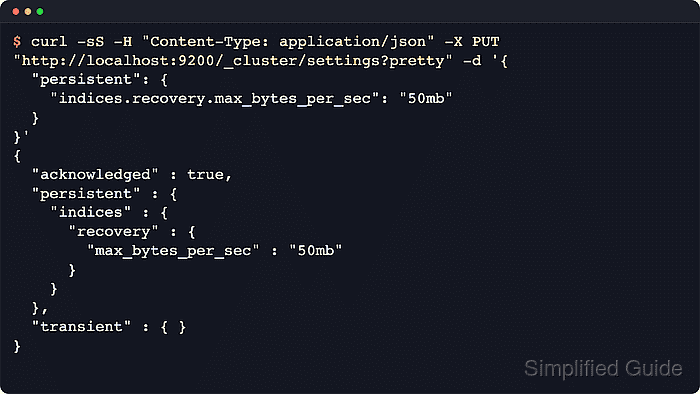
The /_cluster/settings API updates dynamic settings on a running cluster. API-based changes are stored as persistent or transient overrides, and Elasticsearch applies the first defined value in the order transient, persistent, elasticsearch.yml, and built-in default.
Use persistent settings for routine operations because they survive restarts and match Elastic's recommendation. transient settings can disappear after restarts or cluster instability, static settings still belong in elasticsearch.yml, and secured clusters require HTTPS plus authentication with the required cluster privilege.
Steps to update cluster settings in Elasticsearch:
- Review the current value for the target setting.
$ curl -sS "http://localhost:9200/_cluster/settings?include_defaults=true&filter_path=defaults.indices.recovery.max_bytes_per_sec,persistent.indices.recovery.max_bytes_per_sec,transient.indices.recovery.max_bytes_per_sec&pretty"
{
  "defaults" : {
    "indices" : {
      "recovery" : {
        "max_bytes_per_sec" : "40mb"
      }
    }
  }
}
GET /_cluster/settings returns only explicitly defined settings by default. Add include_defaults=true to see the fallback value, replace http://localhost:9200 with the cluster endpoint and required authentication options when security is enabled, and use a credential with cluster monitor privilege for this read call.
- Apply the setting as a persistent cluster override.
$ curl -sS -H "Content-Type: application/json" -X PUT "http://localhost:9200/_cluster/settings?pretty" -d '{
  "persistent": {
    "indices.recovery.max_bytes_per_sec": "50mb"
  }
}'
{
  "acknowledged" : true,
  "persistent" : {
    "indices" : {
      "recovery" : {
        "max_bytes_per_sec" : "50mb"
      }
    }
  },
  "transient" : { }
}
persistent settings survive cluster restarts and are the recommended default for dynamic cluster changes. Use a credential with cluster manage privilege for update calls on secured clusters.
Related: How to configure Elasticsearch recovery throttling - Read the setting again to confirm the persistent override is stored.
$ curl -sS "http://localhost:9200/_cluster/settings?include_defaults=true&filter_path=defaults.indices.recovery.max_bytes_per_sec,persistent.indices.recovery.max_bytes_per_sec,transient.indices.recovery.max_bytes_per_sec&pretty"
{
  "persistent" : {
    "indices" : {
      "recovery" : {
        "max_bytes_per_sec" : "50mb"
      }
    }
  }
}
Once an explicit persistent or transient value exists, the filtered response no longer repeats the matching default value.
- Set a transient override only for a short-lived change that must outrank the persistent value.
$ curl -sS -H "Content-Type: application/json" -X PUT "http://localhost:9200/_cluster/settings?pretty" -d '{
  "transient": {
    "indices.recovery.max_bytes_per_sec": "60mb"
  }
}'
{
  "acknowledged" : true,
  "persistent" : { },
  "transient" : {
    "indices" : {
      "recovery" : {
        "max_bytes_per_sec" : "60mb"
      }
    }
  }
}
Elastic no longer recommends transient cluster settings for routine operations because they can clear unexpectedly if the cluster becomes unstable.
- Verify that the transient value masks the persistent value.
$ curl -sS "http://localhost:9200/_cluster/settings?include_defaults=true&filter_path=defaults.indices.recovery.max_bytes_per_sec,persistent.indices.recovery.max_bytes_per_sec,transient.indices.recovery.max_bytes_per_sec&pretty"
{
  "persistent" : {
    "indices" : {
      "recovery" : {
        "max_bytes_per_sec" : "50mb"
      }
    }
  },
  "transient" : {
    "indices" : {
      "recovery" : {
        "max_bytes_per_sec" : "60mb"
      }
    }
  }
}
Elasticsearch applies the transient value first, so 60mb is effective while the persistent value remains stored.
- Clear the transient override when the temporary change is finished.
$ curl -sS -H "Content-Type: application/json" -X PUT "http://localhost:9200/_cluster/settings?pretty" -d '{
  "transient": {
    "indices.recovery.max_bytes_per_sec": null
  }
}'
{
  "acknowledged" : true,
  "persistent" : { },
  "transient" : { }
}
Assigning null removes the explicit override instead of setting the literal string null.
- Confirm the persistent value is effective after the transient override is removed.
$ curl -sS "http://localhost:9200/_cluster/settings?include_defaults=true&filter_path=defaults.indices.recovery.max_bytes_per_sec,persistent.indices.recovery.max_bytes_per_sec,transient.indices.recovery.max_bytes_per_sec&pretty" { "persistent" : { "indices" : { "recovery" : { "max_bytes_per_sec" : "50mb" } } } } - Clear the persistent override to return to elasticsearch.yml or the built-in default.
$ curl -sS -H "Content-Type: application/json" -X PUT "http://localhost:9200/_cluster/settings?pretty" -d '{ "persistent": { "indices.recovery.max_bytes_per_sec": null } }' { "acknowledged" : true, "persistent" : { }, "transient" : { } } - Confirm the cluster has fallen back to the default value.
$ curl -sS "http://localhost:9200/_cluster/settings?include_defaults=true&filter_path=defaults.indices.recovery.max_bytes_per_sec,persistent.indices.recovery.max_bytes_per_sec,transient.indices.recovery.max_bytes_per_sec&pretty"
{
  "defaults" : {
    "indices" : {
      "recovery" : {
        "max_bytes_per_sec" : "40mb"
      }
    }
  }
}
For a production change, also check the affected subsystem, such as recovery throughput, shard allocation behavior, or index creation, instead of relying only on the settings API response.