How to compare DNS answers across resolvers with dig
Recursive DNS resolvers cache records on separate schedules, so two clients can receive different answers during a DNS change. Asking multiple resolvers the identical question shows whether the difference is in the record data or only in each cache's remaining lifetime.
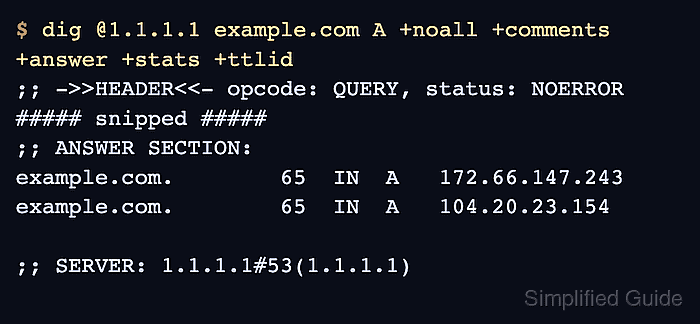
Keep the queried name, record type, and display flags fixed for every request. Only the resolver after @ should change; otherwise a difference in query shape can look like resolver disagreement.
Compare response status and the complete record set before considering order or TTL. Multi-value DNS answers may arrive in a different order, while TTLs naturally differ because each resolver counts down its own cached copy.
Related: How to query a specific DNS server with dig
Related: How to show short DNS answers with dig
Tool: DNS Propagation Checker
Steps to compare DNS resolver answers with dig:
- Query Cloudflare 1.1.1.1 for the A records of example.com.
$ dig @1.1.1.1 example.com A +noall +comments +answer +ttlid
;; Got answer:
;; ->>HEADER<<- opcode: QUERY, status: NOERROR, id: 12592
;; flags: qr rd ra ad; QUERY: 1, ANSWER: 2, AUTHORITY: 0, ADDITIONAL: 1

;; OPT PSEUDOSECTION:
; EDNS: version: 0, flags:; udp: 1232
;; ANSWER SECTION:
example.com.        152 IN  A   104.20.23.154
example.com.        152 IN  A   172.66.147.243
+noall suppresses the default sections, while +comments, +answer, and +ttlid retain the response status, answer records, and numeric TTL.
- Repeat the identical A-record query against Google Public DNS 8.8.8.8.
$ dig @8.8.8.8 example.com A +noall +comments +answer +ttlid
;; Got answer:
;; ->>HEADER<<- opcode: QUERY, status: NOERROR, id: 61129
;; flags: qr rd ra ad; QUERY: 1, ANSWER: 2, AUTHORITY: 0, ADDITIONAL: 1

;; OPT PSEUDOSECTION:
; EDNS: version: 0, flags:; udp: 512
;; ANSWER SECTION:
example.com.        300 IN  A   172.66.147.243
example.com.        300 IN  A   104.20.23.154
- Query a third resolver or an authoritative server with the unchanged request before any DNS change when either status or any record value differs.
Resolver policy, DNSSEC validation, split DNS, and cache timing can produce genuine differences.
- Confirm that both responses show NOERROR and the same complete A-record set.
The order differs, and the observed TTLs are 152 and 300 seconds, but both answers contain 104.20.23.154 and 172.66.147.243. This is matching DNS data with different cache ages.