How to enable Debian backports
Backports help when a Debian stable host needs one newer package without moving the whole system to testing or unstable. Enabling the matching backports suite makes those packages visible to APT, but package installation still stays opt-in so routine upgrades do not drift away from stable packages.
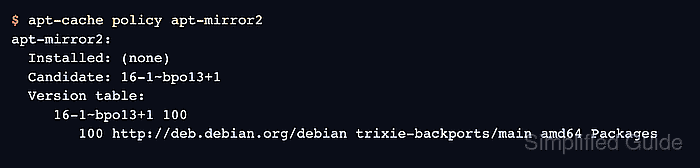
Debian 13 stable uses the trixie codename, so the current stable backports suite is trixie-backports. A deb822 source file under /etc/apt/sources.list.d points APT at deb.debian.org and the Debian archive keyring; after the package lists refresh, apt-cache policy should show backported packages at priority 100.
Use backports only for packages that need the newer version, such as hardware support, drivers, kernels, or tools unavailable in stable. Backports are maintained on a best-effort basis and are not tested as a complete replacement repository, so install packages from the suite deliberately and keep the rest of the system on stable packages.
Related: How to install a package on Debian with apt
Related: How to pin a Debian package version
Related: How to add an APT repository on Debian
Steps to enable Debian backports:
- Check the Debian release codename.
$ cat /etc/os-release
PRETTY_NAME="Debian GNU/Linux 13 (trixie)"
VERSION_ID="13"
VERSION="13 (trixie)"
VERSION_CODENAME=trixie
##### snipped #####
Use the codename from your system when building the backports suite name. On current Debian stable, that suite is trixie-backports.
- Create the deb822 backports source file.
$ sudo tee /etc/apt/sources.list.d/debian-backports.sources >/dev/null <<'EOF'
Types: deb
URIs: http://deb.debian.org/debian
Suites: trixie-backports
Components: main
Enabled: yes
Signed-By: /usr/share/keyrings/debian-archive-keyring.gpg
EOF
Add deb-src after deb in Types only when you need source packages from backports. Binary package installs need Types: deb.
- Refresh the APT package lists.
$ sudo apt update
Get:1 http://deb.debian.org/debian trixie-backports InRelease [54.0 kB]
Hit:2 http://deb.debian.org/debian trixie InRelease
Hit:3 http://deb.debian.org/debian trixie-updates InRelease
Hit:4 http://deb.debian.org/debian-security trixie-security InRelease
Get:5 http://deb.debian.org/debian trixie-backports/main amd64 Packages [289 kB]
Fetched 343 kB in 1s
Reading package lists... Done
A successful refresh should include trixie-backports in the downloaded indexes. If your normal sources use another Debian mirror, keep the backports source on the same Debian release codename.
- Confirm a backported package is visible but pinned below normal stable packages.
$ apt-cache policy apt-mirror2
apt-mirror2:
  Installed: (none)
  Candidate: 16-1~bpo13+1
  Version table:
     16-1~bpo13+1 100
        100 http://deb.debian.org/debian trixie-backports/main amd64 Packages
Priority 100 means backports is available without becoming the default source for ordinary upgrades. Packages already installed from backports can still receive newer backports updates.
Related: How to pin a Debian package version
- Install a selected package from backports when you are ready to opt in.
$ sudo apt install -t trixie-backports apt-mirror2
Reading package lists... Done
Building dependency tree... Done
Reading state information... Done
The following NEW packages will be installed:
  apt-mirror2 python3-apt-mirror2
##### snipped #####
Replace apt-mirror2 with the package you actually need. Use apt install apt-mirror2/trixie-backports when only the named package should be selected from backports; use apt install -t trixie-backports apt-mirror2 when backported dependencies may also be required.