How to debug HTTP requests with cURL
Debugging an API call or site request often depends on seeing the exact HTTP exchange instead of only the response body. Redirects, TLS negotiation, request headers, and method changes can all explain a failure before the application payload becomes the real problem.
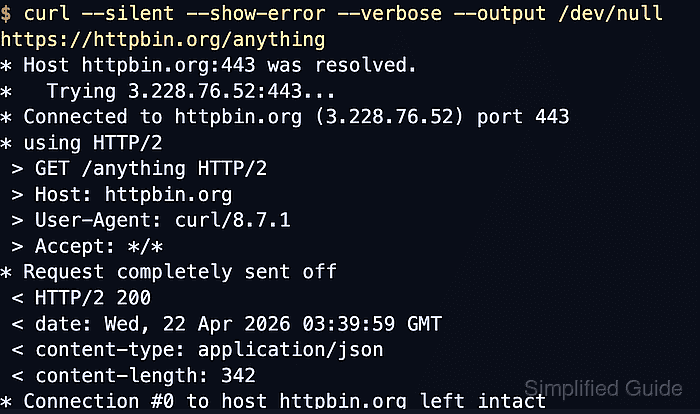
In cURL, --verbose prints transport notes plus the request and response header lines on stderr, while --head limits the request to HTTP headers only. When the request body or response body must be inspected as part of the same capture, --trace-ascii writes a full ASCII trace and --trace-time adds timestamps to each event.
Verbose and trace logs can expose bearer tokens, cookies, signed URLs, and raw request bodies. The examples place --disable first so a local ~/.curlrc cannot add hidden headers, authentication, proxy settings, or output behavior to the capture. Remove saved traces when the check is finished.
Related: How to view HTTP request headers with cURL
Related: How to show HTTP response headers with cURL
Tool: API Testing Tool
Steps to debug HTTP requests with cURL:
- Run the request with --verbose and send the response body to /dev/null so the transport exchange stays readable.
$ curl --disable --silent --show-error --verbose --output /dev/null https://httpbin.org/anything
* Host httpbin.org:443 was resolved.
##### snipped #####
* SSL certificate verified via OpenSSL.
* using HTTP/2
> GET /anything HTTP/2
> Host: httpbin.org
> User-Agent: curl/8.18.0
> Accept: */*
>
* Request completely sent off
< HTTP/2 200
< date: Sat, 06 Jun 2026 02:38:44 GMT
< content-type: application/json
< content-length: 344
##### snipped #####
* Connection #0 to host httpbin.org:443 left intact
In verbose output, > lines are request headers sent by cURL, < lines are response headers from the server, and * lines describe connection activity.
- Repeat the same check with --head when only the status line and response headers matter.
$ curl --disable --silent --show-error --head --verbose --output /dev/null https://httpbin.org/anything
* Host httpbin.org:443 was resolved.
##### snipped #####
> HEAD /anything HTTP/2
> Host: httpbin.org
> User-Agent: curl/8.18.0
> Accept: */*
>
* Request completely sent off
< HTTP/2 200
< date: Sat, 06 Jun 2026 02:38:46 GMT
< content-type: application/json
< content-length: 345
##### snipped #####
* Connection #0 to host httpbin.org:443 left intact
--head changes the request method to HEAD, so use the normal request form when the server behaves differently for GET, POST, or another method.
- Save a full ASCII trace when the request body or response body must be inspected together with the headers.
$ curl --disable --silent --show-error --trace-time --trace-ascii request.trace --output /dev/null --json '{"mode":"audit"}' https://httpbin.org/anything--trace-ascii writes the full exchange to a file, and --trace-time makes it easier to line the request up with server-side logs.
- Read the saved trace and confirm that the request line, request body, and final status appear in the same capture.
$ cat request.trace
02:38:47.014871 => Send header, 147 bytes (0x93)
0000: POST /anything HTTP/2
0017: Host: httpbin.org
002a: User-Agent: curl/8.18.0
0043: Content-Type: application/json
0063: Accept: application/json
007d: Content-Length: 16
0091:
02:38:47.015272 => Send data, 16 bytes (0x10)
0000: {"mode":"audit"}
##### snipped #####
02:38:47.312657 <= Recv header, 13 bytes (0xd)
0000: HTTP/2 200
02:38:47.312955 <= Recv header, 32 bytes (0x20)
0000: content-type: application/json
The trace is ready to compare with server logs when the same file shows the sent request body and the final HTTP status returned by the endpoint.
- Remove the saved trace after the debugging session is complete.
$ rm -f request.trace
Trace files can contain raw credentials, cookies, and request bodies, so keep them local and delete them when they are no longer needed.