How to debug CSS specificity
CSS specificity problems appear when a declaration exists in the stylesheet but a different rule controls the rendered element. The browser chooses the final value through the cascade, so debugging starts with the rule that actually wins instead of adding heavier selectors until the page changes.
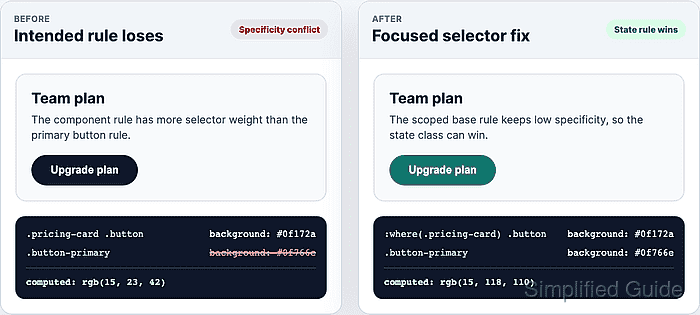
Specificity is only one part of that decision. Origin, cascade layers, !important, inline styles, and source order can outrank or bypass a selector comparison, while :where(), :is(), :not(), and :has() can change how much weight a selector contributes.
Use DevTools on the element that shows the wrong value and keep the reproduction as small as possible. A focused fix usually lowers the competing base rule or aligns selector weight with the intended state, then verifies the computed value after the stylesheet reloads.
Steps to debug CSS specificity:
- Inspect the element that shows the wrong style.
Open the browser Elements panel and select the exact node. Crossed-out declarations in Styles are losing candidates, while Computed shows the final property value.
- Confirm the current computed value for the property.
> getComputedStyle(document.querySelector(".pricing-card .button-primary")).backgroundColor
"rgb(15, 23, 42)"
Replace the selector and property with the element and style being debugged. The value should match the rendered page, not only the stylesheet source.
- Compare the intended declaration with the rule that wins.
.pricing-card .button {
  background: #0f172a;
}

.button-primary {
  background: #0f766e;
}
.pricing-card .button has two class selectors, so its specificity is 0-2-0. .button-primary has one class selector, so its specificity is 0-1-0 and loses even when it appears later.
- Check for cascade gates that beat selector specificity.
A later cascade layer, an inline style, or !important can outrank normal selector weight. Fix the layer, origin, or importance source first when DevTools shows one of those signals.
Related: How to set CSS cascade layer order - Lower the competing base selector when it only needs component scoping.
:where(.pricing-card) .button {
  background: #0f172a;
}

.button-primary {
  background: #0f766e;
}
:where(.pricing-card) keeps the component boundary without adding selector weight. Both rules now carry one class selector, so the later state rule can control the button.
- Keep pseudo-class conditions from adding accidental weight.
.notice-card:has(:where(.notice-card__badge--warning)) {
  border-color: #c2410c;
}
:is(), :not(), and :has() use the most specific selector in their arguments. Wrap a condition in :where() when the child selector should only decide whether the rule matches.
Related: How to style parent elements with the CSS :has selector - Save the stylesheet change and reload the page from the real source file.
Do not leave the fix only as a DevTools edit; a refresh discards temporary browser changes unless DevTools overrides or the project source file has been updated.
- Verify that the intended rule controls the computed value after reload.
> getComputedStyle(document.querySelector(".pricing-card .button-primary")).backgroundColor
"rgb(15, 118, 110)"
If the old value returns after reload, inspect the loaded stylesheet order and any build output that may be replacing the edited CSS.