How to override Codex configuration for a single run
A one-run configuration override lets an operator test a Codex setting without editing the durable files that later sessions will read. Use this layer for a temporary feature flag, a model experiment, or a narrow sandbox change that should disappear when the command exits.
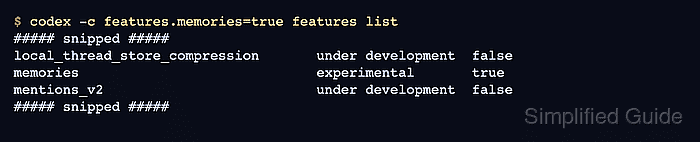
Codex resolves CLI flags and --config overrides before project, profile, user, system, and built-in configuration layers. Dotted keys such as features.memories target nested TOML tables, and the value after = is parsed as TOML before the command starts.
Dedicated launch flags are clearer when Codex already exposes one for the setting being changed, such as a model or approval-policy change. Use --config for keys that have no dedicated flag or when testing exact config.toml syntax. In managed organization environments, requirements can still constrain security-sensitive settings, so a local override may be normalized back to an allowed value.
Related: How to list Codex feature flags
Related: How to set the default model in Codex
Related: How to set Codex approval policy
Tool: TOML Converter
Steps to override Codex configuration for a single run:
- List the current feature states.
$ codex features list
##### snipped #####
local_thread_store_compression       under development  false
memories                             experimental       false
mentions_v2                          under development  false
##### snipped #####
The third column is the effective boolean state for the current run.
Related: How to list Codex feature flags
- Override one feature with the -c shorthand and a dotted key.
$ codex -c features.memories=true features list
##### snipped #####
local_thread_store_compression       under development  false
memories                             experimental       true
mentions_v2                          under development  false
##### snipped #####
-c is shorthand for --config; the long form would be --config features.memories=true.
- Use TOML string quoting for text values.
$ codex --config model='"gpt-5.4"' --help
Codex CLI

If no subcommand is specified, options will be forwarded to the interactive CLI.
##### snipped #####
The outer shell quotes protect the whole key=value argument, and the inner double quotes keep the TOML value a string.
- Use a quoted TOML array when the setting expects a list.
$ codex --config 'shell_environment_policy.include_only=["PATH","HOME"]' --help
Codex CLI

If no subcommand is specified, options will be forwarded to the interactive CLI.
##### snipped #####
Run a harmless help command first when shell quoting is uncertain. If Codex cannot parse the value as TOML, it treats the raw value as a string.
- Re-run the baseline command without --config.
$ codex features list
##### snipped #####
local_thread_store_compression       under development  false
memories                             experimental       false
mentions_v2                          under development  false
##### snipped #####
The override is gone because it applied only to the previous command process.