How to schedule Checkmk downtime
Scheduling downtime in Checkmk marks a planned host or service outage before maintenance begins. Use it for patch windows, hardware work, network changes, or application restarts where operators should not treat the expected outage as an unhandled problem.
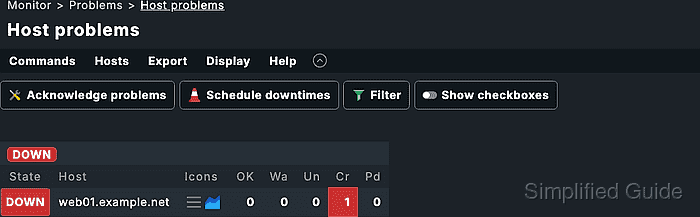
Checkmk host and service views expose downtime actions through their command dialogs. Each downtime needs a comment and accepts either an immediate duration or an explicit start and end time for a future maintenance window.
A host downtime also puts the host's services into derived downtime, while a service downtime affects only the selected service. Verify the entry from Monitor → Overview → Scheduled downtimes before the work starts so the object, scope, comment, and time range match the maintenance record.
Steps to schedule Checkmk downtime:
- Sign in to the Checkmk site with an account that can run commands on the target host or service.
- Open the host or service that should enter downtime.
Use a host downtime when the whole host is expected to be unavailable. Use a service downtime when one check, such as CPU load or HTTP, is the only planned outage.
- Open Display → Filter when the current view contains many objects.
- Filter the view to the target host name or service description.
- Click Show checkboxes when several hosts or services should receive the same downtime.
- Select only the rows that belong to the maintenance window.
Running a command from a filtered view can affect every selected row. Recheck the filter and checkbox selection before opening the command dialog.
- Open Commands → Schedule downtime.
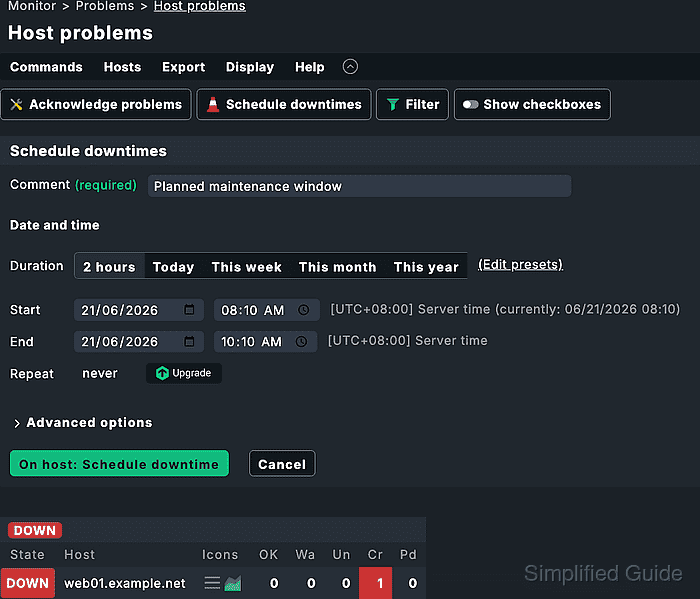
- Enter a maintenance comment in Comment.
Include the change record or ticket URL when available; Checkmk turns URLs in downtime comments into clickable links.
- Set the downtime time range.
Choose a duration such as 2 hours for maintenance that starts now, or set Start and End for a planned future window.
- Leave Repeat set to never for a one-time maintenance window.
Recurring scheduled downtimes are available in the commercial editions and repeat from the first Start and End values.
- Expand Advanced options only when the downtime should depend on object state or host topology.
Only start downtime if host/service goes DOWN/UNREACH keeps the downtime waiting until a problem state appears inside the scheduled window. For host downtime, Set child hosts in downtime can extend the maintenance state through directly connected child hosts.
- Click On host: Schedule downtime or On service: Schedule downtime.
- Confirm the command in the confirmation dialog.
- Open Monitor → Overview → Scheduled downtimes.
- Filter the scheduled downtime view to the same host or service.
- Confirm that the entry shows the intended object, author, comment, start time, and end time.
The scheduled downtime view is also where current downtimes can be removed. Retroactive editing is available only in the commercial editions.
- Open the host or service again and check for the downtime icon beside the object.
Services under a host downtime show the derived downtime icon because the host downtime suppresses their problem handling through the host scope.
- Query the downtime from the site shell when terminal evidence is required.
OMD[monitoring]:~$ lq
GET downtimes
Columns: host_name service_description author comment
Filter: host_name = web01
ColumnHeaders: on

host_name;service_description;author;comment
web01;;cmkadmin;CHG-4821 kernel patch window
Replace web01 and the comment with the monitored object and maintenance record. An empty service_description field indicates a host downtime.
Related: How to query Checkmk status data with Livestatus - Open Monitor → History → Downtime history after the window when audit evidence is required.
The history view records when a downtime starts and ends, including natural expiry and removal by command.
- Remove the downtime from Scheduled downtimes only when it was created for a validation test.