How to test an S3 bucket on Ceph Object Gateway
Ceph Object Gateway exposes object storage through an S3-compatible API, but an application-ready endpoint still needs a real bucket and object round trip. A short bucket test confirms that the RGW endpoint, S3 credentials, signing region, and basic object permissions all work together before an application depends on the gateway.
The AWS CLI s3api commands send signed S3 requests to a custom endpoint with --endpoint-url. Use a disposable bucket name and a profile or temporary shell credentials for the RGW user being tested, so the check does not write keys into article evidence or reuse a production bucket.
The test writes one small object, reads it back, and removes both the object and bucket. Run it with credentials that may create and delete a bucket in the selected RGW zonegroup, and stop before cleanup only long enough to inspect the failed request or missing permission.
Steps to test a Ceph Object Gateway S3 bucket:
- Set the RGW endpoint, AWS CLI profile, region, test bucket, and object key for the shell session.
$ export RGW_ENDPOINT="https://rgw.example.net" \
  AWS_PROFILE="rgw-backup" \
  AWS_DEFAULT_REGION="us-east-1" \
  RGW_BUCKET="backup-archive-test" \
  RGW_OBJECT="rgw-smoke-test.txt"
Use a bucket name that is unique in the RGW namespace and follows domain-style S3 bucket naming. The profile should belong to a disposable RGW user or an application user approved for this smoke test.
Related: How to configure AWS CLI on Linux and macOS
Related: How to create an S3 user in Ceph Object Gateway - Confirm that the profile can send a signed request to the RGW endpoint.
$ aws --endpoint-url "$RGW_ENDPOINT" s3api list-buckets
{
    "Buckets": [],
    "Owner": {
        "DisplayName": "Backup User",
        "ID": "backup-user"
    }
}
A bucket list response proves authentication and endpoint routing before the test writes data. If the request fails with a signature, certificate, or authorization error, fix that problem before creating a bucket.
- Create the disposable S3 bucket.
$ aws --endpoint-url "$RGW_ENDPOINT" s3api create-bucket --bucket "$RGW_BUCKET"
{
    "Location": "/backup-archive-test"
}
When the RGW deployment requires a non-default zonegroup placement, add the AWS CLI --create-bucket-configuration option with the zonegroup API name supplied by the storage team.
- Create a small local object body.
$ printf 'Ceph RGW S3 smoke test\n' > rgw-smoke-test.txt
- Upload the object to the test bucket.
$ aws --endpoint-url "$RGW_ENDPOINT" s3api put-object \
  --bucket "$RGW_BUCKET" \
  --key "$RGW_OBJECT" \
  --body rgw-smoke-test.txt
{
    "ETag": "\"efa30bfc01e2b794af15f8f2dfed143c\""
}
The ETag should stay the same when the object is read back without multipart upload or server-side transformation.
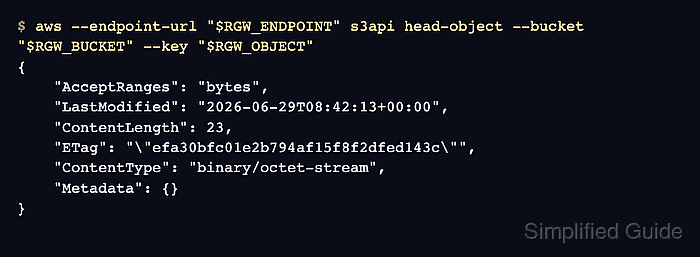
- Check the uploaded object metadata.
$ aws --endpoint-url "$RGW_ENDPOINT" s3api head-object --bucket "$RGW_BUCKET" --key "$RGW_OBJECT"
{
    "AcceptRanges": "bytes",
    "LastModified": "2026-06-29T08:42:13+00:00",
    "ContentLength": 23,
    "ETag": "\"efa30bfc01e2b794af15f8f2dfed143c\"",
    "ContentType": "binary/octet-stream",
    "Metadata": {}
}
ContentLength and ETag confirm that RGW stored the expected object key and object body metadata.
- Download the object from the bucket.
$ aws --endpoint-url "$RGW_ENDPOINT" s3api get-object \ --bucket "$RGW_BUCKET" \ --key "$RGW_OBJECT" \ rgw-smoke-test.download { "AcceptRanges": "bytes", "LastModified": "2026-06-29T08:42:13+00:00", "ContentLength": 23, "ETag": "\"efa30bfc01e2b794af15f8f2dfed143c\"", "ContentType": "binary/octet-stream", "Metadata": {} } - Read the downloaded object body.
$ cat rgw-smoke-test.download
Ceph RGW S3 smoke test
- Delete the test object from the bucket.
$ aws --endpoint-url "$RGW_ENDPOINT" s3api delete-object --bucket "$RGW_BUCKET" --key "$RGW_OBJECT"
No output indicates that RGW accepted the delete request for the object key.
- Delete the empty test bucket.
$ aws --endpoint-url "$RGW_ENDPOINT" s3api delete-bucket --bucket "$RGW_BUCKET"
A BucketNotEmpty error means another object, version, or delete marker remains in the bucket. Remove the remaining entries before retrying bucket deletion.
- Confirm that the bucket was removed.
$ aws --endpoint-url "$RGW_ENDPOINT" s3api head-bucket --bucket "$RGW_BUCKET"

An error occurred (404) when calling the HeadBucket operation: Not Found
The 404 response is expected only after the cleanup succeeds. A successful head-bucket response means the bucket still exists.
- Remove the local test files.
$ rm rgw-smoke-test.txt rgw-smoke-test.download