Applications should reach Ceph Object Gateway with their own S3 credentials instead of a cluster administrator key. A dedicated RGW user gives one workload an access key and secret key that can be rotated, disabled, or scoped without changing the storage cluster administrator identity.
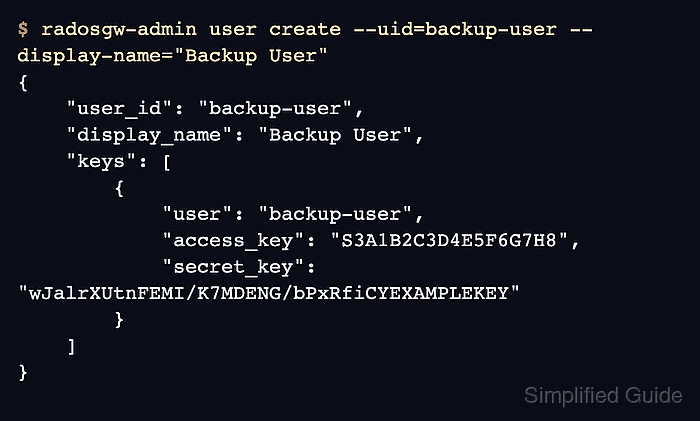
The radosgw-admin user create command writes the user record into the RGW metadata store and returns a generated S3 key pair. Run it from a Ceph administration shell that already has /etc/ceph/ceph.conf and an admin keyring, or from the equivalent cephadm shell for the cluster.
Use a neutral user ID that maps to the application or tenant, not a person who may leave the team. Store the secret key once in the approved secret store, then verify authentication through the gateway endpoint with an S3 client before handing the credential to the application.
Steps to create a Ceph Object Gateway S3 user:
- Confirm the cluster accepts Ceph admin commands.
$ ceph health
HEALTH_OK
Run this check from the same admin shell that will run radosgw-admin. A cluster in HEALTH_WARN can still create users, but resolve monitor, manager, or RGW service problems before onboarding new application credentials.
Related: How to check Ceph cluster health - Create the RGW user and let Ceph generate the S3 key pair.
$ radosgw-admin user create --uid=backup-user --display-name="Backup User" --email=backup@example.net
{
    "user_id": "backup-user",
    "display_name": "Backup User",
    "email": "backup@example.net",
    "suspended": 0,
    "keys": [
        {
            "user": "backup-user",
            "access_key": "S3A1B2C3D4E5F6G7H8",
            "secret_key": "wJalrXUtnFEMI/K7MDENG/bPxRfiCYEXAMPLEKEY"
        }
    ],
    "swift_keys": [],
    "caps": [],
    "op_mask": "read, write, delete",
    "default_placement": "",
    "placement_tags": [],
    "bucket_quota": {
        "enabled": false,
        "check_on_raw": false,
        "max_size": -1,
        "max_size_kb": 0,
        "max_objects": -1
    },
    "user_quota": {
        "enabled": false,
        "check_on_raw": false,
        "max_size": -1,
        "max_size_kb": 0,
        "max_objects": -1
    }
}
The command output contains the only copy of the generated secret_key that many operators will see. Store it in the approved secret store before closing the terminal, and do not paste real key material into tickets, chat, or logs.
- Inspect the saved RGW user record.
$ radosgw-admin user info --uid=backup-user
{
    "user_id": "backup-user",
    "display_name": "Backup User",
    "email": "backup@example.net",
    "suspended": 0,
    "keys": [
        {
            "user": "backup-user",
            "access_key": "S3A1B2C3D4E5F6G7H8",
            "secret_key": "wJalrXUtnFEMI/K7MDENG/bPxRfiCYEXAMPLEKEY"
        }
    ],
    "swift_keys": [],
    "caps": []
}
The keys array should contain one S3 key pair for backup-user. If the array is empty because the user was created without credentials, add a key with radosgw-admin key create --uid=backup-user --key-type=s3.
- Configure an AWS CLI profile with the generated key pair.
$ aws configure --profile rgw-backup

AWS Access Key ID [None]: S3A1B2C3D4E5F6G7H8
AWS Secret Access Key [None]: wJalrXUtnFEMI/K7MDENG/bPxRfiCYEXAMPLEKEY
Default region name [None]: us-east-1
Default output format [None]: json
Ceph Object Gateway commonly accepts any region string for S3-compatible clients, but saving one such as us-east-1 avoids client-side signing errors in tools that require a region.
Related: How to configure AWS CLI on Linux and macOS - Send a signed S3 request to the RGW endpoint.
$ aws --endpoint-url https://rgw.example.net --profile rgw-backup s3api list-buckets
{
    "Buckets": [],
    "Owner": {
        "DisplayName": "Backup User",
        "ID": "backup-user"
    }
}
Use the scheme and hostname of the deployed gateway for --endpoint-url. A bucket list response proves the client can sign requests with the generated RGW key pair, even when the new user does not own any buckets yet.
Related: How to test an S3 bucket on Ceph Object Gateway

Mohd Shakir Zakaria is a cloud architect with deep roots in software development and open-source advocacy. Certified in AWS, Red Hat, VMware, ITIL, and Linux, he specializes in designing and managing robust cloud and on-premises infrastructures.


