How to configure Ceph Object Gateway multisite replication
Ceph Object Gateway multisite replication lets separate RGW zones share users, bucket metadata, and object data across Ceph clusters. It is used when an object endpoint must survive a site outage or when data needs to move between regions without copying each bucket manually.
A multisite topology is stored in a realm, which contains zonegroups, zones, and period epochs. The master zone owns metadata changes such as user creation, while secondary zones pull the realm and synchronize data through their RGW daemons.
Two cephadm-managed Ceph clusters, reachable RGW endpoints, and administration keyrings on both sides are required before realm state is changed. Keep the synchronization user secret out of shell history and run the bucket smoke test with a disposable object so application data is not modified.
Steps to configure Ceph Object Gateway multisite replication:
- Record the realm, zonegroup, zone names, endpoints, and smoke-test bucket.
Realm: production
Zonegroup: us
Master zone: us-east
Secondary zone: us-west
Master endpoint: https://rgw-east.example.net
Secondary endpoint: https://rgw-west.example.net
Smoke-test bucket: backup-archive
Use endpoint hostnames that the opposite site can reach. Local-only hostnames or private addresses break realm pulls and peer synchronization.
- Check the master cluster health before changing RGW realm state.
$ ceph -s
  cluster:
    id:     11111111-2222-3333-4444-555555555555
    health: HEALTH_OK

  services:
    mon: 3 daemons, quorum ceph-node1,ceph-node2,ceph-node3
    mgr: ceph-admin.abc123(active)
    osd: 6 osds: 6 up, 6 in

  data:
    pools:   8 pools, 256 pgs
    objects: 3.42M objects
    usage:   24 TiB used, 76 TiB / 100 TiB avail
    pgs:     256 active+clean
Stop if the cluster reports HEALTH_ERR or placement groups are not active+clean. Fix the cluster before adding multisite state.
Related: How to check Ceph cluster health - Create the master realm on the master-zone cluster.
$ radosgw-admin realm create --rgw-realm=production --default { "id": "11111111-aaaa-4a44-8a8a-111111111111", "name": "production", "current_period": "22222222-bbbb-4b44-9b9b-222222222222", "epoch": 1 } - Create the master zonegroup with the master RGW endpoint.
$ radosgw-admin zonegroup create \ --rgw-realm=production \ --rgw-zonegroup=us \ --endpoints=https://rgw-east.example.net \ --master \ --default { "id": "33333333-cccc-4c44-8c8c-333333333333", "name": "us", "is_master": "true", "endpoints": [ "https://rgw-east.example.net" ], "zones": [] } - Create the master zone in the zonegroup.
$ radosgw-admin zone create \
  --rgw-zonegroup=us \
  --rgw-zone=us-east \
  --endpoints=https://rgw-east.example.net \
  --master \
  --default
{
    "id": "44444444-dddd-4d44-8d8d-444444444444",
    "name": "us-east",
    "endpoints": [
        "https://rgw-east.example.net"
    ],
    "system_key": {
        "access_key": "",
        "secret_key": ""
    }
}
Do not delete an existing default zone or its pools on a cluster that already stores RGW data. Removing those pools deletes object gateway metadata and data.
- Create the system user on the master zone.
$ radosgw-admin user create \
  --uid=zone-sync \
  --display-name="Zone Sync User" \
  --system
{
    "user_id": "zone-sync",
    "display_name": "Zone Sync User",
    "keys": [
        {
            "user": "zone-sync",
            "access_key": "<system-access-key>",
            "secret_key": "<system-secret-key>"
        }
    ],
    "system": "true"
}
Store the generated keys in the site credential vault. Secondary zones use this account to pull realm and period data from the master zone.
- Attach the system user key to the master zone.
$ radosgw-admin zone modify \
  --rgw-zone=us-east \
  --access-key=<system-access-key> \
  --secret='<system-secret-key>'
{
    "id": "44444444-dddd-4d44-8d8d-444444444444",
    "name": "us-east",
    "system_key": {
        "access_key": "<system-access-key>",
        "secret_key": "<system-secret-key>"
    }
}
Keep the secret out of saved command logs when working with live values. The displayed key is a placeholder, not a reusable credential.
- Commit the master period.
$ radosgw-admin period update --rgw-realm=production --commit
{
    "id": "22222222-bbbb-4b44-9b9b-222222222222",
    "epoch": 2,
    "realm_id": "11111111-aaaa-4a44-8a8a-111111111111",
    "master_zonegroup": "33333333-cccc-4c44-8c8c-333333333333",
    "master_zone": "44444444-dddd-4d44-8d8d-444444444444"
}
A period commit publishes the realm configuration epoch that peer zones pull.
- Deploy or update the master-zone RGW daemons with the realm and zone names.
$ ceph orch apply rgw rgw-us-east \
  --realm=production \
  --zonegroup=us \
  --zone=us-east \
  --placement="2 ceph-node1 ceph-node2" \
  --port=8000
Scheduled rgw.rgw-us-east update
cephadm deploys the daemons for a multisite zone, but it does not create the realm, zonegroup, zone, or period state.
Related: How to deploy Ceph Object Gateway with cephadm
Related: How to manage Ceph services with cephadm - Pull the realm on the secondary-zone cluster.
$ radosgw-admin realm pull \
  --url=https://rgw-east.example.net \
  --access-key=<system-access-key> \
  --secret='<system-secret-key>'
{
    "id": "11111111-aaaa-4a44-8a8a-111111111111",
    "name": "production",
    "current_period": "22222222-bbbb-4b44-9b9b-222222222222",
    "epoch": 2
}
Run this on a host that administers the secondary Ceph cluster. The URL must reach a running gateway in the master zone.
- Create the secondary zone on the secondary cluster.
$ radosgw-admin zone create \
  --rgw-zonegroup=us \
  --rgw-zone=us-west \
  --endpoints=https://rgw-west.example.net \
  --access-key=<system-access-key> \
  --secret='<system-secret-key>'
{
    "id": "55555555-eeee-4e44-8e8e-555555555555",
    "name": "us-west",
    "endpoints": [
        "https://rgw-west.example.net"
    ],
    "system_key": {
        "access_key": "<system-access-key>",
        "secret_key": "<system-secret-key>"
    }
}
Leave --master off the secondary zone. Metadata administration stays on the master zone.
- Commit the secondary-zone period update.
$ radosgw-admin period update --rgw-realm=production --commit { "id": "66666666-ffff-4f44-8f8f-666666666666", "epoch": 3, "realm_id": "11111111-aaaa-4a44-8a8a-111111111111", "master_zonegroup": "33333333-cccc-4c44-8c8c-333333333333", "master_zone": "44444444-dddd-4d44-8d8d-444444444444" } - Deploy the secondary-zone RGW daemons with cephadm.
$ ceph orch apply rgw rgw-us-west \
  --realm=production \
  --zonegroup=us \
  --zone=us-west \
  --placement="2 ceph-node3 ceph-node4" \
  --port=8000
Scheduled rgw.rgw-us-west update
Use hosts that belong to the secondary site and expose the endpoint published in the secondary zone.
- Confirm that the secondary RGW daemons are running.
$ ceph orch ps --refresh
NAME                         HOST        PORTS   STATUS      REFRESHED  AGE   VERSION  IMAGE ID      CONTAINER ID
rgw.rgw-us-west.ceph-node3   ceph-node3  *:8000  running     8s ago     2m    20.2.0   1a2b3c4d5e6f  aa11bb22cc33
rgw.rgw-us-west.ceph-node4   ceph-node4  *:8000  running     8s ago     2m    20.2.0   1a2b3c4d5e6f  bb22cc33dd44
If the daemons stay in an error state, inspect the service before testing S3 traffic.
Related: How to manage Ceph services with cephadm - Check multisite synchronization from the secondary zone.
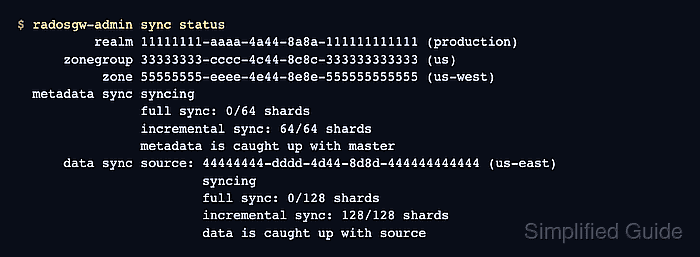
$ radosgw-admin sync status
          realm 11111111-aaaa-4a44-8a8a-111111111111 (production)
      zonegroup 33333333-cccc-4c44-8c8c-333333333333 (us)
           zone 55555555-eeee-4e44-8e8e-555555555555 (us-west)
  metadata sync syncing
                full sync: 0/64 shards
                incremental sync: 64/64 shards
                metadata is caught up with master
      data sync source: 44444444-dddd-4d44-8d8d-444444444444 (us-east)
                        syncing
                        full sync: 0/128 shards
                        incremental sync: 128/128 shards
                        data is caught up with source
Use radosgw-admin metadata sync status or radosgw-admin data sync status when the combined status points to a specific lane that is behind.
- Create a disposable object for the replication smoke test.
$ printf 'multisite replication check\n' > multisite-check.txt
- Upload the object through the master-zone endpoint.
$ aws --endpoint-url https://rgw-east.example.net \
  s3api put-object \
  --bucket backup-archive \
  --key multisite-check.txt \
  --body multisite-check.txt \
  --profile rgw-app
{
    "ETag": "\"9f2a0f8e9f9d2d1d2a7dd4d9a0f7b6df\""
}
The rgw-app profile should use an application S3 user, not the multisite synchronization user.
Related: How to create an S3 user in Ceph Object Gateway - Read the object through the secondary-zone endpoint.
$ aws --endpoint-url https://rgw-west.example.net \
  s3api get-object \
  --bucket backup-archive \
  --key multisite-check.txt \
  multisite-check.out \
  --profile rgw-app
{
    "AcceptRanges": "bytes",
    "ContentLength": 28,
    "ETag": "\"9f2a0f8e9f9d2d1d2a7dd4d9a0f7b6df\"",
    "ContentType": "binary/octet-stream"
}
A matching object read through the secondary endpoint proves that the realm, zones, RGW daemons, and data sync path work together.
Related: How to test an S3 bucket on Ceph Object Gateway - Remove the smoke-test object from the bucket.
$ aws --endpoint-url https://rgw-east.example.net \ s3api delete-object \ --bucket backup-archive \ --key multisite-check.txt \ --profile rgw-app {} - Remove the local smoke-test files.
$ rm multisite-check.txt multisite-check.out