How to bootstrap a Ceph cluster with cephadm
A cephadm cluster starts on one administration host that can run the first monitor and manager containers. Bootstrapping that host creates the cluster identity, initial admin files, dashboard access, and orchestrator SSH material used when more hosts join later.
The bootstrap host needs a monitor address on the public storage network. If the deployment uses a separate backend network for replication, recovery, and heartbeat traffic, pass that network during bootstrap so the first cluster configuration records it before any additional daemons are placed.
Run the bootstrap from the host that will remain an admin node, such as ceph-admin, with cephadm already installed. The sample networks below use documentation placeholder ranges; replace them with the real public monitor address, optional cluster network, and dashboard secret for the storage environment.
Related: How to install cephadm on Ubuntu
Related: How to add a host to a Ceph cluster with cephadm
Related: How to check Ceph cluster health
Steps to bootstrap a Ceph cluster with cephadm:
- Open a terminal on the first Ceph administration host.
- Check the installed cephadm release.
$ cephadm version
cephadm version 20.2.2 (0fcffee29411e3a38036764817b6e1afc59741cc) tentacle (stable)
The cephadm release should match the Ceph release family planned for the cluster.
Related: How to install cephadm on Ubuntu - Identify the public network address for the first monitor.
$ ip -brief address
lo               UNKNOWN        127.0.0.1/8 ::1/128
eno1             UP             192.0.2.10/24
eno2             UP             198.51.100.10/24
Use the address that other Ceph hosts can reach for monitor traffic. In this example, 192.0.2.10 is the monitor address and 198.51.100.0/24 is the separate cluster network.
- Store the initial dashboard password in a shell variable for this session.
$ read -rs CEPH_DASHBOARD_PASSWORD
The password is not printed. Save the real value in a password manager before running the bootstrap command.
- Bootstrap the first monitor and manager daemons.
$ sudo cephadm bootstrap \
  --mon-ip 192.0.2.10 \
  --cluster-network 198.51.100.0/24 \
  --initial-dashboard-user admin \
  --initial-dashboard-password "$CEPH_DASHBOARD_PASSWORD"
Verifying container engine is present...
Verifying host has sufficient RAM...
Extracting ceph user uid/gid from container image...
Deploying mon service with default placement...
Deploying mgr service with default placement...
Ceph Dashboard is now available at:

             URL: https://ceph-admin:8443/
            User: admin

Bootstrap complete.
Remove --cluster-network when the cluster does not use a separate backend network. Add --allow-fqdn-hostname only when the bootstrap host deliberately uses a fully qualified hostname for Ceph daemon names.
- Check the generated admin files on the bootstrap host.
$ sudo ls -l /etc/ceph
total 12
-rw------- 1 root root  151 Jun 29 09:14 ceph.client.admin.keyring
-rw-r--r-- 1 root root  268 Jun 29 09:14 ceph.conf
-rw-r--r-- 1 root root  595 Jun 29 09:14 ceph.pub
The ceph.conf and client.admin keyring let the bootstrap host run admin commands. The ceph.pub key is copied to later hosts when they are enrolled with ceph orch host add.
- Check the cluster summary through the cephadm shell.
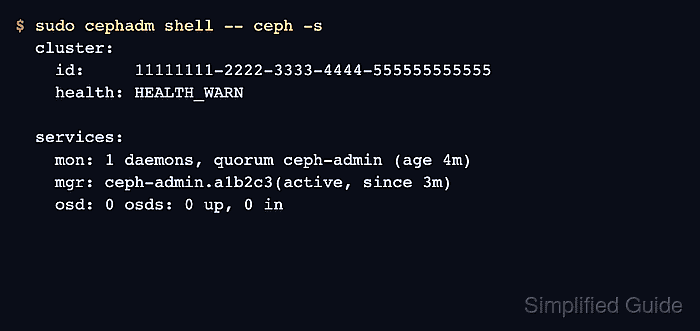
$ sudo cephadm shell -- ceph -s
  cluster:
    id:     11111111-2222-3333-4444-555555555555
    health: HEALTH_WARN

  services:
    mon: 1 daemons, quorum ceph-admin (age 4m)
    mgr: ceph-admin.a1b2c3(active, since 3m)
    osd: 0 osds: 0 up, 0 in

  data:
    pools:   0 pools, 0 pgs
    objects: 0 objects, 0 B
    usage:   0 B used, 0 B / 0 B avail
HEALTH_WARN is expected before storage daemons are added because the new cluster has no OSD capacity yet. The bootstrap is successful when the monitor quorum exists and one manager is active.
- List the orchestrated daemons on the bootstrap host.
$ sudo cephadm shell -- ceph orch ps ceph-admin
NAME                       HOST        PORTS        STATUS          REFRESHED  AGE  VERSION
crash.ceph-admin           ceph-admin               running (4m)    15s ago    4m   20.2.2
mgr.ceph-admin.a1b2c3      ceph-admin  *:8443,9283  running (3m)    15s ago    3m   20.2.2
mon.ceph-admin             ceph-admin               running (4m)    15s ago    4m   20.2.2
node-exporter.ceph-admin   ceph-admin  *:9100       running (3m)    15s ago    3m   20.2.2
The exact monitoring daemons depend on bootstrap options such as --skip-monitoring-stack. The monitor and manager rows are the required first-cluster services.