Table of Contents
How to enable or disable Apache modules
Enabling or disabling Apache modules controls which features the server can actually use, including URL rewriting, TLS, proxying, compression, and status reporting. Keeping only the modules you need reduces configuration sprawl and narrows the set of directives and request-processing hooks that Apache loads at startup.
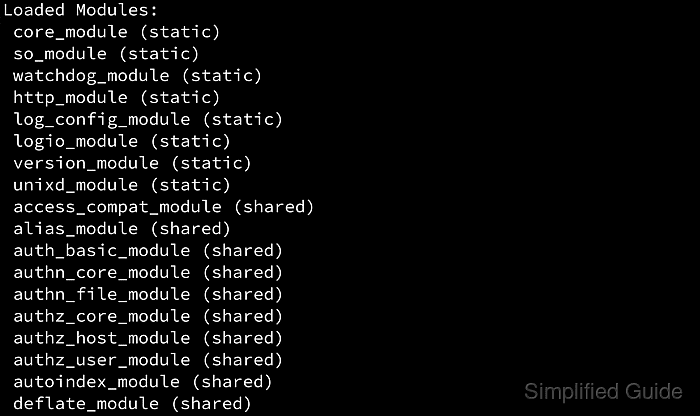
Apache can load functionality either as built-in code or as shared modules declared with LoadModule. On Debian and Ubuntu, a2enmod and a2dismod toggle symlinks under /etc/apache2/mods-enabled; on openSUSE and SLES, the same helper commands update the APACHE_MODULES list in /etc/sysconfig/apache2; on RHEL-style packages, macOS, Homebrew, and XAMPP, module changes are usually made by editing LoadModule lines directly.
Some modules are static and cannot be toggled at all, and some shared modules depend on other modules or provide directives that existing site files still use. Test the configuration before you reload or restart Apache, and expect the exact control command to vary by packaging even when the module state change itself is the same.
Related: How to view a list of modules in Apache
Related: How to manage the Apache web server service
Related: Apache configuration file locations
Methods to enable or disable Apache modules:
Platform method quick reference:
- Debian and Ubuntu use a2enmod and a2dismod to manage symlinks under /etc/apache2/mods-enabled.
- openSUSE and SLES use the same helper commands to update APACHE_MODULES in /etc/sysconfig/apache2.
- RHEL, Rocky Linux, AlmaLinux, CentOS Stream, and Fedora usually load modules from LoadModule files under /etc/httpd/conf.modules.d/.
- Bundled macOS Apache, Homebrew httpd, and XAMPP usually require direct LoadModule edits in their packaged configuration tree.
Steps to enable or disable Apache modules:
Steps to enable or disable Apache modules using a2enmod and a2dismod:
This method is the normal workflow on Debian, Ubuntu, openSUSE, and SLES because the helper scripts keep the packaged module layout consistent with the server's expected configuration tree. Use it to toggle packaged shared modules when the distribution provides the wrapper.
These commands only change whether an already installed module is activated. If the module definition file is missing, install the package first, then enable it, test the configuration, and restart or reload the service with the command your platform uses.
- List the module definition files that are available to enable.
$ ls /etc/apache2/mods-available
access_compat.load
actions.conf
actions.load
alias.conf
alias.load
allowmethods.load
asis.load
auth_basic.load
auth_digest.load
auth_form.load
authn_core.load
authn_file.load
deflate.conf
deflate.load
dir.conf
dir.load
##### snipped #####
rewrite.load
On openSUSE and SLES, a2enmod and a2dismod are still the preferred interface, but the active module list is stored in /etc/sysconfig/apache2 instead of a symlink tree.
- Check the current state of the target module before changing it.
$ sudo a2query -m rewrite
No module matches rewrite
After a module has been explicitly disabled, a2query can report No module matches rewrite (disabled by site administrator) instead.
- Install the package that provides the module if the corresponding .load file is missing.
Related: How to install Apache modules
- Enable the module with a2enmod.
$ sudo a2enmod rewrite
Enabling module rewrite.
To activate the new configuration, you need to run:
  service apache2 restart
- Disable the module with a2dismod when the feature is no longer needed.
$ sudo a2dismod rewrite
Module rewrite disabled.
To activate the new configuration, you need to run:
  service apache2 restart
If another enabled module depends on the target module, a2dismod can refuse the change until you disable the dependent module first or deliberately use --force.
- Test the Apache configuration syntax before applying the module change.
$ sudo apache2ctl configtest
Syntax OK
A fresh Debian or Ubuntu host can print the AH00558 fully qualified domain name warning before Syntax OK. Fix that warning separately when needed.
Related: How to test Apache configuration
- Restart the Apache service so the new module set is loaded.
$ sudo systemctl restart apache2
The helper output often suggests service apache2 restart; on systemd hosts, systemctl restart apache2 is the same service action.
- Verify the final module state with a2query or the loaded module list.
$ sudo a2query -m rewrite
rewrite (enabled by site administrator)
After a disable, the same query reports No module matches rewrite (disabled by site administrator).
Steps to enable or disable Apache modules manually:
Use the manual method on platforms that do not ship a2enmod and a2dismod as the primary interface, including RHEL-style packages, the bundled Apache on macOS, Homebrew httpd, and many XAMPP installs. The workflow is the same everywhere: find the relevant LoadModule declaration, comment it out to disable the module, or uncomment or add it to enable the module.
Manual editing is also the fallback when you are working with third-party or custom-built modules that are not represented by a packaged helper script. Shared modules appear as shared in httpd -M or apachectl -M output, while static modules are built into the binary and cannot be removed with a configuration edit.
- Search the active configuration tree for the module's LoadModule line.
$ sudo grep -RIn "LoadModule rewrite_module" /etc/httpd/conf.modules.d
/etc/httpd/conf.modules.d/00-base.conf:51:LoadModule rewrite_module modules/mod_rewrite.so
Common locations include /etc/httpd/conf.modules.d/ on RHEL-style systems, /etc/apache2/httpd.conf on bundled macOS Apache, and /opt/homebrew/etc/httpd/httpd.conf or /usr/local/etc/httpd/httpd.conf on Homebrew.
- Install the package that provides the module if the .so file or LoadModule line is not present yet.
Related: How to install Apache modules
- Open the file that owns the LoadModule declaration.
$ sudoedit /etc/httpd/conf.modules.d/00-base.conf
- Comment out the LoadModule line to disable the module.
#LoadModule rewrite_module modules/mod_rewrite.soIf any enabled site, include file, or .htaccess file still uses directives from that module, the next config test can fail with an Invalid command error.
- Uncomment the existing LoadModule line or add a new one to enable the module.
LoadModule rewrite_module modules/mod_rewrite.soPackaged modules usually use a relative path under modules/, while third-party modules often need an absolute path supplied by the package or build instructions.
Related: Location for Apache modules
- Test the configuration syntax with the control wrapper your platform provides.
$ sudo apachectl configtest
Syntax OK
Use sudo httpd -t when that is the platform's documented wrapper, or sudo apachectl -t on macOS, Homebrew, or XAMPP.
Related: How to test Apache configuration
- Restart Apache with the service command that matches your packaging.
$ sudo systemctl restart httpd
RHEL-style packages usually use the httpd service unit, bundled macOS Apache uses sudo apachectl restart, and current Homebrew guidance uses brew services restart httpd for the background service.
- Confirm that the module is now loaded or absent in the running server.
$ sudo httpd -M
Loaded Modules:
 core_module (static)
 so_module (static)
##### snipped #####
 rewrite_module (shared)
##### snipped #####
On macOS and Homebrew, use apachectl -M. If the module is disabled, no rewrite_module line appears in the loaded-module list.