How to run a Spark Structured Streaming job
Streaming queries in Spark Structured Streaming stay active while new records continue to arrive. A local run proves more than a successful driver startup when the query consumes files added after startup, updates a stateful result, and shuts down without leaving another stream active.
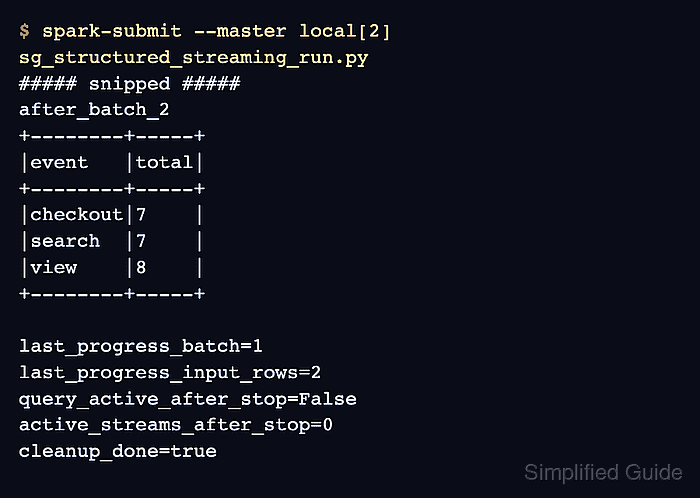
This bounded PySpark job reads JSON Lines files and writes event totals to an in-memory table. Spark needs an explicit schema for a streaming file source, and each finished input file appears through an atomic move so the source never reads a partially written batch.
The memory sink exposes the aggregate to Spark SQL in the same session, which suits a local behavior check rather than a production pipeline. Production jobs need a durable sink and checkpoint location that remain accessible to the driver and executors after a restart.
Related: How to run PySpark locally
Related: How to submit an Apache Spark job
Related: How to configure Spark streaming checkpoints
Steps to run a Spark Structured Streaming job:
- Set the local paths and Spark names for the bounded streaming test.
Application name: sg-structured-streaming-run
Input path: /tmp/sg-structured-streaming/input
Checkpoint path: /tmp/sg-structured-streaming/checkpoint
Query name: event_totals
Sink: memory table
The startup and shutdown cleanup permanently removes /tmp/sg-structured-streaming and everything below it.
- Create sg_structured_streaming_run.py with its imports, local paths, and atomic batch writer.
- sg_structured_streaming_run.py
from pathlib import Path
import json
import shutil

from pyspark.sql import SparkSession
from pyspark.sql import functions as F


BASE_DIR = Path("/tmp/sg-structured-streaming")
INPUT_DIR = BASE_DIR / "input"
CHECKPOINT_DIR = BASE_DIR / "checkpoint"


def add_batch(filename, rows):
    temporary_file = INPUT_DIR / f".{filename}.tmp"
    completed_file = INPUT_DIR / filename

    with temporary_file.open("w", encoding="utf-8") as handle:
        for row in rows:
            handle.write(json.dumps(row) + "\n")

    temporary_file.replace(completed_file)
Spark file sources expect complete files to appear atomically. replace() moves each finished JSON Lines batch to the filename that Spark can discover.
- Add the local Spark session and streaming JSON source below the batch writer.
- sg_structured_streaming_run.py
shutil.rmtree(BASE_DIR, ignore_errors=True)
INPUT_DIR.mkdir(parents=True)

spark = (
    SparkSession.builder
    .appName("sg-structured-streaming-run")
    .config("spark.ui.showConsoleProgress", "false")
    .config("spark.sql.shuffle.partitions", "2")
    .getOrCreate()
)
spark.sparkContext.setLogLevel("ERROR")

events = spark.readStream.schema(
    "event STRING, amount INT"
).json(str(INPUT_DIR))
The explicit schema fixes the columns before any input file exists. Two shuffle partitions keep this small local aggregate from scheduling Spark's larger default partition count.
- Add the event aggregation and memory sink below the streaming source.
- sg_structured_streaming_run.py
totals = events.groupBy("event").agg(
    F.sum("amount").alias("total")
)

query = (
    totals.writeStream
    .format("memory")
    .queryName("event_totals")
    .outputMode("complete")
    .option("checkpointLocation", str(CHECKPOINT_DIR))
    .start()
)
complete mode replaces the memory table with the full aggregate after each trigger. The query name becomes the table name used by Spark SQL.
- Add the result reader below the streaming query.
- sg_structured_streaming_run.py
def show_totals(label):
    rows = spark.sql(
        "SELECT event, total FROM event_totals ORDER BY event"
    ).collect()

    print(label)
    for row in rows:
        print(f"{row['event']}={row['total']}")
- Add the two input batches and progress checks below the result reader.
- sg_structured_streaming_run.py
try:
    print(f"query_name={query.name}")
    print(f"query_active={query.isActive}")

    add_batch(
        "batch-001.json",
        [
            {"event": "checkout", "amount": 4},
            {"event": "search", "amount": 2},
            {"event": "checkout", "amount": 3},
        ],
    )
    query.processAllAvailable()
    show_totals("after_batch_1")

    add_batch(
        "batch-002.json",
        [
            {"event": "search", "amount": 5},
            {"event": "view", "amount": 8},
        ],
    )
    query.processAllAvailable()
    show_totals("after_batch_2")

    progress = query.lastProgress or {}
    print(f"last_progress_batch={progress.get('batchId')}")
    print(f"last_progress_input_rows={progress.get('numInputRows')}")
processAllAvailable() is intended for tests and waits until the data visible before each call has been committed to the sink. A continuously arriving source can prevent it from returning.
- Add the shutdown and cleanup block after the progress checks.
- sg_structured_streaming_run.py
finally:
    query.stop()
    print(f"query_active_after_stop={query.isActive}")
    print(f"active_streams_after_stop={len(spark.streams.active)}")
    spark.stop()
    shutil.rmtree(BASE_DIR, ignore_errors=True)
    print(f"cleanup_exists_after_stop={BASE_DIR.exists()}")
The finally block stops the query even when an input batch or SQL check raises an exception.
- Save the assembled program as sg_structured_streaming_run.py.
- sg_structured_streaming_run.py
from pathlib import Path
import json
import shutil

from pyspark.sql import SparkSession
from pyspark.sql import functions as F


BASE_DIR = Path("/tmp/sg-structured-streaming")
INPUT_DIR = BASE_DIR / "input"
CHECKPOINT_DIR = BASE_DIR / "checkpoint"


def add_batch(filename, rows):
    temporary_file = INPUT_DIR / f".{filename}.tmp"
    completed_file = INPUT_DIR / filename

    with temporary_file.open("w", encoding="utf-8") as handle:
        for row in rows:
            handle.write(json.dumps(row) + "\n")

    temporary_file.replace(completed_file)


shutil.rmtree(BASE_DIR, ignore_errors=True)
INPUT_DIR.mkdir(parents=True)

spark = (
    SparkSession.builder
    .appName("sg-structured-streaming-run")
    .config("spark.ui.showConsoleProgress", "false")
    .config("spark.sql.shuffle.partitions", "2")
    .getOrCreate()
)
spark.sparkContext.setLogLevel("ERROR")

events = spark.readStream.schema(
    "event STRING, amount INT"
).json(str(INPUT_DIR))

totals = events.groupBy("event").agg(
    F.sum("amount").alias("total")
)

query = (
    totals.writeStream
    .format("memory")
    .queryName("event_totals")
    .outputMode("complete")
    .option("checkpointLocation", str(CHECKPOINT_DIR))
    .start()
)


def show_totals(label):
    rows = spark.sql(
        "SELECT event, total FROM event_totals ORDER BY event"
    ).collect()

    print(label)
    for row in rows:
        print(f"{row['event']}={row['total']}")


try:
    print(f"query_name={query.name}")
    print(f"query_active={query.isActive}")

    add_batch(
        "batch-001.json",
        [
            {"event": "checkout", "amount": 4},
            {"event": "search", "amount": 2},
            {"event": "checkout", "amount": 3},
        ],
    )
    query.processAllAvailable()
    show_totals("after_batch_1")

    add_batch(
        "batch-002.json",
        [
            {"event": "search", "amount": 5},
            {"event": "view", "amount": 8},
        ],
    )
    query.processAllAvailable()
    show_totals("after_batch_2")

    progress = query.lastProgress or {}
    print(f"last_progress_batch={progress.get('batchId')}")
    print(f"last_progress_input_rows={progress.get('numInputRows')}")
finally:
    query.stop()
    print(f"query_active_after_stop={query.isActive}")
    print(f"active_streams_after_stop={len(spark.streams.active)}")
    spark.stop()
    shutil.rmtree(BASE_DIR, ignore_errors=True)
    print(f"cleanup_exists_after_stop={BASE_DIR.exists()}")
- Run the completed job with two local worker threads.
$ spark-submit --master 'local[2]' --conf spark.ui.showConsoleProgress=false sg_structured_streaming_run.py
WARNING: Using incubator modules: jdk.incubator.vector
Using Spark's default log4j profile: org/apache/spark/log4j2-defaults.properties
##### snipped #####
query_name=event_totals
query_active=True
after_batch_1
checkout=7
search=2
after_batch_2
checkout=7
search=7
view=8
last_progress_batch=1
last_progress_input_rows=2
query_active_after_stop=False
active_streams_after_stop=0
cleanup_exists_after_stop=False
The second result includes values from both input files. The final three lines show a stopped query, no active stream in the session, and removal of the temporary input and checkpoint directory.