Structured Streaming uses checkpoints to resume an Apache Spark query from committed input progress and state after a driver stop or failure. Without a checkpoint, a replacement process has no durable record of which input the previous run finished.
A PySpark query sets the checkpoint on its streaming writer through checkpointLocation. Production queries need a durable HDFS-compatible location that every replacement driver can reach; the local path used here is suitable only for a single-machine recovery check.
One checkpoint directory belongs to one logical query. Keep the source, sink, output path, and stateful operation schema compatible when restarting from it, because changing those parts can make recovery unsupported or unpredictable.
Related: How to run a Spark Structured Streaming job
Related: How to run PySpark locally
Steps to configure Spark Structured Streaming checkpoints:
- Choose an empty root for the input, output, and checkpoint directories.
Test root: /tmp/sg-spark-streaming-checkpoint
Input: /tmp/sg-spark-streaming-checkpoint/input
Output: /tmp/sg-spark-streaming-checkpoint/output
Checkpoint: /tmp/sg-spark-streaming-checkpoint/checkpoint
Each production query needs a unique durable checkpoint directory. A checkpoint shared by unrelated queries cannot represent either query safely.
- Create sg_streaming_checkpoint.py with the path contract and an empty-path guard.
- sg_streaming_checkpoint.py
import json
from pathlib import Path

from pyspark.sql import SparkSession


BASE = Path("/tmp/sg-spark-streaming-checkpoint")
INPUT = BASE / "input"
OUTPUT = BASE / "output"
CHECKPOINT = BASE / "checkpoint"

if BASE.exists():
    raise RuntimeError(f"Use an empty test path: {BASE}")

INPUT.mkdir(parents=True)
- Append the atomic file-source helper and first input batch below INPUT.mkdir(parents=True).
- sg_streaming_checkpoint.py
def write_events(filename, rows):
    staging_file = BASE / f".{filename}.tmp"
    with staging_file.open("w", encoding="utf-8") as handle:
        for row in rows:
            handle.write(json.dumps(row, sort_keys=True) + "\n")
    staging_file.replace(INPUT / filename)


write_events(
    "events-001.json",
    [
        {"event": "checkout", "region": "MY", "count": 3},
        {"event": "search", "region": "SG", "count": 2},
    ],
)
The temporary file is renamed into the input directory only after its JSON Lines content is complete, so Spark cannot read a partly written batch.
- Add the Spark session and reusable streaming writer below the first write_events() call.
- sg_streaming_checkpoint.py
spark = (
    SparkSession.builder.appName("streaming-checkpoint-check")
    .config("spark.sql.shuffle.partitions", "2")
    .getOrCreate()
)
spark.sparkContext.setLogLevel("ERROR")


def start_query():
    events = spark.readStream.schema(
        "event STRING, region STRING, count INT"
    ).json(str(INPUT))
    return (
        events.writeStream.format("json")
        .option("path", str(OUTPUT))
        .option("checkpointLocation", str(CHECKPOINT))
        .trigger(availableNow=True)
        .start()
    )
The availableNow trigger processes all files present when a query starts and then terminates. A continuously running query can keep its normal trigger while using the same checkpoint option.
- Append the two-run recovery assertions below start_query().
- sg_streaming_checkpoint.py
first = start_query()
first.awaitTermination(60)
first_id = first.id
first_run_id = first.runId
first_input_rows = sum(item["numInputRows"] for item in first.recentProgress)

write_events(
    "events-002.json",
    [{"event": "checkout", "region": "MY", "count": 4}],
)

second = start_query()
second.awaitTermination(60)
second_input_rows = sum(item["numInputRows"] for item in second.recentProgress)

query_id_reused = first_id == second.id
run_id_changed = first_run_id != second.runId
rows = spark.read.json(str(OUTPUT)).orderBy("event", "count").collect()

if not query_id_reused or not run_id_changed:
    raise RuntimeError("The second query did not recover from the checkpoint")
if second_input_rows != 1 or len(rows) != 3:
    raise RuntimeError("The restarted query did not process only the new file")

checkpoint_entries = sorted(
    path.name for path in CHECKPOINT.iterdir() if not path.name.startswith(".")
)
print(f"first_input_rows={first_input_rows}")
print(f"second_input_rows={second_input_rows}")
print("checkpoint_entries=" + ",".join(checkpoint_entries))
print(f"query_id_reused={query_id_reused}")
print(f"run_id_changed={run_id_changed}")
print(f"output_rows={len(rows)}")
for row in rows:
    print(f"{row['event']},{row['region']},{row['count']}")

spark.stop()
A changed source, sink, output path, or stateful aggregation schema can make recovery from an existing production checkpoint unsupported or unpredictable.
- Confirm the completed file contains every section in dependency order.
- sg_streaming_checkpoint.py
import json
from pathlib import Path

from pyspark.sql import SparkSession


BASE = Path("/tmp/sg-spark-streaming-checkpoint")
INPUT = BASE / "input"
OUTPUT = BASE / "output"
CHECKPOINT = BASE / "checkpoint"

if BASE.exists():
    raise RuntimeError(f"Use an empty test path: {BASE}")

INPUT.mkdir(parents=True)


def write_events(filename, rows):
    staging_file = BASE / f".{filename}.tmp"
    with staging_file.open("w", encoding="utf-8") as handle:
        for row in rows:
            handle.write(json.dumps(row, sort_keys=True) + "\n")
    staging_file.replace(INPUT / filename)


write_events(
    "events-001.json",
    [
        {"event": "checkout", "region": "MY", "count": 3},
        {"event": "search", "region": "SG", "count": 2},
    ],
)

spark = (
    SparkSession.builder.appName("streaming-checkpoint-check")
    .config("spark.sql.shuffle.partitions", "2")
    .getOrCreate()
)
spark.sparkContext.setLogLevel("ERROR")


def start_query():
    events = spark.readStream.schema(
        "event STRING, region STRING, count INT"
    ).json(str(INPUT))
    return (
        events.writeStream.format("json")
        .option("path", str(OUTPUT))
        .option("checkpointLocation", str(CHECKPOINT))
        .trigger(availableNow=True)
        .start()
    )


first = start_query()
first.awaitTermination(60)
first_id = first.id
first_run_id = first.runId
first_input_rows = sum(item["numInputRows"] for item in first.recentProgress)

write_events(
    "events-002.json",
    [{"event": "checkout", "region": "MY", "count": 4}],
)

second = start_query()
second.awaitTermination(60)
second_input_rows = sum(item["numInputRows"] for item in second.recentProgress)

query_id_reused = first_id == second.id
run_id_changed = first_run_id != second.runId
rows = spark.read.json(str(OUTPUT)).orderBy("event", "count").collect()

if not query_id_reused or not run_id_changed:
    raise RuntimeError("The second query did not recover from the checkpoint")
if second_input_rows != 1 or len(rows) != 3:
    raise RuntimeError("The restarted query did not process only the new file")

checkpoint_entries = sorted(
    path.name for path in CHECKPOINT.iterdir() if not path.name.startswith(".")
)
print(f"first_input_rows={first_input_rows}")
print(f"second_input_rows={second_input_rows}")
print("checkpoint_entries=" + ",".join(checkpoint_entries))
print(f"query_id_reused={query_id_reused}")
print(f"run_id_changed={run_id_changed}")
print(f"output_rows={len(rows)}")
for row in rows:
    print(f"{row['event']},{row['region']},{row['count']}")

spark.stop()
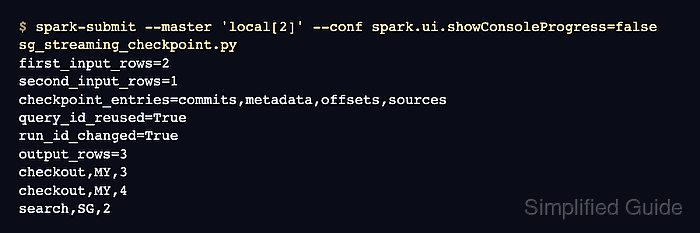
- Run the completed recovery check with spark-submit.
$ spark-submit --master 'local[2]' --conf spark.ui.showConsoleProgress=false sg_streaming_checkpoint.py
WARNING: Using incubator modules: jdk.incubator.vector
Using Spark's default log4j profile: org/apache/spark/log4j2-defaults.properties
##### snipped #####
first_input_rows=2
second_input_rows=1
checkpoint_entries=commits,metadata,offsets,sources
query_id_reused=True
run_id_changed=True
output_rows=3
checkout,MY,3
checkout,MY,4
search,SG,2
query_id_reused=True confirms the second start recovered the same logical query, while run_id_changed=True identifies a new execution attempt. The second run processed one new row and retained all three output rows. The checkpoint directory must remain available for as long as this stream needs restart recovery.
Related: How to submit an Apache Spark job

Mohd Shakir Zakaria is a cloud architect with deep roots in software development and open-source advocacy. Certified in AWS, Red Hat, VMware, ITIL, and Linux, he specializes in designing and managing robust cloud and on-premises infrastructures.


