How to run SQL queries in Spark
Spark SQL lets a Spark job query DataFrames with relational syntax while staying inside the same distributed execution engine. It is useful when analysts hand over SQL logic, when a PySpark job needs a compact aggregation, or when a temporary view is easier to read than a long DataFrame chain.
A SparkSession is the entry point for both the DataFrame API and SQL execution. In PySpark, a DataFrame can be registered as a local temporary view with createOrReplaceTempView(), and spark.sql() returns another DataFrame containing the query result.
Local temporary views are scoped to the session that created them. Use createOrReplaceTempView() for repeatable scripts where re-running the job should replace the same view name, and use persisted tables or global temporary views only when another session must see the data.
Related: How to run PySpark locally
Related: How to create a Spark DataFrame
Related: How to run the Spark SQL CLI
Steps to run Spark SQL queries in PySpark:
- Create a PySpark script for the SQL query check.
$ vi spark_sql_query_check.py
- Import the Spark session.
from pyspark.sql import SparkSession
- Build the Spark session.
spark = (
    SparkSession.builder
    .appName("sg-spark-sql-query-check")
    .config("spark.ui.showConsoleProgress", "false")
    .getOrCreate()
)
spark.sparkContext.setLogLevel("ERROR")
spark.ui.showConsoleProgress is disabled only to keep the terminal output focused on the SQL result.
- Create a small orders DataFrame.
orders = spark.createDataFrame(
    [
        ("ORD-1001", "APAC", 120.00, "COMPLETE"),
        ("ORD-1002", "EMEA", 75.50, "COMPLETE"),
        ("ORD-1003", "APAC", 42.25, "CANCELLED"),
        ("ORD-1004", "AMER", 220.00, "COMPLETE"),
        ("ORD-1005", "APAC", 129.50, "COMPLETE"),
    ],
    ["order_id", "region", "amount", "status"],
)
Use a real DataFrame from files, tables, or upstream transforms in application code. Local rows keep this SQL check repeatable.
- Register the DataFrame as a temporary SQL view.
orders.createOrReplaceTempView("orders")
The view name can be queried through the same SparkSession until it is replaced, dropped, or the session stops.
- Run the SQL aggregation through spark.sql().
result = spark.sql(
    """
    SELECT
        region,
        COUNT(*) AS complete_orders,
        ROUND(SUM(amount), 2) AS revenue
    FROM orders
    WHERE status = 'COMPLETE'
    GROUP BY region
    ORDER BY revenue DESC
    """
)
- Print the query result and verification signals.
print("Spark SQL query result:")
result.show(truncate=False)
print(f"Temp view registered: {spark.catalog.tableExists('orders')}")
print(f"Result rows: {result.count()}")
tableExists(“orders”) confirms the temporary view is registered before the script drops it.
- Drop the temporary view.
spark.catalog.dropTempView("orders")
- Stop the Spark session.
spark.stop()
- Run the script in local mode.
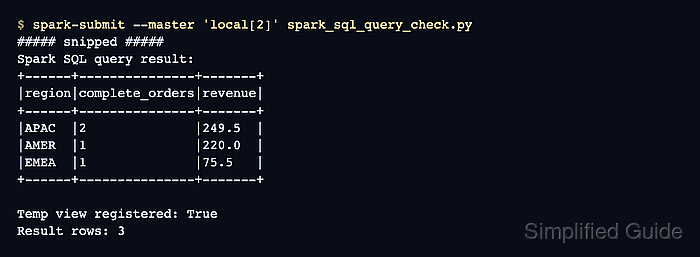
$ spark-submit --master 'local[2]' spark_sql_query_check.py
##### snipped #####
Spark SQL query result:
+------+---------------+-------+
|region|complete_orders|revenue|
+------+---------------+-------+
|APAC  |2              |249.5  |
|AMER  |1              |220.0  |
|EMEA  |1              |75.5   |
+------+---------------+-------+

Temp view registered: True
Result rows: 3
The result rows exclude the CANCELLED order and group the remaining rows by region.
- Remove the proof script when it is not part of the application code.
$ rm spark_sql_query_check.py