How to configure Spark fair scheduling
A busy Spark driver can submit multiple jobs from the same SparkContext, especially when a service handles concurrent requests or analysts share one long-running application. Fair scheduling changes the in-application queue from first-in-first-out execution to pool-aware sharing so short interactive actions can receive executor slots while longer batch work is still active.
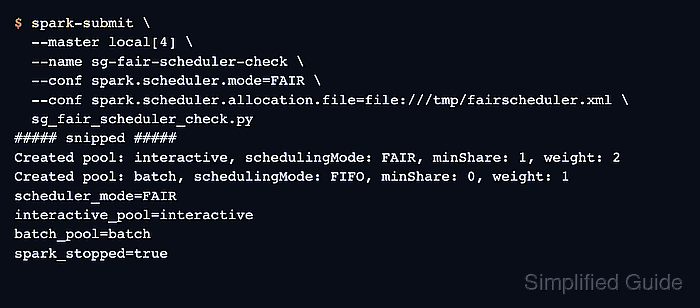
Spark enables fair scheduling before the driver starts with spark.scheduler.mode=FAIR. Pool definitions can be loaded from an XML allocation file through spark.scheduler.allocation.file, where each pool sets its internal scheduling mode, relative weight, and minimum share.
Jobs enter a pool through the per-thread spark.scheduler.pool local property, not through a cluster-manager queue. A local[4] PySpark smoke run can prove that the allocation file loads and that actions submitted after each local-property assignment use the intended pool names before the same pattern is moved into a long-running service or cluster job.
Related: How to submit an Apache Spark job
Related: How to configure Spark defaults
Related: How to check Spark application status
Steps to configure Spark fair scheduling:
- Choose the fair scheduler settings for the application.
Scheduler mode: FAIR
Allocation file: /tmp/fairscheduler.xml
Pools:
  interactive: schedulingMode=FAIR, weight=2, minShare=1
  batch:       schedulingMode=FIFO, weight=1, minShare=0
Fair scheduling shares resources between jobs inside one SparkContext. It does not replace YARN queues, Kubernetes resource requests, standalone application limits, or dynamic allocation between separate Spark applications.
- Create the fair scheduler allocation file.
- /tmp/fairscheduler.xml
<?xml version="1.0"?>
<allocations>
  <pool name="interactive">
    <schedulingMode>FAIR</schedulingMode>
    <weight>2</weight>
    <minShare>1</minShare>
  </pool>
  <pool name="batch">
    <schedulingMode>FIFO</schedulingMode>
    <weight>1</weight>
    <minShare>0</minShare>
  </pool>
</allocations>
Use a path visible to the driver. Spark also accepts HDFS allocation-file URIs such as hdfs:///spark/fairscheduler.xml when the driver can read Hadoop configuration. Pools missing from the XML file use the default values: FIFO, weight 1, and minShare 0.
- Save a PySpark application that assigns actions to scheduler pools.
- sg_fair_scheduler_check.py
from pyspark.sql import SparkSession

spark = SparkSession.builder.getOrCreate()
spark.sparkContext.setLogLevel("ERROR")

sc = spark.sparkContext
print(f"scheduler_mode={sc.getConf().get('spark.scheduler.mode')}")
print(f"allocation_file={sc.getConf().get('spark.scheduler.allocation.file')}")

sc.setLocalProperty("spark.scheduler.pool", "interactive")
interactive_count = spark.range(0, 20).repartition(4).count()
interactive_pool = sc.getLocalProperty("spark.scheduler.pool")
print(f"interactive_pool={interactive_pool}")
print(f"interactive_count={interactive_count}")

sc.setLocalProperty("spark.scheduler.pool", "batch")
batch_count = spark.range(0, 10).repartition(2).count()
batch_pool = sc.getLocalProperty("spark.scheduler.pool")
print(f"batch_pool={batch_pool}")
print(f"batch_count={batch_count}")

sc.setLocalProperty("spark.scheduler.pool", None)
print(f"cleared_pool={sc.getLocalProperty('spark.scheduler.pool')}")

spark.stop()
print("spark_stopped=true")
The local property affects jobs submitted by the current thread after the assignment. For concurrent PySpark threads, use pyspark.InheritableThread when thread-local Spark properties need to reach the JVM scheduler.
- Submit the application with fair scheduling enabled.
$ spark-submit \
  --master local[4] \
  --name sg-fair-scheduler-check \
  --conf spark.scheduler.mode=FAIR \
  --conf spark.scheduler.allocation.file=file:///tmp/fairscheduler.xml \
  --conf spark.ui.showConsoleProgress=false \
  sg_fair_scheduler_check.py
WARNING: Using incubator modules: jdk.incubator.vector
Using Spark's default log4j profile: org/apache/spark/log4j2-defaults.properties
##### snipped #####
FairSchedulableBuilder: Created pool: interactive, schedulingMode: FAIR, minShare: 1, weight: 2
FairSchedulableBuilder: Created pool: batch, schedulingMode: FIFO, minShare: 0, weight: 1
##### snipped #####
scheduler_mode=FAIR
allocation_file=file:///tmp/fairscheduler.xml
interactive_pool=interactive
interactive_count=20
batch_pool=batch
batch_count=10
cleared_pool=None
spark_stopped=true
Pass the same properties with spark-submit for a single application, or put them in the active spark-defaults.conf file for recurring submissions.
Related: How to configure Spark defaults
Related: How to submit an Apache Spark job - Confirm the scheduler mode, allocation file, and pool names in the output.
The FairSchedulableBuilder lines show that Spark parsed the XML pools. The printed interactive_pool and batch_pool values show that actions were submitted after assigning the matching spark.scheduler.pool local property.
- Remove the temporary smoke-test files.
$ rm sg_fair_scheduler_check.py /tmp/fairscheduler.xml
Keep the allocation file in a durable Spark configuration path instead of removing it when the same pool policy should remain active for future applications.