How to cache a Spark DataFrame
Spark caches a DataFrame when the same transformed rows feed more than one action, such as a count, a filtered display, and a later write. Without caching, Spark can recompute the full lineage for each action, which wastes executor time on iterative notebooks and tuning probes.
In PySpark, cache() is shorthand for persisting the DataFrame with Spark's default DataFrame storage level. Current Spark uses memory with a disk fallback for the default cache level, and cached blocks are filled only after an action such as count() evaluates the DataFrame.
Cache only reused DataFrames that fit the available executor storage memory or have a clear disk fallback. Release the DataFrame with unpersist() when the repeated work is finished so later queries do not keep stale intermediate blocks.
Related: How to run PySpark locally
Related: How to troubleshoot Spark out-of-memory errors
Steps to cache a Spark DataFrame in PySpark:
- Create a PySpark check script.
$ vi dataframe_cache_check.py
- Build the Spark session and sample DataFrame.
from pyspark.sql import SparkSession, functions as F

spark = (
    SparkSession.builder
    .appName("sg-dataframe-cache-check")
    .config("spark.sql.shuffle.partitions", "2")
    .getOrCreate()
)
spark.sparkContext.setLogLevel("ERROR")

orders = spark.createDataFrame(
    [
        (1, "MY", 42.50),
        (2, "SG", 31.20),
        (3, "MY", 18.90),
        (4, "ID", 25.00),
    ],
    ["order_id", "country_code", "amount"],
)
- Add the reusable transformations and cache the resulting DataFrame.
cached_orders = (
    orders
    .withColumn("tax", F.round(F.col("amount") * F.lit(0.08), 2))
    .withColumn("total", F.round(F.col("amount") + F.col("tax"), 2))
    .cache()
)
cache() marks the DataFrame for Spark SQL caching, but no blocks are stored until an action evaluates it.
- Print the cache storage flags and materialize the DataFrame.
level = cached_orders.storageLevel
print("cache uses memory =", level.useMemory)
print("cache uses disk fallback =", level.useDisk)
print("materialized rows =", cached_orders.count())
count() materializes the cached DataFrame here. Use the first action that fits the job, such as a count, write, or downstream aggregation.
- Add a follow-up action that should read from the cached plan.
malaysia_orders = (
    cached_orders
    .filter(F.col("country_code") == "MY")
    .select("order_id", "country_code", "total")
    .orderBy("order_id")
)
plan = malaysia_orders._jdf.queryExecution().executedPlan().toString()
print("follow-up action uses cached scan =", "InMemoryTableScan" in plan)
malaysia_orders.show(truncate=False)
- Release the cache before stopping the session.
cached_orders.unpersist(blocking=True)
level_after = cached_orders.storageLevel
print("cached after unpersist =", level_after.useMemory or level_after.useDisk)

spark.stop()
blocking=True waits for Spark to remove cached blocks before the script prints the final storage state.
- Run the script in local mode.
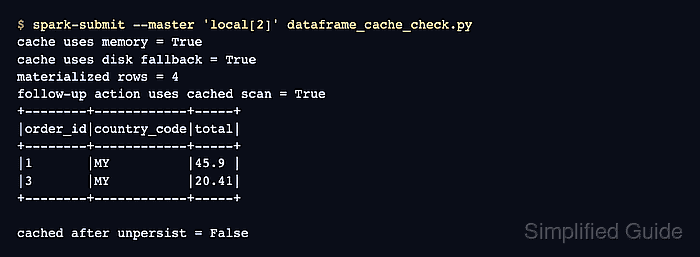
$ spark-submit --master 'local[2]' dataframe_cache_check.py
cache uses memory = True
cache uses disk fallback = True
materialized rows = 4
follow-up action uses cached scan = True
+--------+------------+-----+
|order_id|country_code|total|
+--------+------------+-----+
|1       |MY          |45.9 |
|3       |MY          |20.41|
+--------+------------+-----+

cached after unpersist = False
The storage flags show the DataFrame has memory and disk persistence enabled. The cached scan line shows the second action reused the cached plan, and the final line confirms unpersist() cleared the persistence state.
- Remove the proof script when it is not part of the application code.
$ rm dataframe_cache_check.py