How to read and write Avro files with Spark
Avro combines a compact binary record format with a schema that describes each field. Spark can use that schema to recover column names and types, transform the resulting DataFrame, and exchange structured datasets without delimiter or column-position assumptions.
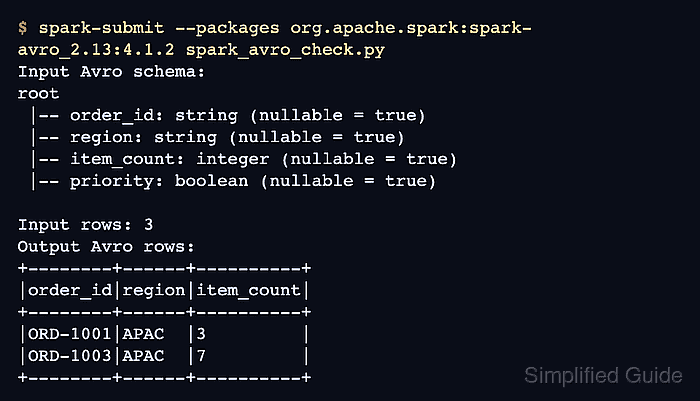
Spark provides Avro support through the external spark-avro module rather than the default application classpath. The --packages coordinate must match both the Spark release and its Scala binary version before format(“avro”) can resolve the data source.
A Spark file write creates a directory containing part-*.avro data files and commit metadata. Reading the written directory back, comparing the decoded rows, and confirming that an Avro part file exists proves the complete serialization and deserialization path.
Steps to read and write Avro files with Apache Spark:
- Match the Avro package coordinate to the installed Spark and Scala binary versions.
Spark runtime: 4.1.2
Scala binary version: 2.13
Package: org.apache.spark:spark-avro_2.13:4.1.2
- Start spark_avro_round_trip.py with the paths, imports, and local Spark session.
- spark_avro_round_trip.py
from pathlib import Path

from pyspark.sql import SparkSession
from pyspark.sql import functions as F


input_path = "data/avro/orders"
output_path = "data/avro/priority-apac"

spark = (
    SparkSession.builder.master("local[1]")
    .appName("spark-avro-read-write")
    .getOrCreate()
)
spark.sparkContext.setLogLevel("ERROR")
The paths are directories, not individual .avro filenames. overwrite mode replaces either sample directory when the job is rerun, so choose unused paths when existing data must remain intact.
- Add the source order records after the Spark log-level setting.
- spark_avro_round_trip.py
orders = spark.createDataFrame(
    [
        ("ORD-1001", "APAC", 3, True),
        ("ORD-1002", "EMEA", 1, False),
        ("ORD-1003", "APAC", 7, True),
    ],
    "order_id string, region string, item_count int, priority boolean",
)
- Append the source Avro write and read-back operations below the orders DataFrame.
- spark_avro_round_trip.py
orders.write.format("avro").mode("overwrite").save(input_path)
loaded = spark.read.format("avro").load(input_path)
- Add the APAC priority selection after the input read.
- spark_avro_round_trip.py
priority_orders = loaded.filter(
    (F.col("region") == "APAC") & F.col("priority")
).select("order_id", "region", "item_count")
- Finish the file with the output round trip and fail-capable row assertions.
- spark_avro_round_trip.py
priority_orders.write.format("avro").mode("overwrite").save(output_path)
result = spark.read.format("avro").load(output_path)

actual_rows = [tuple(row) for row in result.orderBy("order_id").collect()]
expected_rows = [
    ("ORD-1001", "APAC", 3),
    ("ORD-1003", "APAC", 7),
]
assert actual_rows == expected_rows, actual_rows

data_files = sorted(Path(output_path).glob("part-*.avro"))
assert data_files, "No Avro data files were written"

print("Output Avro rows:")
result.orderBy("order_id").show(truncate=False)
print(f"Avro data files: {len(data_files)}")

spark.stop()
- Run the completed program with the Spark 4.1.2 Avro package to verify the round trip.
$ spark-submit \
  --conf spark.ui.showConsoleProgress=false \
  --packages org.apache.spark:spark-avro_2.13:4.1.2 \
  spark_avro_round_trip.py
org.apache.spark#spark-avro_2.13 added as a dependency
##### snipped #####
Output Avro rows:
+--------+------+----------+
|order_id|region|item_count|
+--------+------+----------+
|ORD-1001|APAC  |3         |
|ORD-1003|APAC  |7         |
+--------+------+----------+

Avro data files: 1
The package coordinate shown is specific to Spark 4.1.2 with Scala 2.13.
Related: How to add packages to a Spark job