How to configure Spark adaptive query execution
Spark SQL plans a query from estimates that may not match the data moved between stages. Adaptive Query Execution (AQE) uses runtime statistics from completed stages to revise the remaining physical plan, including the number of post-shuffle partitions.
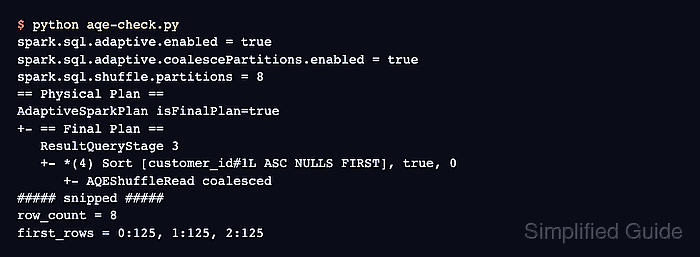
The spark.sql.adaptive.enabled setting is the umbrella switch for AQE, while the coalescing setting allows Spark to combine small contiguous shuffle partitions. Both settings are enabled by default in current Spark releases, but setting them in the application makes its intended execution behavior independent of session or cluster defaults.
The local PySpark workload below starts with eight shuffle partitions and produces only eight grouped rows. A completed plan containing AdaptiveSparkPlan isFinalPlan=true and AQEShuffleRead coalesced shows that Spark executed the query and replaced the original shuffle reads with coalesced reads.
Related: How to set Spark SQL shuffle partitions
Related: How to explain a Spark DataFrame query plan
Related: How to configure Spark defaults
Steps to configure Spark adaptive query execution:
- Start aqe-check.py with the Spark session and quiet application logging.
- aqe-check.py
from pyspark.sql import SparkSession
from pyspark.sql.functions import col

spark = SparkSession.builder.appName("aqe-check").getOrCreate()
spark.sparkContext.setLogLevel("ERROR")
- Add the AQE and initial shuffle-partition settings after the log-level line.
- aqe-check.py
spark.conf.set("spark.sql.adaptive.enabled", "true")
spark.conf.set("spark.sql.adaptive.coalescePartitions.enabled", "true")
spark.conf.set("spark.sql.shuffle.partitions", "8")
The value 8 is intentionally small for this local workload. Production jobs normally start with enough shuffle partitions for their data volume because AQE can combine small partitions after map output statistics become available.
- Append the input DataFrame after the configuration block.
- aqe-check.py
orders = spark.range(0, 1000).select((col("id") % 8).alias("customer_id"))
- Build the grouped and ordered result after the input DataFrame.
- aqe-check.py
result = (
    orders.groupBy("customer_id")
    .count()
    .orderBy("customer_id")
)
- Finish the application with the query action and execution-plan checks.
- aqe-check.py
rows = result.collect()

print(f"spark.sql.adaptive.enabled = {spark.conf.get('spark.sql.adaptive.enabled')}")
print(
    "spark.sql.adaptive.coalescePartitions.enabled = "
    f"{spark.conf.get('spark.sql.adaptive.coalescePartitions.enabled')}"
)
print(f"spark.sql.shuffle.partitions = {spark.conf.get('spark.sql.shuffle.partitions')}")
result.explain()
print(f"row_count = {len(rows)}")
print(f"first_row = {rows[0].customer_id}:{rows[0]['count']}")

spark.stop()
Calling collect() before explain() completes the query stages so the physical-plan output includes Spark's final adaptive plan.
- Submit the completed application in local mode to confirm AQE coalesces the shuffle reads.
$ spark-submit --master local[2] aqe-check.py
spark.sql.adaptive.enabled = true
spark.sql.adaptive.coalescePartitions.enabled = true
spark.sql.shuffle.partitions = 8
== Physical Plan ==
AdaptiveSparkPlan isFinalPlan=true
+- == Final Plan ==
   ResultQueryStage 2
   +- *(3) Sort [customer_id#1L ASC NULLS FIRST], true, 0
      +- AQEShuffleRead coalesced
##### snipped #####
row_count = 8
first_row = 0:125
AdaptiveSparkPlan isFinalPlan=true identifies the completed adaptive plan, AQEShuffleRead coalesced identifies the applied partition optimization, and row_count = 8 confirms that the grouped query returned one row per customer ID.