How to restore an Apache Cassandra snapshot
A Cassandra snapshot restore matters when a table was dropped or a recovery rehearsal must prove that saved SSTable files still load into a table. The restore must preserve the table schema, use the snapshot from the right Cassandra node, and verify a known row after Cassandra reads the copied files.
For a local restore, the snapshot's SSTable components are copied into the active table directory on the same node and nodetool refresh tells Cassandra to load newly placed files without restarting. Cassandra 5.0.8 still supports refresh for this flow, but it prints a deprecation warning that points operators toward nodetool import for rehearsed imports from separate directories.
Use this flow during an outage window or a disposable recovery test, not against a table that is still receiving writes. Do not truncate the table immediately before loading an older snapshot, because the truncation marker can keep older rows hidden; recreate the table from schema.cql or restore into a prepared empty target instead.
Steps to restore an Apache Cassandra snapshot locally:
- Stop application writes to the table being restored.
Restoring old SSTables into a table that is still receiving writes can mix recovered rows with newer application state. Put the workload into maintenance mode, route writes away, or perform the restore in an isolated recovery cluster.
- Check the target node's Cassandra ring state.
$ nodetool status retail
Datacenter: dc1
===============
Status=Up/Down
|/ State=Normal/Leaving/Joining/Moving
--  Address    Load        Tokens  Owns (effective)  Host ID                               Rack
UN  10.0.0.11  118.31 KiB  16      100.0%            8f4f6e2d-9f74-4f5a-a85f-43df5d4fcb21  rack1
Run the restore on the node that owns this local snapshot. In a multi-node cluster, repeat the local restore with each node's own snapshot files rather than copying one node's SSTables to every node.
Related: How to check Apache Cassandra cluster status with nodetool - List the staged snapshot directory.
$ sudo ls /srv/cassandra-restore/retail/orders/orders-before-restore
manifest.json
nb-1-big-CompressionInfo.db
nb-1-big-Data.db
nb-1-big-Digest.crc32
nb-1-big-Filter.db
nb-1-big-Index.db
nb-1-big-Statistics.db
nb-1-big-Summary.db
nb-1-big-TOC.txt
schema.cql
The snapshot should contain schema.cql plus the SSTable component files. The staged path under /srv/cassandra-restore keeps the original snapshot untouched.
- Create the target table from the snapshot schema when the table was dropped.
$ cqlsh cassandra-a.example.net 9042 -f /srv/cassandra-restore/retail/orders/orders-before-restore/schema.cql
Run schema replay only against the intended restore target. If schema.cql contains only table DDL, create the keyspace first with the replication strategy expected for the target cluster.
Related: How to export an Apache Cassandra schema - Confirm the restore target does not already return the row being recovered.
$ cqlsh cassandra-a.example.net 9042 -e "SELECT order_id, status FROM retail.orders WHERE order_id = 1001;"

 order_id | status
----------+--------


(0 rows)
Use a primary key that should exist in the snapshot. Avoid broad count queries on large tables during a recovery window.
- Locate the active table data directory on the target node.
$ sudo ls -d /var/lib/cassandra/data/retail/orders-*
/var/lib/cassandra/data/retail/orders-8edab4e06a0311f19bdba9688e7f3831
Package installs commonly use /var/lib/cassandra/data. Tarball installs keep the data directory under the extracted Cassandra installation path.
- Copy only the snapshot SSTable components into the active table directory.
$ sudo cp /srv/cassandra-restore/retail/orders/orders-before-restore/nb-* /var/lib/cassandra/data/retail/orders-8edab4e06a0311f19bdba9688e7f3831/
Do not copy manifest.json or schema.cql into the active table directory. Copy only the component files that share the same SSTable prefix.
- Set ownership on the copied files for the Cassandra service user.
$ sudo chown cassandra:cassandra /var/lib/cassandra/data/retail/orders-8edab4e06a0311f19bdba9688e7f3831/nb-*
- Load the copied SSTables into the running node.
$ nodetool refresh retail orders
nodetool refresh is deprecated, use nodetool import instead
Cassandra 5.0.8 prints this deprecation warning but still loads newly placed SSTables from the active table directory. If the recovery process has already been validated with nodetool import and --copy-data from a separate backup directory, use that rehearsed path instead.
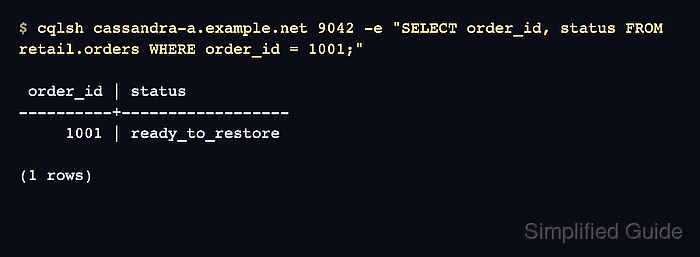
- Query a known restored row through cqlsh.
$ cqlsh cassandra-a.example.net 9042 -e "SELECT order_id, status FROM retail.orders WHERE order_id = 1001;"

 order_id | status
----------+------------------
     1001 | ready_to_restore

(1 rows)
When the row returns, Cassandra is reading the restored SSTable data through the normal client path.
Related: How to connect to Apache Cassandra with cqlsh - Repeat the restore on every node that has snapshot files for the recovered table.
A Cassandra snapshot is node-local. Restoring only one replica owner can leave other replicas without the recovered data until the recovery plan streams or repairs the missing ranges.