An Apache Cassandra schema export gives operators the CQL definitions needed to recreate keyspaces, tables, indexes, and related schema objects before a backup, migration, or review. Keeping that DDL beside a data snapshot prevents a recovery handoff from depending on memory of table options, replication settings, or secondary indexes.
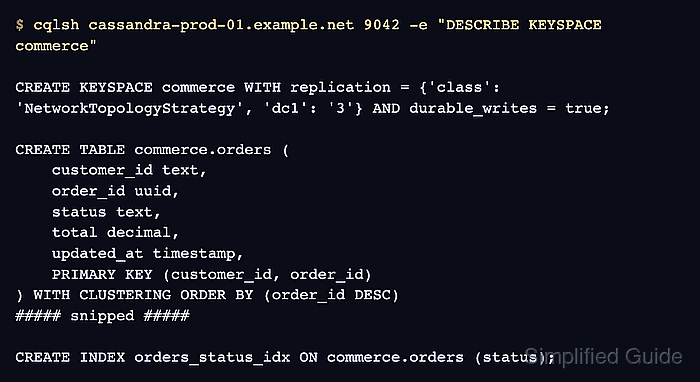
cqlsh prints schema definitions through its DESCRIBE commands. DESCRIBE KEYSPACE is the safer default when one application keyspace is being backed up or moved, while DESCRIBE SCHEMA is useful when every non-system schema object in the cluster must be captured.
A schema export does not copy rows, SSTables, snapshots, commit logs, or backup files. Use the same authenticated and TLS-ready cqlsh connection that production operators use, then replay the exported file only into a disposable validation cluster or an intentionally empty target.
Steps to export an Apache Cassandra schema with cqlsh:
- Confirm that cqlsh reaches the target Cassandra cluster.
$ cqlsh cassandra-prod-01.example.net 9042 -e "SHOW HOST"
Connected to SG Cluster at cassandra-prod-01.example.net:9042
Use --cqlshrc, --credentials, or --ssl with the same host and port when the cluster requires authentication or client TLS.
Related: How to connect to Apache Cassandra with cqlsh - List keyspaces before choosing the export target.
$ cqlsh cassandra-prod-01.example.net 9042 -e "DESCRIBE KEYSPACES"

commerce  system_auth  system_schema  system_traces
Choose the application keyspace for a focused export. Use DESCRIBE SCHEMA instead of DESCRIBE KEYSPACE commerce only when the export should include all non-system schema objects.
- Preview the target keyspace schema.
$ cqlsh cassandra-prod-01.example.net 9042 -e "DESCRIBE KEYSPACE commerce"

CREATE KEYSPACE commerce WITH replication = {'class': 'NetworkTopologyStrategy', 'dc1': '3'} AND durable_writes = true;

CREATE TABLE commerce.orders (
    customer_id text,
    order_id uuid,
    status text,
    total decimal,
    updated_at timestamp,
    PRIMARY KEY (customer_id, order_id)
) WITH CLUSTERING ORDER BY (order_id DESC)
##### snipped #####

CREATE INDEX orders_status_idx ON commerce.orders (status);
The output should contain the keyspace definition and the expected tables, indexes, types, functions, or aggregates for that keyspace.
- Export the keyspace schema to a CQL file.
$ cqlsh cassandra-prod-01.example.net 9042 -e "DESCRIBE KEYSPACE commerce" > commerce-schema.cql
Keep the file name tied to the keyspace, environment, or backup bundle so it is not confused with a data export.
- Confirm that the schema file was written.
$ ls -lh commerce-schema.cql
-rw-r--r-- 1 cassandra dba 1.2K Jun 17 10:15 commerce-schema.cql
- Inspect the exported file before storing it with backup evidence.
$ cat commerce-schema.cql

CREATE KEYSPACE commerce WITH replication = {'class': 'NetworkTopologyStrategy', 'dc1': '3'} AND durable_writes = true;

CREATE TABLE commerce.orders (
    customer_id text,
    order_id uuid,
    status text,
    total decimal,
    updated_at timestamp,
    PRIMARY KEY (customer_id, order_id)
) WITH CLUSTERING ORDER BY (order_id DESC)
##### snipped #####

CREATE INDEX orders_status_idx ON commerce.orders (status);
Schema files can reveal keyspace names, table names, index names, and business data model details. Treat them as operational artifacts even though they do not contain table rows.
- Replay the schema file on a disposable validation cluster.
$ cqlsh cassandra-lab-01.example.net 9042 -f commerce-schema.cql
Run this only against an empty lab keyspace or an intentional restore target. The file contains CREATE KEYSPACE and CREATE TABLE statements, and replaying it against the wrong cluster can fail or create unwanted objects.
- Verify that the replayed schema contains an exported table and index.
$ cqlsh cassandra-lab-01.example.net 9042 -e "DESCRIBE TABLE commerce.orders"

CREATE TABLE commerce.orders (
    customer_id text,
    order_id uuid,
    status text,
    total decimal,
    updated_at timestamp,
    PRIMARY KEY (customer_id, order_id)
) WITH CLUSTERING ORDER BY (order_id DESC)
##### snipped #####

CREATE INDEX orders_status_idx ON commerce.orders (status);

Mohd Shakir Zakaria is a cloud architect with deep roots in software development and open-source advocacy. Certified in AWS, Red Hat, VMware, ITIL, and Linux, he specializes in designing and managing robust cloud and on-premises infrastructures.


