How to check Apache Cassandra service status
An Apache Cassandra process can be active in the service manager before the node is ready for client traffic. Checking the Linux service, Cassandra ring state, and native transport listener separates a stopped daemon from a node that is still joining the ring or not yet accepting CQL connections.
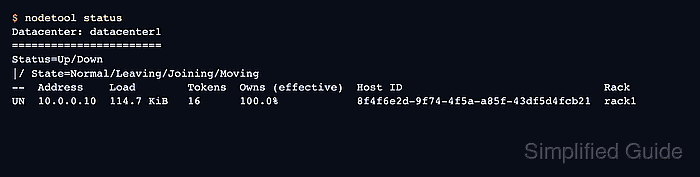
The service manager reports whether the packaged cassandra service is running on the host. nodetool talks to Cassandra through the local management interface and shows whether the node has reached the expected ring state, while cqlsh uses the same native transport path that clients use.
Run these checks from the Cassandra node or from an administration host with service, JMX, and client-network access to the node being checked. The examples use a systemd managed Linux package; non-systemd installs may use sudo service cassandra status for the service layer, and tarball or container deployments need a process-manager equivalent before the nodetool and cqlsh checks.
Steps to check Apache Cassandra service status:
- Check the service manager active state.
$ sudo systemctl is-active cassandra
active
active means the service manager sees the cassandra unit as running. activating means startup has not finished, and failed or inactive means Cassandra is not serving from this unit.
- Open the service status summary.
$ sudo systemctl status cassandra
cassandra.service - Apache Cassandra
     Loaded: loaded (/lib/systemd/system/cassandra.service; enabled; preset: enabled)
     Active: active (running) since Wed 2026-06-17 04:08:31 UTC; 2min 12s ago
   Main PID: 1842 (java)
      Tasks: 79
     Memory: 1.3G
The Main PID should be a Java process. A recently started service can still need more time before nodetool and cqlsh succeed.
- Review recent startup messages when the service is new or the status is unexpected.
$ sudo journalctl --unit cassandra --since "10 minutes ago"
Jun 17 04:08:23 db01 cassandra[1842]: Node /10.0.0.10:7000 state jump to NORMAL
Jun 17 04:08:31 db01 cassandra[1842]: Startup complete
Detailed Cassandra logs usually remain in /var/log/cassandra/system.log even when service-wrapper messages appear in the journal. Look there when the journal only shows start or stop wrapper output.
- Check the Cassandra ring state with nodetool.
$ nodetool status
Datacenter: datacenter1
=======================
Status=Up/Down
|/ State=Normal/Leaving/Joining/Moving
--  Address    Load        Tokens  Owns (effective)  Host ID                               Rack
UN  10.0.0.10  114.7 KiB   16      100.0%            8f4f6e2d-9f74-4f5a-a85f-43df5d4fcb21  rack1
UN means the node is up and normal from this node's ring view. An empty result or No nodes present in the cluster usually means Cassandra has not finished startup or gossip has not settled.
- Confirm the native transport listener with cqlsh.
$ cqlsh 10.0.0.10 9042 -e "SHOW HOST"
Connected to SG Cluster at 10.0.0.10:9042
Use the node address and native transport port that clients reach. If authentication or client TLS is enabled, use the same cqlshrc, credentials file, and TLS options used by operators instead of placing passwords directly in shell history.