How to grant permissions to an Apache Cassandra role
Granting an Apache Cassandra permission to a role gives an application or operator only the CQL action it needs on the chosen resource. A table-level SELECT grant lets a login role read that table without making it a superuser or giving it write access.
Cassandra models data permissions as a hierarchy from all keyspaces, to one keyspace, to one table. A permission granted on a keyspace flows down to the tables in that keyspace, while a permission granted on one table stays limited to that table.
Use a superuser or a role with AUTHORIZE permission on the target resource to run the grant. cqlsh credentials files keep the administrator and target-role passwords out of reusable shell history and shared transcripts.
Steps to grant an Apache Cassandra role permission:
- Open an authenticated cqlsh session as the role that can grant permissions.
$ cqlsh --disable-history --credentials ~/.cassandra/dba.credentials cassandra01.example.net 9042
Connected to SG Cluster at cassandra01.example.net:9042
[cqlsh 6.2.0 | Cassandra 5.0.8 | CQL spec 3.4.7 | Native protocol v5]
Use HELP for help.
dba@cqlsh>
CassandraAuthorizer must be enabled before grants affect CQL access. The default AllowAllAuthorizer disables authorization checks and effectively allows every authenticated role to do everything.
Related: How to enable authentication in Apache Cassandra - Confirm the target role exists and is not a superuser.
dba@cqlsh> LIST ROLES OF app_reader NORECURSIVE;

 role       | super | login | options | datacenters
------------+-------+-------+---------+-------------
 app_reader | False |  True |        {} |         ALL

(1 rows)
Create or adjust the role before granting table permissions if it is missing or still has super set to True.
Related: How to create an Apache Cassandra user - Grant the required permission on the narrowest Cassandra resource.
dba@cqlsh> GRANT SELECT ON app_data.orders TO app_reader;
dba@cqlsh>
Replace SELECT, app_data.orders, and app_reader for the task. Use GRANT SELECT ON KEYSPACE app_data only when the role should read every table in that keyspace. Use MODIFY only when the role should be able to INSERT, UPDATE, DELETE, and TRUNCATE.
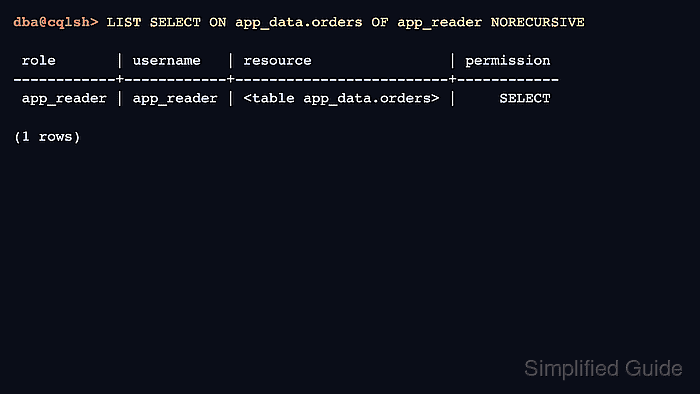
- List the direct permission grant.
dba@cqlsh> LIST SELECT ON app_data.orders OF app_reader NORECURSIVE;

 role       | username   | resource                | permission
------------+------------+-------------------------+------------
 app_reader | app_reader | <table app_data.orders> |     SELECT

(1 rows)
NORECURSIVE limits the listing to permissions granted directly to app_reader or roles assigned to it. Omit it when inherited permissions from parent roles or higher resources should also be reviewed.
- Open a fresh cqlsh session as the target role.
$ cqlsh --disable-history --credentials ~/.cassandra/app_reader.credentials cassandra01.example.net 9042
Connected to SG Cluster at cassandra01.example.net:9042
[cqlsh 6.2.0 | Cassandra 5.0.8 | CQL spec 3.4.7 | Native protocol v5]
Use HELP for help.
app_reader@cqlsh>
A fresh session proves what a new application connection sees after the grant. Existing client sessions normally see permission changes without reconnecting, but a new session avoids stale client-side assumptions during validation.
- Test the permitted action as the target role.
app_reader@cqlsh> SELECT * FROM app_data.orders; order_id | status ----------+-------- 1001 | ready (1 rows) - Test an ungranted action that should remain blocked.
app_reader@cqlsh> INSERT INTO app_data.orders (order_id, status) VALUES (1002, 'blocked');
Unauthorized: Error from server: code=2100 [Unauthorized] message="User app_reader has no MODIFY permission on <table app_data.orders> or any of its parents"
The failed write confirms the role received SELECT without also receiving MODIFY on the table or its parent keyspace.