An Apache Cassandra cluster that still accepts CQL connections without credentials lets any reachable client run queries under the default open configuration. Enabling password authentication makes the native protocol require a database role before cqlsh, drivers, or application clients can execute CQL.
Cassandra controls client authentication with the authenticator setting in /etc/cassandra/cassandra.yaml for package installs, or conf/cassandra.yaml for tarball installs. PasswordAuthenticator stores role names and hashed passwords in the system_auth keyspace, so that keyspace needs a replication layout that stays available before the setting is rolled across the cluster.
Apply the change from one selected node, create a replacement administrative role, and restart the remaining nodes one at a time. Authentication does not encrypt client traffic, grant table permissions, or secure JMX by itself; pair it with client TLS, role grants, and JMX controls when the cluster is reachable outside a trusted administration network.
Steps to enable Apache Cassandra authentication:
- Confirm the selected node currently accepts CQL.
$ cqlsh -e "SELECT release_version FROM system.local;"

 release_version
-----------------
           5.0.8

(1 rows)
Run the bootstrap work from one node first. Keep application clients away from that node until replacement roles and credentials are ready.
- Set system_auth replication for the cluster.
$ cqlsh -e "ALTER KEYSPACE system_auth WITH replication = {'class': 'NetworkTopologyStrategy', 'datacenter1': 3};"Replace datacenter1 with the datacenter name shown by nodetool status or system.local. Use a replication factor that the datacenter can satisfy; a one-node lab uses 1, while production clusters normally use at least 3 per datacenter.
- Repair system_auth if the replication setting changed on an existing cluster.
$ nodetool repair system_auth
Run repair before relying on the new auth replicas. A new one-node lab that kept replication at 1 does not need this step.
- Open the active cassandra.yaml file.
$ sudo vi /etc/cassandra/cassandra.yaml
For a tarball install, edit conf/cassandra.yaml under the Cassandra install directory instead of /etc/cassandra/cassandra.yaml.
- Set PasswordAuthenticator and keep CassandraRoleManager.
- /etc/cassandra/cassandra.yaml
authenticator: PasswordAuthenticator
role_manager: CassandraRoleManager
PasswordAuthenticator requires Cassandra's role manager because login roles and password hashes are stored in system_auth.
- Restart the selected Cassandra node.
$ sudo systemctl restart cassandra
Restart only the selected node at this point. Wait for it to rejoin before changing the next node.
Related: How to check Apache Cassandra service status - Verify unauthenticated CQL is rejected.
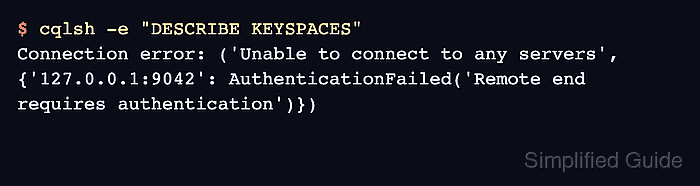
$ cqlsh -e "DESCRIBE KEYSPACES"
Connection error: ('Unable to connect to any servers', {'127.0.0.1:9042': AuthenticationFailed('Remote end requires authentication')})
This rejection confirms the native protocol now asks clients to authenticate before returning schema or data.
- Log in with the default Cassandra superuser on the selected node.
$ cqlsh -u cassandra -p cassandra -e "LIST ROLES;"

 role      | super | login | options | datacenters
-----------+-------+-------+---------+-------------
 cassandra |  True |  True |        {} |         ALL

(1 rows)
The default cassandra credentials are a bootstrap path only. Replace them before reconnecting normal clients. For routine use, avoid putting passwords in shell history and use a cqlsh credentials file or an interactive password prompt.
- Create a replacement superuser role.
$ cqlsh -u cassandra -p cassandra -e "CREATE ROLE cluster_admin WITH SUPERUSER = true AND LOGIN = true AND PASSWORD = 'UseALongUniquePasswordHere!2026';"
Replace the sample password with a unique secret from the cluster's password process before running the command.
- Disable login and superuser status on the default role from the replacement role.
$ cqlsh -u cluster_admin -p 'UseALongUniquePasswordHere!2026' -e "ALTER ROLE cassandra WITH SUPERUSER = false AND LOGIN = false;"
- Verify the replacement role and the disabled default role.
$ cqlsh -u cluster_admin -p 'UseALongUniquePasswordHere!2026' -e "LIST ROLES;" role | super | login | options | datacenters ---------------+-------+-------+---------+------------- cassandra | False | False | {} | ALL cluster_admin | True | True | {} | ALL (2 rows) - Create application login roles before reconnecting clients.
$ cqlsh -u cluster_admin -p 'UseALongUniquePasswordHere!2026' -e "CREATE ROLE app_service WITH LOGIN = true AND PASSWORD = 'UseADifferentLongPasswordHere!2026' AND SUPERUSER = false;"
Authentication proves client identity. Use authorization grants separately when the role should be limited to specific keyspaces, tables, or functions.
Related: How to grant permissions to an Apache Cassandra role - Repeat the authenticator file change on each remaining Cassandra node.
Restart one node at a time, wait for it to return to UN in nodetool status, and verify authenticated cqlsh access before moving to the next node.
Related: How to check Apache Cassandra cluster status with nodetool

Mohd Shakir Zakaria is a cloud architect with deep roots in software development and open-source advocacy. Certified in AWS, Red Hat, VMware, ITIL, and Linux, he specializes in designing and managing robust cloud and on-premises infrastructures.


