How to query Apache Cassandra metrics
Metric checks during an Apache Cassandra incident need to answer which node, table, or request path changed without waiting for a dashboard refresh. Cassandra exposes live node-local metrics through virtual tables, so an operator can use cqlsh to read latency, disk, cache, and thread-pool counters from the node being inspected.
The system_views keyspace contains read-only virtual tables backed by the running Cassandra process. Latency tables separate coordinator and local request paths, while tables such as thread_pools, caches, and disk_usage expose node pressure during health reviews.
Metric values are local to the node that answers the query. Counters, rates, and latency samples reflect the current process state, so repeat the same query on other nodes when the question is cluster-wide, and compare results with the node's recent restarts and workload.
Steps to query Apache Cassandra metrics with cqlsh:
- Connect to the Cassandra node and confirm the target host.
$ cqlsh 10.0.0.10 9042 -e "SHOW HOST"
Connected to SG Cluster at 10.0.0.10:9042
Replace 10.0.0.10 and 9042 with the native transport endpoint used by administrators.
Related: How to connect to Apache Cassandra with cqlsh - Add the required client authentication or TLS options when the cluster requires them.
Use the same --cqlshrc, --credentials, or --ssl settings used for normal read-only Cassandra access.
Related: How to enable authentication in Apache Cassandra
Related: How to enable client TLS in Apache Cassandra - List the available virtual tables in system_views.
$ cqlsh 10.0.0.10 9042 -e "SELECT table_name, comment FROM system_virtual_schema.tables WHERE keyspace_name='system_views'"

 table_name                | comment
---------------------------+----------------------------------------------------
             batch_metrics |               Metrics specific to batch statements
                    caches |                                      system caches
 coordinator_read_latency |
 coordinator_scan_latency |
coordinator_write_latency |
                disk_usage |
        local_read_latency |
       local_write_latency |
              thread_pools |
       tombstones_per_read |
##### snipped #####

(43 rows)
Metric virtual tables live beside other operational views, so choose the table that matches the metric scope being checked.
- Inspect the metric table schema before choosing columns.
$ cqlsh 10.0.0.10 9042 -e "DESCRIBE TABLE system_views.coordinator_read_latency"

/*
Warning: Table system_views.coordinator_read_latency is a virtual table and cannot be recreated with CQL.
Structure, for reference:
VIRTUAL TABLE system_views.coordinator_read_latency (
    keyspace_name text,
    table_name text,
    count bigint,
    max_ms double,
    p50th_ms double,
    p99th_ms double,
    per_second double,
    PRIMARY KEY ((keyspace_name, table_name))
) WITH comment = '';
*/
Virtual tables are read-only views. Use DESCRIBE TABLE to confirm column names instead of guessing a metric field.
- Query a table-scoped latency metric.
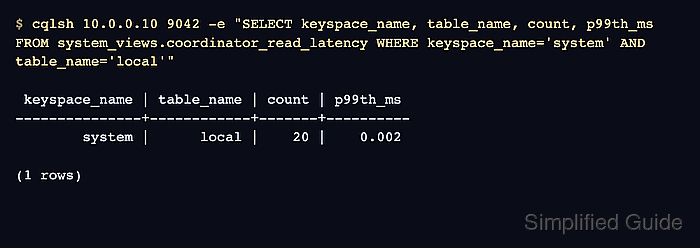
$ cqlsh 10.0.0.10 9042 -e "SELECT keyspace_name, table_name, count, p99th_ms FROM system_views.coordinator_read_latency WHERE keyspace_name='system' AND table_name='local'"

 keyspace_name | table_name | count | p99th_ms
---------------+------------+-------+----------
        system |      local |    20 |    0.002

(1 rows)
The row identifies the keyspace and table whose coordinator read latency is being checked. Use the application keyspace and table when investigating a production workload.
- Query a node-scoped thread-pool metric.
$ cqlsh 10.0.0.10 9042 -e "SELECT name, active_tasks, pending_tasks, completed_tasks FROM system_views.thread_pools WHERE name='Native-Transport-Requests'"

 name                      | active_tasks | pending_tasks | completed_tasks
---------------------------+--------------+---------------+-----------------
 Native-Transport-Requests |            1 |             0 |             117

(1 rows)
Pending tasks above zero on request pools can point to local node pressure. Compare the same table on other nodes before treating one node's values as a cluster-wide condition.