How to enable dynamic data masking in Apache Cassandra
Sensitive columns in Apache Cassandra often need to stay queryable without showing every value to every reader. Dynamic data masking lets the table schema return masked values for selected columns while roles with UNMASK keep access to the clear data.
Cassandra applies the masking function during SELECT processing and does not rewrite the stored value. The dynamic_data_masking_enabled setting must be enabled in cassandra.yaml before new column masks can be created, and a node with the setting disabled ignores existing masks at query time.
Data masking depends on authentication and authorization. When authentication is disabled, the anonymous default user has broad permissions and can see unmasked values, so use masking with PasswordAuthenticator, CassandraAuthorizer, and narrow role grants. Masking does not protect files on disk from anyone who can read the underlying SSTable files.
Steps to enable Apache Cassandra dynamic data masking:
- Open the active cassandra.yaml file on a Cassandra node.
$ sudo vi /etc/cassandra/cassandra.yaml
Package installs usually use /etc/cassandra/cassandra.yaml. Tarball installs use conf/cassandra.yaml under the Cassandra install directory.
- Enable dynamic data masking.
- /etc/cassandra/cassandra.yaml
dynamic_data_masking_enabled: true
Apply this setting on every node before relying on masked output. A coordinator with masking disabled can ignore existing masks and return clear values.
- Restart the Cassandra node.
$ sudo systemctl restart cassandra
Restart one node at a time in a cluster and wait for the node to rejoin before changing the next one.
Related: How to check Apache Cassandra service status - Confirm the setting is present after the restart.
$ grep "^dynamic_data_masking_enabled:" /etc/cassandra/cassandra.yaml
dynamic_data_masking_enabled: true
- Create a disposable keyspace for the masking smoke test.
$ cqlsh -u cassandra -p cassandra -e "CREATE KEYSPACE privacy_demo WITH replication = {'class': 'SimpleStrategy', 'replication_factor': 1};"SimpleStrategy with replication factor 1 is for a one-node lab. Use the cluster's approved keyspace and replication strategy for production data.
- Create a table with masked columns.
$ cqlsh -u cassandra -p cassandra -e "CREATE TABLE privacy_demo.customers (customer_id uuid PRIMARY KEY, full_name text MASKED WITH mask_inner(1, 1), email text MASKED WITH mask_default());"
For an existing table, attach a mask with ALTER TABLE privacy_demo.customers ALTER email MASKED WITH mask_default(); instead of recreating the table.
- Insert a sample row.
$ cqlsh -u cassandra -p cassandra -e "INSERT INTO privacy_demo.customers (customer_id, full_name, email) VALUES (11111111-1111-1111-1111-111111111111, 'Alice Moran', 'alice.moran@example.com');"
- Create the role that should see only masked values.
$ cqlsh -u cassandra -p cassandra -e "CREATE ROLE masked_reader WITH LOGIN = true AND PASSWORD = 'MaskReaderPass!2026' AND SUPERUSER = false;"
The passwords shown here are disposable examples. Use a protected cqlsh credentials file or an interactive password prompt for real credentials.
- Grant read access to the masked-reader role.
$ cqlsh -u cassandra -p cassandra -e "GRANT SELECT ON TABLE privacy_demo.customers TO masked_reader;"
- Create the role that may see clear values.
$ cqlsh -u cassandra -p cassandra -e "CREATE ROLE clear_reader WITH LOGIN = true AND PASSWORD = 'ClearReaderPass!2026' AND SUPERUSER = false;"
- Grant read access to the clear-reader role.
$ cqlsh -u cassandra -p cassandra -e "GRANT SELECT ON TABLE privacy_demo.customers TO clear_reader;"
- Grant UNMASK only to the clear-reader role.
$ cqlsh -u cassandra -p cassandra -e "GRANT UNMASK ON TABLE privacy_demo.customers TO clear_reader;"
Roles without UNMASK cannot filter on masked columns in a WHERE clause. Use SELECT_MASKED only for trusted application roles that must filter on masked columns while still receiving masked output.
Related: How to grant permissions to an Apache Cassandra role - Confirm the table schema stores the masking functions.
$ cqlsh -u cassandra -p cassandra -e "DESCRIBE TABLE privacy_demo.customers;" CREATE TABLE privacy_demo.customers ( customer_id uuid PRIMARY KEY, email text MASKED WITH system.mask_default(), full_name text MASKED WITH system.mask_inner(1, 1) ) WITH additional_write_policy = '99p' ##### snipped ##### - Confirm the clear-reader role has SELECT and UNMASK.
$ cqlsh -u cassandra -p cassandra -e "LIST ALL PERMISSIONS OF clear_reader;"

 role         | username     | resource                       | permission
--------------+--------------+--------------------------------+------------
 clear_reader | clear_reader | <table privacy_demo.customers> |     SELECT
 clear_reader | clear_reader | <table privacy_demo.customers> |     UNMASK

(2 rows)
- Query the masked column as the masked-reader role.
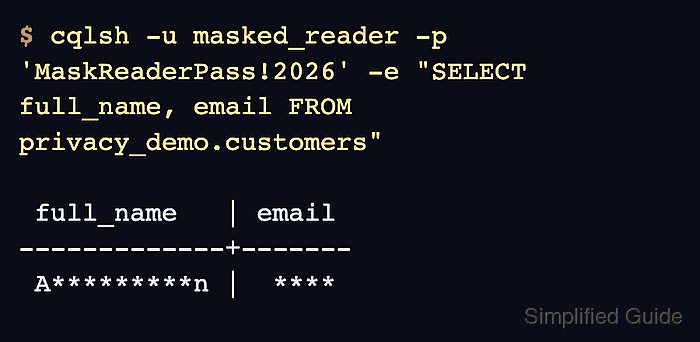
$ cqlsh -u masked_reader -p 'MaskReaderPass!2026' -e "SELECT full_name, email FROM privacy_demo.customers;"

 full_name   | email
-------------+-------
 A*********n |  ****

(1 rows)
- Query the same row as the clear-reader role.
$ cqlsh -u clear_reader -p 'ClearReaderPass!2026' -e "SELECT full_name, email FROM privacy_demo.customers;"

 full_name   | email
-------------+-------------------------
 Alice Moran | alice.moran@example.com

(1 rows)
The different outputs prove that Cassandra stores one clear value and applies the mask according to the reader's permissions.
- Remove the disposable smoke-test objects if they were created only for validation.
$ cqlsh -u cassandra -p cassandra -e "DROP ROLE masked_reader; DROP ROLE clear_reader; DROP KEYSPACE privacy_demo;"
Run this only for the sample roles and keyspace above. Dropping a real keyspace removes its schema and data from the cluster.