How to create a single-node Apache Cassandra cluster
A single-node Apache Cassandra cluster gives a development host or first lab server a real Cassandra ring without coordinating additional nodes. The node still has a cluster name, seed list, listen address, native transport listener, datacenter, and rack, so configuring those values before first use prevents confusing identity changes after data has already been written.
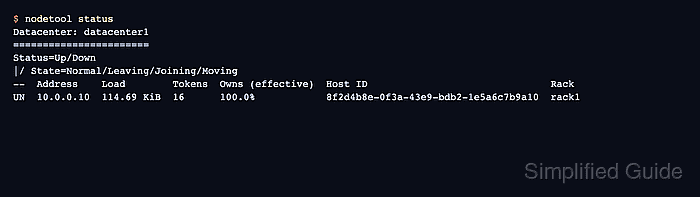
Package installs usually store the active server configuration under /etc/cassandra/cassandra.yaml. Tarball installs keep the same file under the extracted conf directory, but the settings below are the same. For one node, the seed list points back to the node itself, and nodetool status should show one UN row after the service starts.
Choose the node address from the interface Cassandra clients and future nodes should use. Binding only to loopback is fine for a local-only lab, while a server that must accept remote cqlsh or driver connections needs a private address, a reachable native transport port, and firewall rules that do not expose Cassandra to the public internet.
Steps to create a single-node Apache Cassandra cluster:
- Stop the cassandra service before changing the node identity.
$ sudo service \
    cassandra stop
Set the cluster name and listen addresses before loading important data. Changing cluster identity on an initialized node can require data-directory cleanup or a planned rebuild.
- Open the active cassandra.yaml file.
For a tarball install, edit conf/cassandra.yaml under the Cassandra install directory instead of /etc/cassandra/cassandra.yaml.
- Set the cluster name, listen address, client address, and local seed entry.
cluster_name: 'SG Lab'

listen_address: 10.0.0.10
rpc_address: 10.0.0.10
seeds: "10.0.0.10"
Set seeds under the existing SimpleSeedProvider parameters entry. Use the node's private IP address or resolvable hostname.
- Start the cassandra service.
$ sudo service \ cassandra start - Check that the node joined the ring as Up/Normal.
$ nodetool status
Datacenter: datacenter1
##### snipped #####
UN  10.0.0.10  100.0%
##### snipped #####
UN means the node is up and in the normal state. A single-node cluster should show one row with 100.0 ownership.
- Confirm the cluster name through cqlsh.
$ cqlsh 10.0.0.10
cqlsh> DESCRIBE CLUSTER;

Cluster: SG Lab
Partitioner: Murmur3Partitioner
##### snipped #####
This proves the native transport listener is reachable and that the running node is using the expected cluster name.
- Run a temporary CQL write and read smoke test.
$ cqlsh 10.0.0.10
cqlsh> CREATE KEYSPACE lab
   ... WITH replication =
   ... {'class':
   ... 'SimpleStrategy',
   ... 'replication_factor': 1};
cqlsh> CREATE TABLE lab.probe
   ... (id text PRIMARY KEY,
   ... result text);
cqlsh> INSERT INTO lab.probe
   ... (id, result)
   ... VALUES ('cluster', 'ok');
cqlsh> SELECT id, result
   ... FROM lab.probe;

 id      | result
---------+--------
 cluster |     ok

(1 rows)
The temporary keyspace uses SimpleStrategy with replication factor 1 because only one node exists.
- Remove the temporary smoke-test keyspace.
$ cqlsh 10.0.0.10
cqlsh> DROP KEYSPACE lab;