Zsh can print colored status text without hard-coding raw escape bytes in every command. Prompt-style color escapes keep short terminal messages readable and make it clear when a script is reporting a ready, warning, or error state.
The print builtin expands prompt sequences when it runs with -P. Adding -r keeps ordinary backslash text in the message from being treated as a print escape. Foreground color starts with %F{color} and returns to the terminal's default foreground with %f, so the color stays attached to the label instead of leaking into the rest of the line.
The same pattern fits interactive helpers and small Zsh scripts that need simple status output. It depends on terminal color support, and redirected output will still contain escape sequences unless the script adds a separate no-color path.
Related: How to customize the Zsh prompt with PS1
Related: How to debug a Zsh script
Related: Color output in Bash
Steps to color output in Zsh:
- Open a Zsh terminal or the script that should print colored status messages.
- Print one colored line with prompt expansion.
$ print -rP -- '%F{green}READY%f deployment check passed'
READY deployment check passed
The word READY appears green in a color-capable terminal. The -- separator prevents later message text that begins with a hyphen from being parsed as another print option.
- Create a small script with reset-wrapped labels.
- status-colors.zsh
#!/usr/bin/env zsh
print -rP -- '%F{green}READY%f deployment check passed'
print -rP -- '%F{yellow}WARN%f review disk space'
print -rP -- '%F{red}ERROR%f release blocked'
green, yellow, and red are named foreground colors. Keep %f after the colored label so normal message text returns to the terminal's default foreground color.
- Check the script syntax.
$ zsh -n status-colors.zsh
No output from zsh -n means Zsh parsed the script without finding a syntax error.
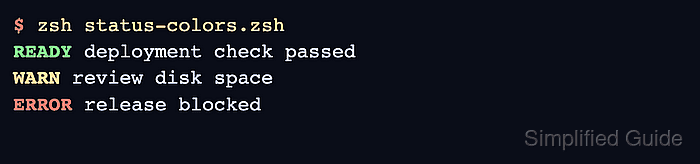
- Run the script in a color terminal.
$ zsh status-colors.zsh
READY deployment check passed
WARN review disk space
ERROR release blocked
The labels appear green, yellow, and red. The message text after each label should use the terminal's normal foreground color.
- Use a background color only when the label must stand apart from normal output.
$ print -rP -- '%K{red}%F{white} ERROR %f%k release blocked'
 ERROR  release blocked
%K{red} starts a red background, %k resets the background, and %f resets the foreground.
- Keep colored output out of plain-text logs and machine-readable output.
ANSI color sequences are bytes in the output stream. Disable color when another command, log collector, or parser expects plain text.

Mohd Shakir Zakaria is a cloud architect with deep roots in software development and open-source advocacy. Certified in AWS, Red Hat, VMware, ITIL, and Linux, he specializes in designing and managing robust cloud and on-premises infrastructures.


