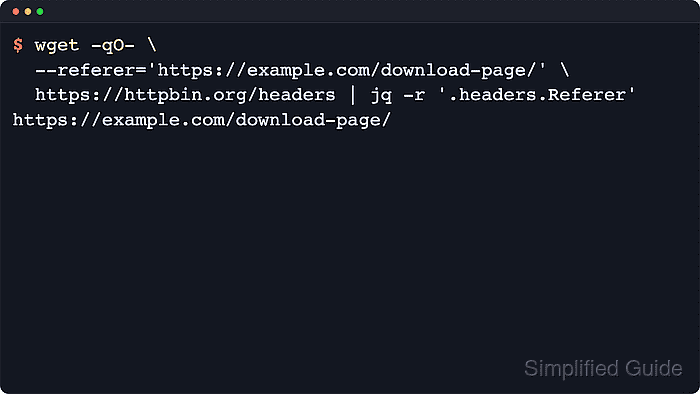
Some web servers use the HTTP Referer header to decide whether to serve files, alter responses, or block direct access to download URLs, so sending a custom referer enables scripted downloads that behave more like clicks from a browser page.
The HTTP Referer header carries the URL of the page that initiated a request, and the wget client exposes this value through the --referer option, which injects a chosen URL into the outgoing request while still following redirects, cookies, and other HTTP behavior.
Incorrect or abusive referer spoofing can violate site policies, trigger rate limits, or cause IP bans, so usage must respect terms of service and legal constraints, and any automation should remain conservative and limited to sources that explicitly permit scripted access.
Related: How to send custom headers with wget
Steps to set a custom referer in wget:
- Open a terminal on a Linux system with wget available.
$ wget --version GNU Wget 1.21.4 built on linux-gnu. -cares +digest -gpgme +https +ipv6 +iri +large-file -metalink +nls +ntlm +opie +psl +ssl/openssl Wgetrc: /etc/wgetrc (system) Locale: /usr/share/locale Compile: gcc -DHAVE_CONFIG_H -DSYSTEM_WGETRC="/etc/wgetrc" -DLOCALEDIR="/usr/share/locale" -I. -I../../src -I../lib -I../../lib -Wdate-time -D_FORTIFY_SOURCE=3 -DHAVE_LIBSSL -DNDEBUG -g -O2 -fno-omit-frame-pointer -mno-omit-leaf-frame-pointer -ffile-prefix-map=/build/wget-SlgjzS/wget-1.21.4=. -flto=auto -ffat-lto-objects -fstack-protector-strong -fstack-clash-protection -Wformat -Werror=format-security -mbranch-protection=standard -fdebug-prefix-map=/build/wget-SlgjzS/wget-1.21.4=/usr/src/wget-1.21.4-1ubuntu4.1 -DNO_SSLv2 -D_FILE_OFFSET_BITS=64 -g -Wall Link: gcc -DHAVE_LIBSSL -DNDEBUG -g -O2 -fno-omit-frame-pointer -mno-omit-leaf-frame-pointer -ffile-prefix-map=/build/wget-SlgjzS/wget-1.21.4=. -flto=auto -ffat-lto-objects -fstack-protector-strong -fstack-clash-protection -Wformat -Werror=format-security -mbranch-protection=standard -fdebug-prefix-map=/build/wget-SlgjzS/wget-1.21.4=/usr/src/wget-1.21.4-1ubuntu4.1 -DNO_SSLv2 -D_FILE_OFFSET_BITS=64 -g -Wall -Wl,-Bsymbolic-functions -flto=auto -ffat-lto-objects -Wl,-z,relro -Wl,-z,now -lpcre2-8 -luuid -lidn2 -lssl -lcrypto -lz -lpsl ../lib/libgnu.a Copyright (C) 2015 Free Software Foundation, Inc. License GPLv3+: GNU GPL version 3 or later <http://www.gnu.org/licenses/gpl.html>. This is free software: you are free to change and redistribute it. There is NO WARRANTY, to the extent permitted by law. Originally written by Hrvoje Niksic <hniksic@xemacs.org>. Please send bug reports and questions to <bug-wget@gnu.org>.Version output confirms that wget is installed and ready to send HTTP requests with custom headers.
- Send a download request with a specific referer using the --referer option and a target URL.
$ wget --referer=https://www.example.com/download-page/ https://downloads.example.net/data.tar.gz --2026-01-10 04:48:08-- https://downloads.example.net/data.tar.gz Resolving downloads.example.net (downloads.example.net)... 203.0.113.50 Connecting to downloads.example.net (downloads.example.net)|203.0.113.50|:443... connected. HTTP request sent, awaiting response... 200 OK Length: 1048576 (1.0M) [application/gzip] Saving to: 'data.tar.gz' 0K .......... .......... .......... .......... .......... 4% 475M 0s 50K .......... .......... .......... .......... .......... 9% 470M 0s 100K .......... .......... .......... .......... .......... 14% 708M 0s 150K .......... .......... .......... .......... .......... 19% 557M 0s 200K .......... .......... .......... .......... .......... 24% 355M 0s 250K .......... .......... .......... .......... .......... 29% 538M 0s 300K .......... .......... .......... .......... .......... 34% 636M 0s 350K .......... .......... .......... .......... .......... 39% 579M 0s 400K .......... .......... .......... .......... .......... 43% 520M 0s 450K .......... .......... .......... .......... .......... 48% 518M 0s 500K .......... .......... .......... .......... .......... 53% 750M 0s 550K .......... .......... .......... .......... .......... 58% 513M 0s 600K .......... .......... .......... .......... .......... 63% 720M 0s 650K .......... .......... .......... .......... .......... 68% 701M 0s 700K .......... .......... .......... .......... .......... 73% 735M 0s 750K .......... .......... .......... .......... .......... 78% 473M 0s 800K .......... .......... .......... .......... .......... 83% 467M 0s 850K .......... .......... .......... .......... .......... 87% 366M 0s 900K .......... .......... .......... .......... .......... 92% 616M 0s 950K .......... .......... .......... .......... .......... 97% 512M 0s 1000K .......... .......... .... 100% 1.08G=0.002s 2026-01-10 04:48:08 (543 MB/s) - 'data.tar.gz' saved [1048576/1048576]The --referer flag sets the outgoing Referer header to https://www.example.com/download-page/// while the file content is fetched from https://downloads.example.net// .
- Adjust the referer URL so that it matches the real page that normally exposes the download link.
$ wget --referer="https://www.example.com/download?from=newsletter&utm_source=mail" \ https://downloads.example.net/files/tool.tar.gzWrapping the referer URL in quotes avoids shell parsing issues when query strings or special characters appear in the value.
- Combine a custom referer with a browser-like User-Agent string and optional extra headers when a server validates multiple request fields.
$ wget --referer=https://www.example.com/download-page/ \ --user-agent="Mozilla/5.0 (X11; Linux x86_64) AppleWebKit/537.36" \ --header="Accept-Language: en-US,en;q=0.9" \ https://downloads.example.net/data.tar.gzSending misleading headers to bypass access controls or geographic restrictions may breach site terms of service and can result in account suspension or IP blocking.
- Verify that the downloaded file matches the expected size and file type.
$ ls -lh data.tar.gz -rw-r--r-- 1 user user 1.0M Jan 10 04:05 data.tar.gz
Success signals include an HTTP status like 200 OK in the wget output, a nonzero file size from ls -lh, and a valid file type reported by the file command.
Mohd Shakir Zakaria is a cloud architect with deep roots in software development and open-source advocacy. Certified in AWS, Red Hat, VMware, ITIL, and Linux, he specializes in designing and managing robust cloud and on-premises infrastructures.