Sending POST request bodies with wget is useful for simple API checks, form submissions, and webhook tests that do not need a heavier HTTP client. The command can send the body and print the server response in the same terminal run.
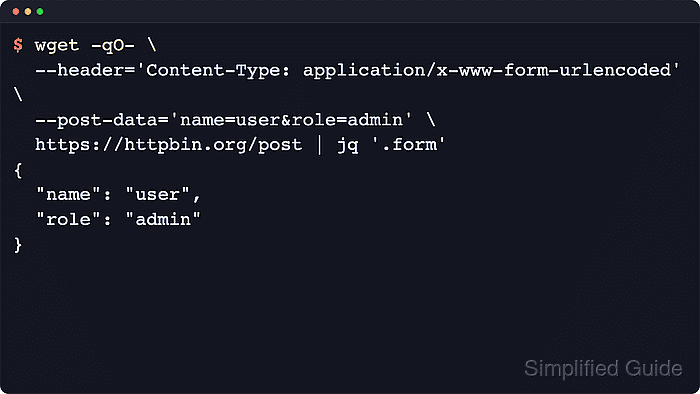
Use --post-data for short inline bodies and --post-file when the payload is easier to keep in a regular file. Add --header when the server expects a specific Content-Type, such as application/json.
GNU wget still does not implement multipart/form-data, so browser-style form uploads need another client. Keep secrets out of inline shell history when possible, use a regular file for reusable payloads because wget needs to know the POST body size before it sends the request, and check redirect responses before using POST commands in automation.
Related: How to upload file contents with wget
Related: How to send custom headers with wget
Tool: Wget Command Generator
Tool: JSON Validator
Steps to send POST data with wget:
- Send a short URL-encoded form body with --post-data.
$ wget --quiet --output-document=- \
  --post-data='project=docs&role=reviewer' https://httpbin.org/post
{
  "args": {},
  "data": "",
  "files": {},
  "form": {
    "project": "docs",
    "role": "reviewer"
  },
  "headers": {
    "Accept": "*/*",
    "Accept-Encoding": "identity",
    "Content-Length": "26",
    "Content-Type": "application/x-www-form-urlencoded",
##### snipped #####
  "url": "https://httpbin.org/post"
}
The echoed form object and Content-Type confirm that the server received a normal URL-encoded POST body.
- Create a payload file when the body is longer, JSON-shaped, or easier to review outside the command line.
$ cat > post-body.json <<'EOF'
{
  "project": "docs",
  "profile": "staging"
}
EOF
--post-file must read from a regular file because wget needs the request body length before it starts the POST request.
- Send the file contents with --post-file and the matching JSON Content-Type header.
$ wget --quiet --output-document=- \
  --header='Content-Type: application/json' \
  --post-file=post-body.json https://httpbin.org/post
{
  "args": {},
  "data": "{\n  \"project\": \"docs\",\n  \"profile\": \"staging\"\n}\n",
  "files": {},
  "form": {},
  "headers": {
    "Accept": "*/*",
    "Accept-Encoding": "identity",
    "Content-Length": "48",
    "Content-Type": "application/json",
##### snipped #####
  },
  "json": {
    "profile": "staging",
    "project": "docs"
  },
##### snipped #####
  "url": "https://httpbin.org/post"
}
The echoed json object confirms that the file contents and the explicit Content-Type reached the server as intended.
- Check the first response status without following redirects when the POST target controls a session, payment, or webhook action.
$ wget --server-response --quiet --output-document=/dev/null --max-redirect=0 \
  --header='Content-Type: application/json' \
  --post-file=post-body.json https://httpbin.org/post
  HTTP/1.1 200 OK
  Content-Type: application/json
  Content-Length: 582
GNU wget handles POST redirects differently depending on the response code. Inspect the first status before trusting a command that may be replayed by a script.
- Remove the temporary payload file after the test finishes.
$ rm -f post-body.json

Mohd Shakir Zakaria is a cloud architect with deep roots in software development and open-source advocacy. Certified in AWS, Red Hat, VMware, ITIL, and Linux, he specializes in designing and managing robust cloud and on-premises infrastructures.


