Floating-point failures can surface several operations after the calculation that created them. A NaN or infinite tensor can therefore obscure whether the original fault came from a logarithm boundary, division by zero, loss scaling, or another numerically sensitive operation.
Use tf.debugging.check_numerics() when the suspect tensor is already known. It returns a finite floating tensor unchanged, but raises tf.errors.InvalidArgumentError when the tensor contains NaN or Inf.
Use tf.debugging.enable_check_numerics() when the first invalid tensor is still unknown. The instrumentation covers eager and tf.function graph execution on the calling thread, so keep it around a focused reproduction and disable it before normal training or inference continues.
Steps to check TensorFlow tensors for NaN and Inf:
- Create the base check_tensor_numerics.py program.
- check_tensor_numerics.py
import os

os.environ["TF_CPP_MIN_LOG_LEVEL"] = "2"

import tensorflow as tf

tf.get_logger().setLevel("ERROR")


def report_error(label, error):
    relevant = next(
        line.strip()
        for line in str(error).splitlines()
        if "Detected Infinity or NaN" in line or "Tensor had" in line
    )
    cleaned = relevant.replace("!!! ", "").replace(" !!!", "")
    if "}} " in cleaned:
        cleaned = cleaned.split("}} ", 1)[1]
    cleaned = cleaned.replace(" (# of outputs: 1)", "")
    cleaned = cleaned.split(" [Op:", 1)[0]
    print(f"{label}: {cleaned}")
The reporter selects TensorFlow's actual invalid-numerics line so eager and graph errors remain readable without hiding whether the runtime detected NaN or Inf.
- Append the finite-tensor pass-through check.
finite_tensor = tf.debugging.check_numerics(
    tf.constant([1.0, 2.0], dtype=tf.float32),
    "finite tensor",
)
print(f"Finite tensor: {finite_tensor.numpy().tolist()}")
check_numerics() accepts floating types such as float16, bfloat16, float32, and float64. A finite input is returned with the same type.
- Append the targeted Inf check.
try:
    tf.debugging.check_numerics(
        tf.constant([1.0, float("inf")], dtype=tf.float32),
        "target tensor",
    )
except tf.errors.InvalidArgumentError as error:
    report_error("Targeted check", error)
The target tensor message prefix appears in the exception line and can identify the batch, loss, gradient, or layer in a project.
- Enable global numerics checking below the targeted check.
tf.debugging.enable_check_numerics()
The global mechanism is idempotent and applies only to the thread that enables it.
- Append the eager Sqrt check.
try:
    tf.math.sqrt(tf.constant([4.0, -1.0], dtype=tf.float32))
except tf.errors.InvalidArgumentError as error:
    report_error("Eager check", error)
- Append the tf.function Log check.
@tf.function
def unstable_log(values):
    return tf.math.log(values)


try:
    unstable_log(tf.constant([1.0, 0.0], dtype=tf.float32))
except tf.errors.InvalidArgumentError as error:
    report_error("Graph check", error)
- Disable global numerics checking after the graph check.
tf.debugging.disable_check_numerics()
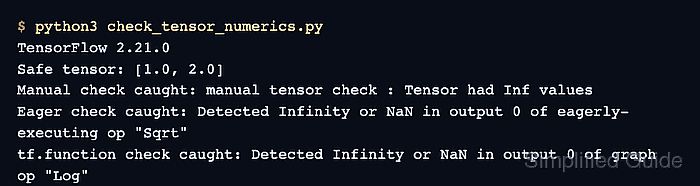
- Run the completed numerics program to confirm all four expected outcomes.
$ python3 check_tensor_numerics.py
Finite tensor: [1.0, 2.0]
Targeted check: target tensor : Tensor had Inf values
Eager check: Detected Infinity or NaN in output 0 of eagerly-executing op "Sqrt"
Graph check: Detected Infinity or NaN in output 0 of graph op "Log"
The finite tensor passes unchanged. Each invalid operation raises at the point where Inf or NaN first appears instead of allowing the value to propagate.

Mohd Shakir Zakaria is a cloud architect with deep roots in software development and open-source advocacy. Certified in AWS, Red Hat, VMware, ITIL, and Linux, he specializes in designing and managing robust cloud and on-premises infrastructures.


