An inference service can expose several models through one server while keeping a separate name and version for each. A TensorFlow Serving model config file defines those models together, including their export locations and version labels that clients can use instead of numeric versions.
Each model's base_path points to the parent of its numeric version directories. A version policy selects which exports to load, while a label such as stable names one selected version within that model; the same label can refer to different versions in different models.
The Docker method requires two existing SavedModel exports and a POSIX shell on a Docker host. The official CPU image uses Linux amd64, so an ARM host needs compatible amd64 emulation already available. The server starts separately from any existing deployment and exposes REST only on the local computer.
Steps to configure TensorFlow Serving with a model config file:
- Place your two complete SavedModel exports in models/price/1 and models/demand/2 beneath the current directory.
The names price and demand identify the two models here. Each numeric directory contains its own saved_model.pb, variables, and any exported assets. Moving only the protobuf file loses the rest of the export. Existing exports can use different names and versions if the directories, configuration, and request URLs all agree.
- Create models/models.config in your text editor with the two model entries.
- models/models.config
model_config_list {
  config {
    name: "price"
    base_path: "/models/price"
    model_platform: "tensorflow"
    model_version_policy {
      specific { versions: 1 }
    }
    version_labels {
      key: "stable"
      value: 1
    }
  }
  config {
    name: "demand"
    base_path: "/models/demand"
    model_platform: "tensorflow"
    model_version_policy {
      specific { versions: 2 }
    }
    version_labels {
      key: "stable"
      value: 2
    }
  }
}
These base_path values are paths inside the container, without the numeric version suffix. The specific policies pin price to version 1 and demand to version 2 instead of automatically choosing the highest version directory. Each version_labels entry maps stable to that model's selected version.
- Save models/models.config.
The file uses protobuf text format rather than JSON or YAML. An existing configuration needs both entries inside its single model_config_list block, with its other required models preserved.
- Start a separate TensorFlow Serving container with the model directory mounted read-only.
Port 18501 must be free. The loopback binding keeps the unauthenticated REST API off external interfaces, and the read-only mount prevents the container from modifying the exports. This command leaves existing serving containers running.
$ docker run -d --name model-config-serving \
  --platform linux/amd64 --cpus 2 --memory 4g \
  -p 127.0.0.1:18501:8501 \
  --mount "type=bind,source=$PWD/models,target=/models,readonly" \
  tensorflow/serving:2.21.0 \
  --model_config_file=/models/models.config \
  --allow_version_labels_for_unavailable_models=true
The config flag selects the mounted file instead of the single-model startup settings. The label flag permits new labels at startup, before their versions finish loading; it does not permit moving an existing label to an unloaded version. The CPU and memory limits suit small models and need adjustment for larger exports. The image platform selects amd64 but does not install emulation.
- Check that the price model reports version 1 as AVAILABLE.
$ curl -fsS http://127.0.0.1:18501/v1/models/price
{
 "model_version_status": [
  {
   "version": "1",
   "state": "AVAILABLE",
   "status": {
    "error_code": "OK",
    "error_message": ""
   }
  }
 ]
}
Loading can take a few seconds. If the connection fails or the model is not available, docker logs model-config-serving shows configuration parse errors, missing version directories, and model-loading failures. There is no separate config-only syntax-test command; the new server parses the file at startup.
- Check that the demand model reports version 2 as AVAILABLE.
$ curl -fsS http://127.0.0.1:18501/v1/models/demand { "model_version_status": [ { "version": "2", "state": "AVAILABLE", "status": { "error_code": "OK", "error_message": "" } } ] } - Query the price status through its stable label URL.
$ curl -fsS http://127.0.0.1:18501/v1/models/price/labels/stable
{
 "model_version_status": [
  {
   "version": "1",
   "state": "AVAILABLE",
   "status": {
    "error_code": "OK",
    "error_message": ""
   }
  }
 ]
}
In TensorFlow Serving 2.21.0, the status API can return model status even for an unknown label. The metadata requests also check that each label resolves.
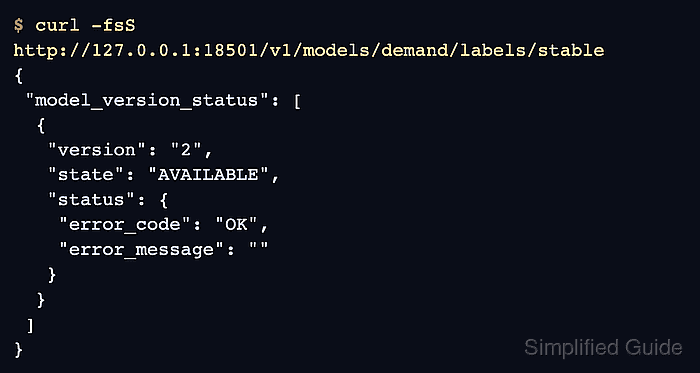
- Query the demand status through its stable label URL.
$ curl -fsS http://127.0.0.1:18501/v1/models/demand/labels/stable { "model_version_status": [ { "version": "2", "state": "AVAILABLE", "status": { "error_code": "OK", "error_message": "" } } ] } - Confirm that the price label stable resolves to version 1 in model metadata. Example output:
$ curl -fsS http://127.0.0.1:18501/v1/models/price/labels/stable/metadata
{
"model_spec":{
 "name": "price",
 "version": "1",
 "signature_name": ""
}
,
##### snipped #####
The omitted metadata section describes the exported signatures and varies with your model. An unknown label returns an HTTP error rather than this model_spec.
- Confirm that the demand label stable resolves to version 2 in model metadata. Example output:
$ curl -fsS http://127.0.0.1:18501/v1/models/demand/labels/stable/metadata
{
"model_spec":{
 "name": "demand",
 "version": "2",
 "signature_name": ""
}
,
##### snipped #####
Both named models are now loaded, with stable resolving to the configured version of each. The config file is read once at startup by default; saving a later edit alone does not apply it to the running server.