Training data needs a consistent feature structure and a known set of examples before it reaches a model. TensorFlow Datasets (TFDS) loads catalog datasets as TensorFlow input pipelines, with split metadata and optional feature-label pairs.
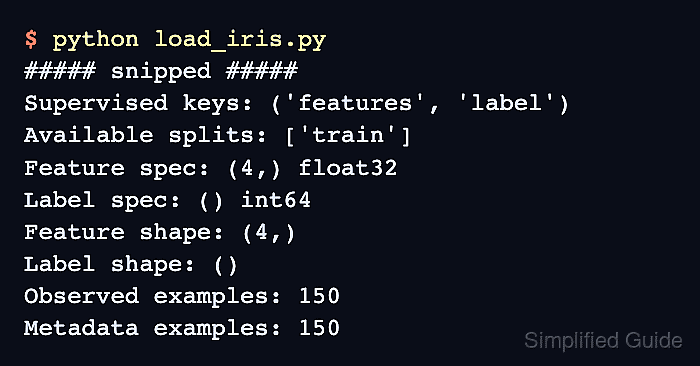
A catalog entry defines the available splits, feature types, and supervised mapping. The small Iris dataset has one training split containing 150 examples, each with four measurements and a flower-class label; it needs no account or manually supplied files.
The first load downloads and prepares data in the TFDS cache, normally under ~/tensorflow_datasets, and later loads reuse it. Selecting a split controls which examples are read, but does not necessarily limit the initial download size for a larger dataset.
Steps to load datasets with TensorFlow Datasets:
- Prepare a Python 3.13 interpreter for the dataset project.
TensorFlow 2.21 publishes wheels for Python 3.10–3.13, so the default Python 3.14 on Ubuntu 26.04 cannot install that release. A separate interpreter can come from uv's installation instructions and its Python installation instructions for version 3.13. The Linux installer needs curl and CA certificates, available as Ubuntu's curl and ca-certificates packages.
- Create a virtual environment named .venv in the project directory.
$ python3.13 -m venv .venv
- Activate the project's virtual environment.
$ source .venv/bin/activate
- Install TensorFlow and TensorFlow Datasets with the catalog resource dependency.
$ python -m pip install tensorflow tensorflow-datasets \
    importlib-resources
The importlib-resources package is needed by the catalog-loading path with TFDS 4.9.10 and etils 1.15.0. Tested with TensorFlow 2.21.0 on Linux ARM64 with Python 3.13.
Related: How to install TensorFlow with pip - Create load_iris.py in your text editor with the catalog inspection code.
- load_iris.py
import tensorflow_datasets as tfds

builder = tfds.builder("iris")
print("Supervised keys:", builder.info.supervised_keys)
The builder exposes the feature mapping before loading examples. Iris provides train and maps features to label. Other catalog entries can have different split names or no supervised mapping.
Related: Iris catalog entry - Append the training-split load to load_iris.py.
dataset, info = tfds.load(
    "iris",
    split="train",
    as_supervised=True,
    with_info=True,
)
With as_supervised=True, each element is an input-label pair rather than the default feature dictionary. The with_info=True option returns dataset metadata alongside the pipeline.
Related: tfds.load options - Append the element and example-count inspection to load_iris.py.
print("Available splits:", list(info.splits))
feature_spec, label_spec = dataset.element_spec
print("Feature spec:",
      feature_spec.shape, feature_spec.dtype.name)
print("Label spec:",
      label_spec.shape, label_spec.dtype.name)
observed = sum(1 for _ in dataset)
features, label = next(iter(dataset))
print("Feature shape:", features.shape)
print("Label shape:", label.shape)
print("Observed examples:", observed)
print("Metadata examples:", info.splits["train"].num_examples)
The count traverses the unbatched training split and compares it with the full split's metadata. A separate iterator then reads a feature-label pair from the same dataset.
- Save load_iris.py in the project directory.
- Run the dataset-loading script.
$ python load_iris.py
The first invocation also shows download and preparation progress; later invocations read the prepared data. A missing dataset_info.json warning can precede preparation of a new cache.
- Confirm that the output shows feature-label pairs and matching training-example counts. Example output:
##### snipped #####
Feature spec: (4,) float32
Label spec: () int64
Feature shape: (4,)
Label shape: ()
Observed examples: 150
Metadata examples: 150
The two tensor specifications describe four floating-point features and one integer label per example. Both counts should be 150 for the full Iris training split.