CSV files often carry tabular training data from exports and preparation jobs into machine-learning code. TensorFlow can parse a headered CSV directly into batched feature tensors and a label tensor, avoiding an in-memory pandas step when the input belongs in a tf.data pipeline.
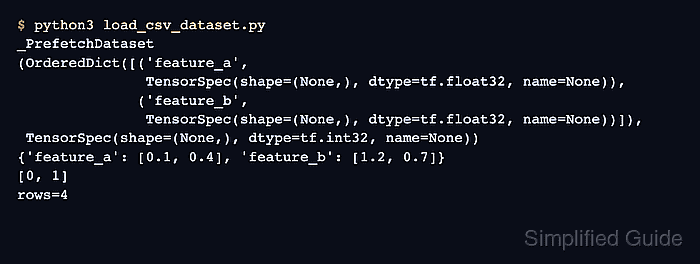
The high-level tf.data.experimental.make_csv_dataset() loader uses the header names as feature keys and infers each selected column's data type from sampled rows. Setting label_name removes that column from the feature dictionary and returns it as the second element of every dataset batch.
The sample keeps one finite pass in file order so the first batch and total row count can be checked exactly. Production training can enable shuffling after the column names, label split, and inferred numeric types match the intended model inputs.
Steps to load CSV data into a TensorFlow dataset:
- Save the headered training records as training.csv.
- training.csv
feature_a,feature_b,label
0.10,1.20,0
0.40,0.70,1
0.30,1.10,0
0.90,0.20,1
The label header identifies the supervised target, while the other headers become feature dictionary keys.
Tool: Comma-Separated Values (CSV) Converter - Create load_csv_dataset.py with the TensorFlow import.
- load_csv_dataset.py
import tensorflow as tf
- Append the finite CSV dataset construction below the import.
- load_csv_dataset.py
dataset = tf.data.experimental.make_csv_dataset(
    "training.csv",
    batch_size=2,
    label_name="label",
    num_epochs=1,
    shuffle=False,
)
num_epochs=1 prevents the dataset from repeating indefinitely, and shuffle=False preserves file order for the first-batch check.
- Append the batch inspection and data checks below the dataset construction.
- load_csv_dataset.py
first_features, first_labels = next(iter(dataset))
row_count = sum(int(labels.shape[0]) for _, labels in dataset)

assert set(first_features) == {"feature_a", "feature_b"}
assert first_labels.numpy().tolist() == [0, 1]
assert row_count == 4

for name, values in first_features.items():
    print(f"{name}={values.numpy()}")
print(f"labels={first_labels.numpy()}")
print(f"rows={row_count}")
Each assertion stops the program when the inferred feature keys, label split, first batch, or complete record count differs from the CSV file.
- Run the loader to verify the TensorFlow feature batches and labels.
$ python3 load_csv_dataset.py
feature_a=[0.1 0.4]
feature_b=[1.2 0.7]
labels=[0 1]
rows=4

Mohd Shakir Zakaria is a cloud architect with deep roots in software development and open-source advocacy. Certified in AWS, Red Hat, VMware, ITIL, and Linux, he specializes in designing and managing robust cloud and on-premises infrastructures.


