Embedding similarity alone does not show whether a search system places the right document near the top of a ranked corpus. Sentence Transformers provides InformationRetrievalEvaluator to score a model against labeled query-to-document matches with retrieval metrics such as accuracy@k, recall@k, MRR@k, nDCG@k, and MAP@k.
The evaluator accepts three ID-keyed structures: query text, corpus text, and a relevance map from each query ID to one or more correct document IDs. Matching IDs across those structures matters because the evaluator uses them to determine which ranked results count as relevant.
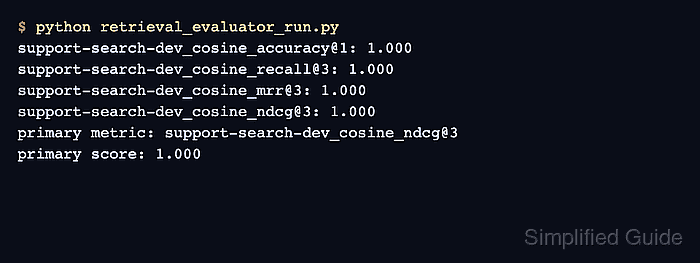
The compact support-search corpus keeps the expected matches easy to inspect. Perfect scores confirm that both labeled documents reached the configured cutoffs for this smoke test; real model comparisons need a larger held-out dataset with representative queries, distractors, and relevance judgments.
Steps to run retrieval evaluation with Sentence Transformers:
- Create retrieval_evaluator_run.py with the embedding model and labeled retrieval data.
- retrieval_evaluator_run.py
from sentence_transformers import SentenceTransformer
from sentence_transformers.sentence_transformer.evaluation import (
    InformationRetrievalEvaluator,
)

model = SentenceTransformer("sentence-transformers/all-MiniLM-L6-v2")

queries = {
    "q1": "How do I reset a forgotten password?",
    "q2": "How can I export invoices as a CSV file?",
}

corpus = {
    "d1": "Reset a lost account password from the profile security page.",
    "d2": "Export paid invoices from the billing dashboard as a CSV file.",
    "d3": "Change the color theme for the analytics workspace.",
    "d4": "Archive an inactive user without deleting historical records.",
}

relevant_docs = {
    "q1": {"d1"},
    "q2": {"d2"},
}
Every key in relevant_docs must identify an existing query, and every document ID inside its set must exist in corpus.
- Append the retrieval metric configuration to retrieval_evaluator_run.py.
evaluator = InformationRetrievalEvaluator(
    queries=queries,
    corpus=corpus,
    relevant_docs=relevant_docs,
    name="support-search-dev",
    accuracy_at_k=[1],
    precision_recall_at_k=[3],
    mrr_at_k=[3],
    ndcg_at_k=[3],
    map_at_k=[3],
    show_progress_bar=False,
    write_csv=False,
)
The evaluator prefixes result keys with the name value and the active similarity function. With write_csv=True, the run also retains a metrics file.
- Append result calculation and metric reporting to retrieval_evaluator_run.py.
results = evaluator(model)

for metric in (
    "support-search-dev_cosine_accuracy@1",
    "support-search-dev_cosine_recall@3",
    "support-search-dev_cosine_mrr@3",
    "support-search-dev_cosine_ndcg@3",
):
    print(f"{metric}: {results[metric]:.3f}")

print(f"primary metric: {evaluator.primary_metric}")
print(f"primary score: {results[evaluator.primary_metric]:.3f}")
primary_metric identifies the score the evaluator exposes for model selection. With these cutoffs, it resolves to nDCG@3.
- Run the completed retrieval evaluator script.
$ python retrieval_evaluator_run.py
support-search-dev_cosine_accuracy@1: 1.000
support-search-dev_cosine_recall@3: 1.000
support-search-dev_cosine_mrr@3: 1.000
support-search-dev_cosine_ndcg@3: 1.000
primary metric: support-search-dev_cosine_ndcg@3
primary score: 1.000
The first model load may download files from Hugging Face before the metric lines appear. A lower score means at least one relevant document missed a configured rank or appeared below the ideal position.

Mohd Shakir Zakaria is a cloud architect with deep roots in software development and open-source advocacy. Certified in AWS, Red Hat, VMware, ITIL, and Linux, he specializes in designing and managing robust cloud and on-premises infrastructures.


