Retrieval models learn more from confusing distractors than from answers that are obviously unrelated. A hard-negative mining pass finds candidates close to each query in embedding space while retaining the labeled answer as the positive.
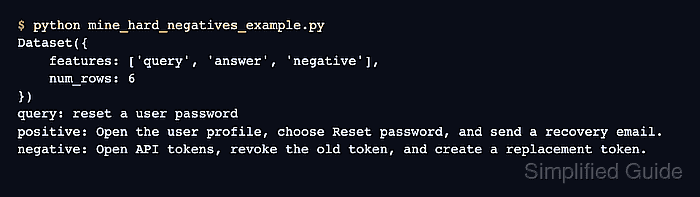
The mine_hard_negatives() helper accepts a Hugging Face Dataset of aligned pairs, embeds its query and answer columns, and returns the selected training shape. A relative margin rejects candidates whose score is too close to the labeled positive, while the top sampling strategy keeps the nearest remaining candidate.
Use a Python environment that already contains sentence-transformers[train] so the datasets integration is available. The saved triplets still need semantic review because an embedding model can rank another valid answer as a negative even when the score filter accepts it.
Steps to mine hard negatives with Sentence Transformers:
- Create mine_support_negatives.py with the imports and aligned support-search pairs.
- mine_support_negatives.py
from datasets import Dataset, disable_progress_bars
from sentence_transformers import SentenceTransformer
from sentence_transformers.util import mine_hard_negatives


disable_progress_bars()

pairs = Dataset.from_list(
    [
        {"query": "reset a user password", "answer": "Open the user profile and send a password reset email."},
        {"query": "unlock a user account", "answer": "Open the admin user record and clear the account lock."},
        {"query": "enable two-factor authentication", "answer": "Open account security and enroll an authenticator app."},
        {"query": "rotate an API token", "answer": "Revoke the old API token and create a replacement token."},
        {"query": "restore a deleted project", "answer": "Open deleted projects and restore the selected project."},
        {"query": "export audit logs", "answer": "Open compliance reports and export the audit log CSV."},
        {"query": "invite a new team member", "answer": "Open team settings and send an invitation email."},
        {"query": "change the billing contact", "answer": "Open billing settings and update the primary contact."},
    ]
)
The pairs dataset contains only the verified positive columns here; source metadata does not participate in mining.
- Append the embedding model and mining call after the pairs definition.
model = SentenceTransformer("sentence-transformers/all-MiniLM-L6-v2")
mined = mine_hard_negatives(
    dataset=pairs,
    model=model,
    anchor_column_name="query",
    positive_column_name="answer",
    range_max=7,
    relative_margin=0.05,
    num_negatives=1,
    sampling_strategy="top",
    output_format="triplet",
    verbose=False,
)
range_max=7 covers the remaining candidate answers in this eight-row sample. Larger corpora can use a wider window, while relative_margin=0.05 discards candidates whose score is within five percent of the positive score magnitude.
- Append the dataset export and summary after the mining call.
mined.save_to_disk("support-hard-negatives")
print(mined)
print(*mined, sep="\n")
- Run the completed mining program.
$ python mine_support_negatives.py Dataset({ features: ['query', 'answer', 'negative'], num_rows: 8 }) {'query': 'reset a user password', 'answer': 'Open the user profile and send a password reset email.', 'negative': 'Open the admin user record and clear the account lock.'} {'query': 'unlock a user account', 'answer': 'Open the admin user record and clear the account lock.', 'negative': 'Open the user profile and send a password reset email.'} {'query': 'enable two-factor authentication', 'answer': 'Open account security and enroll an authenticator app.', 'negative': 'Open the user profile and send a password reset email.'} {'query': 'rotate an API token', 'answer': 'Revoke the old API token and create a replacement token.', 'negative': 'Open account security and enroll an authenticator app.'} {'query': 'restore a deleted project', 'answer': 'Open deleted projects and restore the selected project.', 'negative': 'Open the user profile and send a password reset email.'} {'query': 'export audit logs', 'answer': 'Open compliance reports and export the audit log CSV.', 'negative': 'Open account security and enroll an authenticator app.'} {'query': 'invite a new team member', 'answer': 'Open team settings and send an invitation email.', 'negative': 'Open the user profile and send a password reset email.'} {'query': 'change the billing contact', 'answer': 'Open billing settings and update the primary contact.', 'negative': 'Open the user profile and send a password reset email.'} - Review every query-negative pair in the displayed mining output for candidates that also answer the query.
A false negative teaches the model to separate a query from a valid answer, even when its embedding score passed the margin filter.
- Reload the saved triplets to confirm that the training dataset is usable.
$ python -c 'from datasets import load_from_disk; data = load_from_disk("support-hard-negatives"); print(data.column_names); print(len(data)); print(data[0])'
['query', 'answer', 'negative']
8
{'query': 'reset a user password', 'answer': 'Open the user profile and send a password reset email.', 'negative': 'Open the admin user record and clear the account lock.'}

Mohd Shakir Zakaria is a cloud architect with deep roots in software development and open-source advocacy. Certified in AWS, Red Hat, VMware, ITIL, and Linux, he specializes in designing and managing robust cloud and on-premises infrastructures.


