Infinite scrolling pages usually return only the first batch of cards, posts, or search results in the initial HTML response. Scraping the background request that loads the next batches is the reliable way to collect the full dataset instead of stopping at the first visible screen.
Most infinite scrolling implementations call a JSON or HTML fragment endpoint through browser Fetch or XHR requests. Scrapy works best when it replays that request directly, parses the returned payload with response.json() or selectors, and keeps requesting the next cursor, page number, or offset until the endpoint stops returning one.
Current Scrapy releases use async def start() for custom start requests, and Request.from_curl() is the quickest way to turn a copied browser request into a working spider. If the next batch depends on browser-only state such as rendered DOM content, JavaScript events, or anti-bot tokens that cannot be replayed as HTTP requests, move to a browser-rendered workflow instead of forcing a plain HTTP crawl.
Steps to scrape an infinite scrolling page with Scrapy:
- Open the target page in a browser.
- Open the browser developer tools and select the Network tab.
- Select the Fetch/XHR filter.
- Scroll until the page loads the next batch of results.
- Select the request that returned the new batch of items.
Look for a changing query string or request-body field such as cursor, page, offset, after, or next.
- Inspect the response payload and note the keys that hold the items and the next pagination value.
Common response keys include items, results, entries, next, and next_cursor.
Tool: JSON Validator
- Copy the request with Copy → Copy as cURL (bash).
Related: How to set request headers in Scrapy
Related: How to use cookies in Scrapy - Create a new Scrapy project.
$ scrapy startproject scrollfeed New Scrapy project 'scrollfeed', using template directory '/usr/local/lib/python3.12/site-packages/scrapy/templates/project', created in: /home/user/scrollfeed You can start your first spider with: cd scrollfeed scrapy genspider example example.com - Change to the project directory.
$ cd scrollfeed
- Generate a spider for the host used by the scrolling request.
$ scrapy genspider feed api.example.net
Created spider 'feed' using template 'basic' in module:
  scrollfeed.spiders.feed
- Replace scrollfeed/spiders/feed.py with a spider that replays the copied request and follows the returned cursor.
- scrollfeed/spiders/feed.py
import scrapy


class FeedSpider(scrapy.Spider):
    name = "feed"
    allowed_domains = ["api.example.net"]
    curl_command = "curl 'https://api.example.net/feed?cursor=0' -H 'Accept: application/json' -H 'Referer: https://www.example.net/feed/'"

    custom_settings = {
        "AUTOTHROTTLE_ENABLED": True,
        "AUTOTHROTTLE_START_DELAY": 0.25,
        "AUTOTHROTTLE_MAX_DELAY": 10.0,
        "DOWNLOAD_DELAY": 0.25,
    }

    async def start(self):
        yield scrapy.Request.from_curl(self.curl_command, callback=self.parse_feed)

    def parse_feed(self, response):
        payload = response.json()

        for entry in payload.get("items", []):
            yield {
                "id": entry.get("id"),
                "title": entry.get("title"),
            }

        next_cursor = payload.get("next_cursor")
        if next_cursor is None:
            return

        yield response.request.replace(
            url=f"https://api.example.net/feed?cursor={next_cursor}",
            callback=self.parse_feed,
        )
Replace the copied cURL command, the allowed_domains value, and the items and next_cursor keys so they match the real endpoint. If the pagination value moves in a POST body instead of the URL, keep using response.request.replace() and pass an updated body= value.
Current Scrapy releases use async def start() for custom start requests. If the same spider must also run on releases older than 2.13, add a matching start_requests() method as a compatibility path.
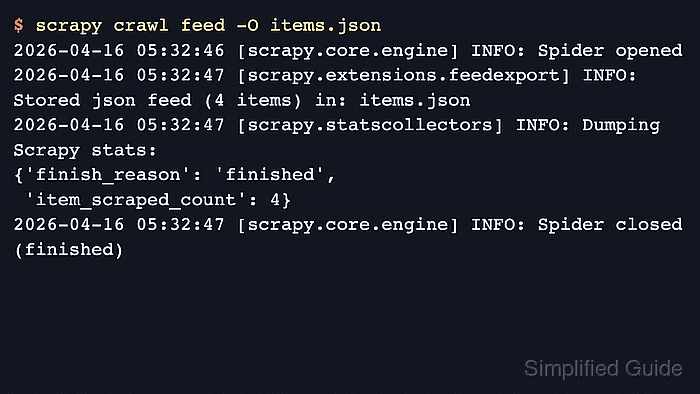
- Run the spider and export the collected items to JSON.
$ scrapy crawl feed -O items.json
2026-04-21 21:50:40 [scrapy.core.engine] INFO: Spider opened
2026-04-21 21:50:41 [scrapy.extensions.feedexport] INFO: Stored json feed (4 items) in: items.json
2026-04-21 21:50:41 [scrapy.statscollectors] INFO: Dumping Scrapy stats:
{'finish_reason': 'finished',
 'item_scraped_count': 4}
2026-04-21 21:50:41 [scrapy.core.engine] INFO: Spider closed (finished)
Infinite scrolling endpoints are often rate limited and can still be covered by robots.txt rules, so keep delays conservative and confirm the site's crawling policy before scaling the spider up.
- Open the exported file to confirm later batches were written.
$ cat items.json
[
{"id": 101, "title": "First batch item"},
{"id": 102, "title": "Second batch item"},
{"id": 103, "title": "Third batch item"},
{"id": 104, "title": "Fourth batch item"}
]
The exported file should include items from the later cursor values instead of only the first batch returned by the page's initial HTML.

Mohd Shakir Zakaria is a cloud architect with deep roots in software development and open-source advocacy. Certified in AWS, Red Hat, VMware, ITIL, and Linux, he specializes in designing and managing robust cloud and on-premises infrastructures.


