Downloading images during a Scrapy crawl keeps each scraped item tied to the media that the page actually published. That matters for product catalogs, article archives, and training datasets because the crawl captures the image files alongside the extracted item data instead of leaving them on a remote site that may change later.
Scrapy handles this through ImagesPipeline. When a spider yields an item with an image_urls list, the pipeline schedules those image requests through the normal downloader, stores each file under IMAGES_STORE, and writes an images result list back into the item with the original URL, stored path, checksum, and status. Current Scrapy releases still use image_urls and images as the default field names, keep saved images fresh for 90 days through IMAGES_EXPIRES, and store the default image files as URL-hash names under full/.
Current ImagesPipeline still requires Pillow 8.3.2 or later. It also normalizes saved images to JPEG in RGB mode, so a source file such as .png or .webp is usually stored locally as a hashed *.jpg path. Relative src attributes must be converted with response.urljoin(), and redirected media URLs still need MEDIA_ALLOW_REDIRECTS = True before the crawl if the site sends the image through a CDN or signed redirect first.
Related: How to download files with Scrapy
Related: How to enable item pipelines in Scrapy
Steps to download images with Scrapy ImagesPipeline:
- Change to the Scrapy project directory that contains scrapy.cfg.
$ cd /srv/scrapy/images_demo
- Open the item definitions file.
$ vi images_demo/items.py
- Define fields for the scraped title, the image URL list, and the processed image results.
import scrapy

class GalleryItem(scrapy.Item):
    title = scrapy.Field()
    image_urls = scrapy.Field()
    images = scrapy.Field()
ImagesPipeline reads URLs from image_urls and writes the per-image results to images unless those field names are customized.
- Open the project settings file.
$ vi images_demo/settings.py
- Enable ImagesPipeline and set a writable IMAGES_STORE path.
ITEM_PIPELINES = {
    "scrapy.pipelines.images.ImagesPipeline": 1,
}

IMAGES_STORE = "images-store"
If IMAGES_STORE is missing or points to the wrong location, the crawl can finish without saving the images that the item depends on.
- Open the spider file that extracts the gallery images.
$ vi images_demo/spiders/gallery.py
- Yield each gallery entry with an image_urls list built from absolute image URLs.
import scrapy

from images_demo.items import GalleryItem

class GallerySpider(scrapy.Spider):
    name = "gallery"
    start_urls = ["http://media.example.net/gallery.html"]

    def parse(self, response):
        for card in response.css("figure"):
            image_src = card.css("img::attr(src)").get()
            if image_src:
                yield GalleryItem(
                    title=card.css("figcaption::text").get(),
                    image_urls=[response.urljoin(image_src)],
                )
image_urls must stay a list even when each item has only one image, and response.urljoin() converts a relative src value into a full request URL that the pipeline can download.
- Run the spider and export the items so the images metadata is saved with each record.
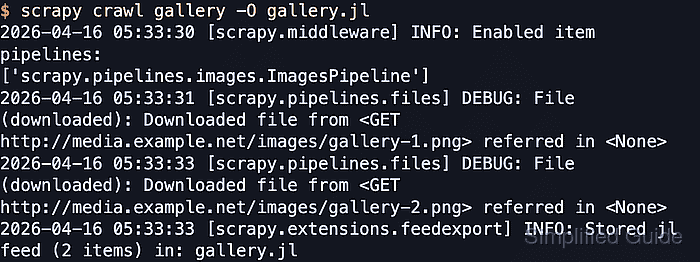
$ scrapy crawl gallery -O gallery.jl
2026-04-22 05:58:50 [scrapy.utils.log] INFO: Scrapy 2.15.0 started (bot: images_demo)
##### snipped #####
2026-04-22 05:58:56 [scrapy.middleware] INFO: Enabled item pipelines:
['scrapy.pipelines.images.ImagesPipeline']
2026-04-22 05:58:57 [scrapy.pipelines.files] DEBUG: File (downloaded): Downloaded file from <GET http://media.example.net/images/gallery-1.png> referred in <None>
2026-04-22 05:58:59 [scrapy.pipelines.files] DEBUG: File (downloaded): Downloaded file from <GET http://media.example.net/images/gallery-2.png> referred in <None>
2026-04-22 05:58:59 [scrapy.extensions.feedexport] INFO: Stored jl feed (2 items) in: gallery.jl
If the image URL first returns 301 or 302, add MEDIA_ALLOW_REDIRECTS = True before this run or the media request is treated as failed.
- Open the exported feed to confirm Scrapy wrote the stored image metadata back into each item.
$ cat gallery.jl
{"title": "Gallery Image 1", "image_urls": ["http://media.example.net/images/gallery-1.png"], "images": [{"url": "http://media.example.net/images/gallery-1.png", "path": "full/190189632ca8f84ddd67245247213422e717d64b.jpg", "checksum": "3c101f2e17b8840bcab68cc377586430", "status": "downloaded"}]}
{"title": "Gallery Image 2", "image_urls": ["http://media.example.net/images/gallery-2.png"], "images": [{"url": "http://media.example.net/images/gallery-2.png", "path": "full/bc4de106168178ec5616391b97c904c442dd2796.jpg", "checksum": "fc1f6b7f319e089d0f1f04b239bf0396", "status": "downloaded"}]}
The path value is relative to IMAGES_STORE, not an absolute filesystem path.
- List the image store to confirm the downloaded files exist as local JPEG images under full/.
$ ls images-store/full
190189632ca8f84ddd67245247213422e717d64b.jpg
bc4de106168178ec5616391b97c904c442dd2796.jpg
ImagesPipeline hashes the source URL into the stored filename by default. Override file_path() in a custom pipeline when original filenames or per-item folders matter more than the default hash-based layout.

Mohd Shakir Zakaria is a cloud architect with deep roots in software development and open-source advocacy. Certified in AWS, Red Hat, VMware, ITIL, and Linux, he specializes in designing and managing robust cloud and on-premises infrastructures.


