Configuring feed exports in Scrapy moves the output target, serialization format, and field order into project settings so repeated crawls write the same layout every time. That keeps downstream processing predictable and removes the need to remember one-off -o or -O flags for each spider run.
Scrapy reads FEEDS as a dictionary whose keys are feed destinations and whose values are per-feed options. Each feed definition can set the format, exported fields, encoding, overwrite behavior, and other feed-specific options, while the feed URI selects the storage backend.
Current Scrapy docs still default local filesystem feeds to overwrite: False, so setting overwrite: True and store_empty: False keeps one reusable export target from appending old items or leaving behind a new empty file after an empty crawl. New projects generated by startproject already set FEED_EXPORT_ENCODING to utf-8, and feed URIs can still use placeholders such as %(name)s and %(time)s when each spider or run should write a separate file.
Related: How to export Scrapy items to JSON
Related: How to export Scrapy items to CSV
Steps to configure feed exports in Scrapy:
- Open a terminal in the Scrapy project directory that contains scrapy.cfg.
$ cd /srv/catalog_demo
scrapy crawl and scrapy settings load the active project settings from this directory.
- Set the FEEDS dictionary in catalog_demo/settings.py.
FEEDS = {
    "output/products.jsonl": {
        "format": "jsonlines",
        "fields": ["name", "price", "url"],
        "overwrite": True,
        "store_empty": False,
    },
}
fields keeps the saved keys in a stable order even if the spider yields item values in a different order. Use output/%(name)s-%(time)s.jsonl when each crawl should write a separate file.
overwrite: True replaces any existing file at the same path as soon as the crawl writes the new feed.
- Read the resolved project setting before the crawl.
$ scrapy settings --get FEEDS
{"output/products.jsonl": {"format": "jsonlines", "fields": ["name", "price", "url"], "overwrite": true, "store_empty": false}}
The printed setting should match the feed definition that the spider will use at runtime.
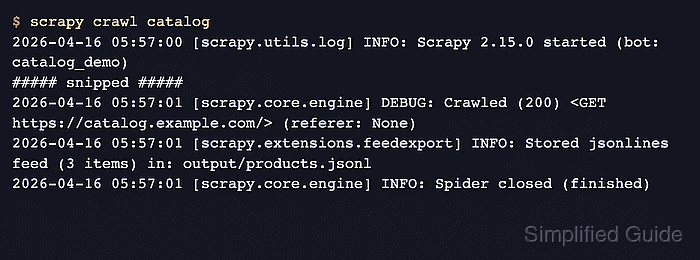
- Run the spider so Scrapy writes items through the configured feed exporter.
$ scrapy crawl catalog
2026-04-22 07:20:33 [scrapy.utils.log] INFO: Scrapy 2.15.0 started (bot: catalog_demo)
##### snipped #####
2026-04-22 07:20:39 [scrapy.core.engine] INFO: Closing spider (finished)
2026-04-22 07:20:39 [scrapy.extensions.feedexport] INFO: Stored jsonlines feed (3 items) in: output/products.jsonl
2026-04-22 07:20:39 [scrapy.core.engine] INFO: Spider closed (finished)
The feed exporter logs the saved file path and item total when the export finishes cleanly. Related: How to export a feed as JSON Lines in Scrapy
- Open the exported file to confirm the configured field order and one-item-per-line JSON Lines output.
$ cat output/products.jsonl
{"name": "Starter Plan", "price": "$29", "url": "https://catalog.example.com/products/starter-plan.html"}
{"name": "Team Plan", "price": "$79", "url": "https://catalog.example.com/products/team-plan.html"}
{"name": "Growth Plan", "price": "$129", "url": "https://catalog.example.com/products/growth-plan.html"}
JSON Lines writes one complete JSON object per line, which is easier to append, stream, and diff than a single JSON array.
Tool: JSON Validator
- Count the saved records when a quick end-of-run verification is enough.
$ wc -l output/products.jsonl
       3 output/products.jsonl
The line total should match the item total from the crawl log because JSON Lines writes one item on each line.

Mohd Shakir Zakaria is a cloud architect with deep roots in software development and open-source advocacy. Certified in AWS, Red Hat, VMware, ITIL, and Linux, he specializes in designing and managing robust cloud and on-premises infrastructures.


