Servers often accumulate reports, logs, and export files that need to be examined or retained on an operator's local system. A remote-to-local rsync transfer carries that directory through SSH and avoids retransmitting unchanged content on later pulls.
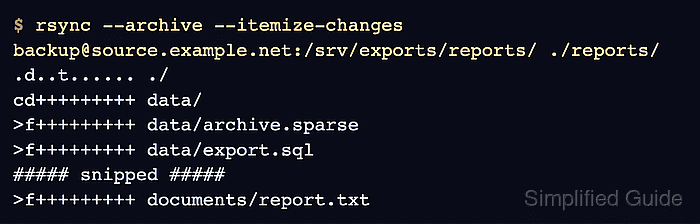
The remote source appears before the local destination in the command, written in the user@host:path form. A single colon selects the remote-shell transport, so both endpoints need rsync and the SSH account only needs read access to the source tree.
A trailing slash copies the contents of the remote directory into the local destination. The pull can replace matching local paths but leaves local-only files in place unless a delete option is added, so preview the exact source spelling before the live transfer and compare a representative checksum afterward.
Steps to pull files over SSH with rsync:
- Confirm key-based SSH access can run rsync without a password prompt.
$ ssh -o BatchMode=yes backup@source.example.net 'rsync --version'
rsync  version 3.4.1  protocol version 32
Copyright (C) 1996-2025 by Andrew Tridgell, Wayne Davison, and others.
##### snipped #####
BatchMode=yes fails instead of prompting for a password, which makes authentication problems visible before the transfer starts. Compare a new host-key fingerprint with a trusted inventory or server console before accepting it.
Related: How to configure an SSH alias for rsync key authentication
Tool: SSH Key Fingerprint Checker - Create the local destination directory.
$ mkdir -p ./reports
- Preview the remote-to-local transfer without changing the destination.
$ rsync --archive --itemize-changes --dry-run backup@source.example.net:/srv/exports/reports/ ./reports/
.d..t...... ./
cd+++++++++ data/
>f+++++++++ data/archive.sparse
>f+++++++++ data/export.sql
cL+++++++++ data/latest-report.txt -> ../documents/report.txt
>f+++++++++ data/session.tmp
cd+++++++++ documents/
>f+++++++++ documents/notes.txt
>f+++++++++ documents/report-hardlink.txt
>f+++++++++ documents/report.txt
The live pull can replace local files that share a path with remote files. It leaves local-only files untouched because no delete option is present; do not add --delete unless the destination is intentionally being mirrored and the dry run lists only acceptable removals.
- Pull the remote directory contents into the local destination.
$ rsync --archive --itemize-changes backup@source.example.net:/srv/exports/reports/ ./reports/
.d..t...... ./
cd+++++++++ data/
>f+++++++++ data/archive.sparse
>f+++++++++ data/export.sql
cL+++++++++ data/latest-report.txt -> ../documents/report.txt
>f+++++++++ data/session.tmp
cd+++++++++ documents/
>f+++++++++ documents/notes.txt
>f+++++++++ documents/report-hardlink.txt
>f+++++++++ documents/report.txt
- List the local tree to confirm the expected paths arrived.
$ find ./reports -maxdepth 3 -print
./reports
./reports/data
./reports/data/archive.sparse
./reports/data/session.tmp
./reports/data/export.sql
./reports/data/latest-report.txt
./reports/documents
./reports/documents/notes.txt
./reports/documents/report.txt
./reports/documents/report-hardlink.txt
- Calculate the remote checksum for a representative file.
$ ssh -o BatchMode=yes backup@source.example.net 'sha256sum /srv/exports/reports/documents/report.txt'
fb9a0db6fb9da6f4ebdc2e7076bbe4849667463b57986036cb3a2dbef0fdab90  /srv/exports/reports/documents/report.txt
- Calculate the local checksum and confirm it matches the remote hash.
$ sha256sum ./reports/documents/report.txt
fb9a0db6fb9da6f4ebdc2e7076bbe4849667463b57986036cb3a2dbef0fdab90  ./reports/documents/report.txt
- Run a final dry run with itemized changes.
$ rsync --archive --itemize-changes --dry-run backup@source.example.net:/srv/exports/reports/ ./reports/
No itemized path appears after the command when the local tree has no pending rsync updates from the remote source.

Mohd Shakir Zakaria is a cloud architect with deep roots in software development and open-source advocacy. Certified in AWS, Red Hat, VMware, ITIL, and Linux, he specializes in designing and managing robust cloud and on-premises infrastructures.


