phpMyAdmin stores bookmarks, relation metadata, Designer layouts, interface preferences, and other advanced-feature data in dedicated database tables. Central configuration storage keeps those features available across sessions while a restricted control account separates phpMyAdmin's internal tables from application data.
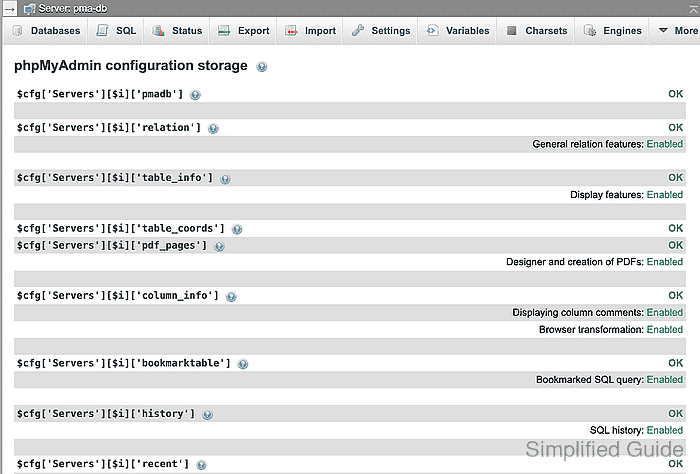
The official phpMyAdmin Docker image loads /etc/phpmyadmin/config.user.inc.php after its environment-based configuration and accepts PMA_CONTROLPASS_FILE for a file-backed control password. A read-only bind mount preserves the table mappings when the container is replaced, and the bundled /var/www/html/sql/create_tables.sql matches the storage schema to the running phpMyAdmin release.
The existing Compose project already runs database, application, and phpMyAdmin services on an application network. The database and phpMyAdmin services will also share an internal storage network. A profile-gated database-administrator client applies one protected SQL batch that resets the subnet-restricted storage_admin account to global CREATE USER plus only the schema and data privileges needed in the phpmyadmin database.
Steps to enable phpMyAdmin configuration storage:
- Start an isolated Bash process for the secret and configuration file operations.
$ bash
The later umask and noclobber settings apply only to this child shell and disappear when it exits.
- Restrict permissions on files created by the current Bash session.
$ umask 077
- Enable fail-closed output redirection in the current Bash session.
$ set -o noclobber
Bash now rejects > redirection when the destination already exists, so later secret and configuration-file commands cannot replace existing bytes.
- Create the local secrets directory with owner-only access.
$ install -d -m 700 secrets
- Create the schema-only bind directory with owner-only access.
$ install -d -m 700 storage-schema
- Select an unused private /24 subnet for pma_storage that does not overlap any host, VPN, or Docker network.
The values 10.77.55.0/24 for Compose and 10.77.55.0/255.255.255.0 for MariaDB describe the same example network.
- Generate the phpMyAdmin control-account password directly into a protected secret file.
$ openssl rand -base64 32 > secrets/pma-control-password.txt
The noclobber setting leaves an existing secret unchanged. Replacing that file without changing the matching MariaDB account would break configuration storage.
- Generate the storage-administrator password directly into a protected temporary file.
$ openssl rand -base64 32 > secrets/storage-admin-password.txt
- Read the generated storage-administrator password into a non-exported Bash variable.
$ IFS= read -r STORAGE_ADMIN_PASSWORD < secrets/storage-admin-password.txt
- Set the storage-administrator account host to the selected subnet's MariaDB address-and-netmask form using the example /24 value when applicable.
$ STORAGE_ADMIN_HOST=10.77.55.0/255.255.255.0
The value must match the pma_storage subnet selected for Compose.
- Escape backslashes in the storage-administrator password for MariaDB option-file syntax.
$ STORAGE_ADMIN_ESCAPED=${STORAGE_ADMIN_PASSWORD//\\/\\\\} - Escape double quotes in the storage-administrator password for MariaDB option-file syntax.
$ STORAGE_ADMIN_ESCAPED=${STORAGE_ADMIN_ESCAPED//\"/\\\"} - Store the storage-administrator credentials in a protected MariaDB client option file.
$ builtin printf '[client]\nuser=storage_admin\npassword="%s"\n' "$STORAGE_ADMIN_ESCAPED" > secrets/storage-admin.cnf
Bash builtins keep the entered value out of shell history and operating-system process arguments. The protected option file supplies it directly to the MariaDB client.
- Build the protected storage-administrator provisioning batch for the selected MariaDB account host.
$ builtin printf '%s\n' \
  "CREATE USER IF NOT EXISTS 'storage_admin'@'$STORAGE_ADMIN_HOST' IDENTIFIED BY '$STORAGE_ADMIN_PASSWORD';" \
  "ALTER USER 'storage_admin'@'$STORAGE_ADMIN_HOST' IDENTIFIED BY '$STORAGE_ADMIN_PASSWORD';" \
  "REVOKE ALL PRIVILEGES, GRANT OPTION FROM 'storage_admin'@'$STORAGE_ADMIN_HOST';" \
  "GRANT CREATE USER ON *.* TO 'storage_admin'@'$STORAGE_ADMIN_HOST';" \
  "GRANT CREATE, SELECT, INSERT, UPDATE, DELETE ON phpmyadmin.* TO 'storage_admin'@'$STORAGE_ADMIN_HOST' WITH GRANT OPTION;" \
  > secrets/provision-storage-admin.sql
The REVOKE statement removes every existing direct grant from this dedicated account before the narrow grants are applied. This dedicated account is unsuitable for another administrative purpose.
The generated Base64 password contains no SQL quote characters.
- Remove the storage-administrator password values from the current Bash process.
$ unset STORAGE_ADMIN_PASSWORD STORAGE_ADMIN_ESCAPED
- Compare the existing recovery file with the current config.user.inc.php override when both files exist.
$ cmp -- config.user.inc.php.pre-storage config.user.inc.php
An exit status of 0 means the existing recovery point already matches the current override; an exit status of 1 means the files differ.
- Move a differing recovery file without replacing an existing archive.
$ mv -n -- config.user.inc.php.pre-storage config.user.inc.php.pre-storage.archived
The -n option preserves an existing archive but can report success without moving the source, so the next check must pass before a new recovery file is created.
- Confirm the differing recovery file no longer exists at its original pathname.
$ test ! -e config.user.inc.php.pre-storage
- Back up config.user.inc.php when the project has that override and no current recovery file.
$ cat -- config.user.inc.php > config.user.inc.php.pre-storage
An absent override has no local bytes to preserve. The noclobber setting leaves an existing recovery file unchanged.
- Create config.user.inc.php only when the project has no existing override.
$ printf '%s\n' '<?php' > config.user.inc.php
The command fails without changing /config.user.inc.php when that file already exists.
- Define the db network list with both the existing application network and the storage network.
- compose.yaml
services:
  db:
    networks:
      app_net:
      pma_storage:
        aliases:
          - pma-db
- Add the profile-gated MariaDB client used for database administration.
- compose.yaml
  database-admin:
    image: mariadb:11.8
    profiles:
      - storage-admin
    entrypoint:
      - mariadb
    networks:
      - pma_storage
    secrets:
      - database_admin_client
This utility receives the existing database-administrator option file only when explicitly targeted with docker compose run.
- Add the profile-gated MariaDB client used for storage administration.
- compose.yaml
  storage-admin:
    image: mariadb:11.8
    profiles:
      - storage-admin
    entrypoint:
      - mariadb
    networks:
      - pma_storage
    secrets:
      - storage_admin_client
    volumes:
      - ./storage-schema:/work/schema:ro
This utility runs only when explicitly targeted with docker compose run. The account's secret is available only through its read-only client option file.
- Configure phpmyadmin to use the storage alias and file-backed control password.
- compose.yaml
  phpmyadmin:
    environment:
      PMA_HOST: pma-db
      PMA_CONTROLHOST: pma-db
      PMA_CONTROLUSER: pma
      PMA_CONTROLPASS_FILE: /run/secrets/pma_control_password
      PMA_PMADB: phpmyadmin
    networks:
      - frontend
      - pma_storage
    secrets:
      - pma_control_password
    volumes:
      - ./config.user.inc.php:/etc/phpmyadmin/config.user.inc.php:ro
- Export the existing MariaDB administrator option-file path for Compose interpolation using the example project-relative path when applicable.
$ export DB_ADMIN_OPTION_FILE=./secrets/database-admin.cnf
The selected file must contain the credentials of an account authorized to create users and grant the listed global and phpmyadmin database privileges.
- Define the existing networks, selected internal storage subnet, and three client secrets.
- compose.yaml
networks:
  app_net:
  frontend:
  pma_storage:
    name: pma-storage
    internal: true
    ipam:
      config:
        - subnet: 10.77.55.0/24

secrets:
  database_admin_client:
    file: "${DB_ADMIN_OPTION_FILE:?Set DB_ADMIN_OPTION_FILE}"
  storage_admin_client:
    file: ./secrets/storage-admin.cnf
  pma_control_password:
    file: ./secrets/pma-control-password.txt
An overlapping subnet can misroute database traffic or make the storage service unreachable.
- Validate the merged Compose configuration.
$ docker compose config --quiet
- List the service names in the existing Compose project.
$ docker compose config --services
- Set the existing Compose application service name using app when it matches the service list.
$ APPLICATION_SERVICE=app
The value must be one service name returned by docker compose config --services.
- Set the existing application service's MariaDB option-file secret name using application_client when it matches the mounted filename.
$ APPLICATION_CLIENT_SECRET=application_client
The value is the option-file name mounted under /run/secrets.
- Set the existing application database name.
$ APPLICATION_DATABASE=reader_app
- Set a readable table name from the existing application database.
$ KNOWN_APPLICATION_TABLE=asset_registry
- Apply the database, selected application, and phpMyAdmin service definitions.
$ docker compose up -d db "$APPLICATION_SERVICE" phpmyadmin
- Apply the protected storage-administrator provisioning batch through the database-administrator option file.
$ docker compose run --rm -T database-admin \
  --defaults-extra-file=/run/secrets/database_admin_client \
  --host=pma-db \
  < secrets/provision-storage-admin.sql
The database-administrator container receives the option file through its service-scoped Compose secret, and the host shell streams the SQL batch over standard input.
- Delete the temporary storage-administrator password and provisioning batch.
$ rm -- secrets/storage-admin-password.txt secrets/provision-storage-admin.sql
The runtime credential remains in /secrets/storage-admin.cnf for the read-only Compose secret mount.
- Confirm the storage-administrator account has only the required global and database grants.
$ docker compose run --rm database-admin \
  --defaults-extra-file=/run/secrets/database_admin_client \
  --host=pma-db \
  --execute="SHOW GRANTS FOR 'storage_admin'@'$STORAGE_ADMIN_HOST';"
The result must contain one global CREATE USER grant and one CREATE, SELECT, INSERT, UPDATE, DELETE grant on phpmyadmin.* with GRANT OPTION, with no other grant rows.
- Remove the storage-administrator account host from the current Bash process.
$ unset STORAGE_ADMIN_HOST
- List the only secret granted to the storage-administrator container.
$ docker compose run --rm --entrypoint ls storage-admin -1 /run/secrets
storage_admin_client
The service receives neither pma_control_password nor any database or application credential because Compose grants secrets per service.
- Copy the release-matched configuration-storage schema from the phpmyadmin service.
$ docker compose cp phpmyadmin:/var/www/html/sql/create_tables.sql ./storage-schema/create_tables.sql
- Check whether the phpmyadmin storage database already exists.
$ docker compose run --rm storage-admin --defaults-extra-file=/run/secrets/storage_admin_client --host=pma-db --execute="SHOW DATABASES LIKE 'phpmyadmin';"
Database (phpmyadmin)
phpmyadmin
An absent database produces no rows. A returned phpmyadmin row selects the backup branch before import.
- Back up the storage database when the existence check returns phpmyadmin.
$ docker compose run --rm --entrypoint mariadb-dump storage-admin --defaults-extra-file=/run/secrets/storage_admin_client --host=pma-db --single-transaction --skip-lock-tables phpmyadmin > phpmyadmin-storage.sql
The dump is the rollback point if the release-matched schema changes an existing storage installation unexpectedly.
- Confirm the rollback dump contains data at the pre-import checkpoint.
$ test -s phpmyadmin-storage.sql
- Import the bundled schema without preselecting a database.
$ docker compose run --rm storage-admin --defaults-extra-file=/run/secrets/storage_admin_client --host=pma-db --execute="SOURCE /work/schema/create_tables.sql"
The bundled script creates phpmyadmin when absent, selects it internally, and uses idempotent table definitions when the database already exists.
- Read the generated control password into a non-exported Bash variable.
$ IFS= read -r PMA_CONTROL_PASSWORD < secrets/pma-control-password.txt
- Set the control account host to the selected subnet's MariaDB address-and-netmask form using the example /24 value when applicable.
$ PMA_CONTROL_HOST=10.77.55.0/255.255.255.0
The value must match the pma_storage subnet selected for Compose.
- Build the protected control-account SQL with the selected network in every account host specification.
$ builtin printf "CREATE USER IF NOT EXISTS 'pma'@'%s' IDENTIFIED BY '%s';\nALTER USER 'pma'@'%s' IDENTIFIED BY '%s';\nGRANT SELECT, INSERT, UPDATE, DELETE ON phpmyadmin.* TO 'pma'@'%s';\n" "$PMA_CONTROL_HOST" "$PMA_CONTROL_PASSWORD" "$PMA_CONTROL_HOST" "$PMA_CONTROL_PASSWORD" "$PMA_CONTROL_HOST" > secrets/provision-control-user.sql
The generated Base64 password contains no SQL quote characters. The real value moves from the protected secret file through Bash's builtin command into a temporary owner-readable SQL file without appearing in shell history or an operating-system process argument.
- Remove the control password and network value from the current Bash process.
$ unset PMA_CONTROL_PASSWORD PMA_CONTROL_HOST
- Apply the protected control-account SQL through the storage-administrator option file.
$ docker compose run --rm -T storage-admin --defaults-extra-file=/run/secrets/storage_admin_client --host=pma-db < secrets/provision-control-user.sql
The host shell streams the SQL over standard input, so storage-admin never receives a mount of the host secrets directory.
- Delete the temporary SQL file that contains the control password.
$ rm -- secrets/provision-control-user.sql
The runtime password remains in /secrets/pma-control-password.txt for the read-only Compose secret mount.
- Add the configuration-storage mappings after the opening PHP line without replacing existing directives.
- config.user.inc.php
$cfg['Servers'][$i]['pmadb'] = 'phpmyadmin';
$cfg['Servers'][$i]['bookmarktable'] = 'pma__bookmark';
$cfg['Servers'][$i]['relation'] = 'pma__relation';
$cfg['Servers'][$i]['table_info'] = 'pma__table_info';
$cfg['Servers'][$i]['table_coords'] = 'pma__table_coords';
$cfg['Servers'][$i]['pdf_pages'] = 'pma__pdf_pages';
$cfg['Servers'][$i]['column_info'] = 'pma__column_info';
$cfg['Servers'][$i]['history'] = 'pma__history';
$cfg['Servers'][$i]['recent'] = 'pma__recent';
$cfg['Servers'][$i]['favorite'] = 'pma__favorite';
$cfg['Servers'][$i]['table_uiprefs'] = 'pma__table_uiprefs';
$cfg['Servers'][$i]['tracking'] = 'pma__tracking';
$cfg['Servers'][$i]['userconfig'] = 'pma__userconfig';
$cfg['Servers'][$i]['users'] = 'pma__users';
$cfg['Servers'][$i]['usergroups'] = 'pma__usergroups';
$cfg['Servers'][$i]['navigationhiding'] = 'pma__navigationhiding';
$cfg['Servers'][$i]['savedsearches'] = 'pma__savedsearches';
$cfg['Servers'][$i]['central_columns'] = 'pma__central_columns';
$cfg['Servers'][$i]['designer_settings'] = 'pma__designer_settings';
$cfg['Servers'][$i]['export_templates'] = 'pma__export_templates';
- Validate the mounted override with the PHP parser inside the phpmyadmin service.
$ docker compose exec phpmyadmin php -l /etc/phpmyadmin/config.user.inc.php
No syntax errors detected in /etc/phpmyadmin/config.user.inc.php
- Replace the phpmyadmin container from its validated Compose definition.
$ docker compose up -d --force-recreate phpmyadmin
- Confirm the replacement container reaches MariaDB through the subnet-scoped control account.
$ docker compose exec phpmyadmin php -r '$password = trim(file_get_contents("/run/secrets/pma_control_password")); $db = new mysqli("pma-db", "pma", $password); printf("matched account: %s\n", $db->query("SELECT CURRENT_USER()")->fetch_row()[0]);' matched account: pma@10.77.55.0/255.255.255.0 - Confirm the control account cannot read the selected application table.
$ docker compose exec -e APPLICATION_DATABASE="$APPLICATION_DATABASE" -e KNOWN_APPLICATION_TABLE="$KNOWN_APPLICATION_TABLE" phpmyadmin php -r '$password = trim(file_get_contents("/run/secrets/pma_control_password")); $db = new mysqli("pma-db", "pma", $password); $target = sprintf("`%s`.`%s`", getenv("APPLICATION_DATABASE"), getenv("KNOWN_APPLICATION_TABLE")); try { $db->query("SELECT * FROM $target LIMIT 1"); } catch (mysqli_sql_exception $e) { printf("denied error: %d (%s)\n", $e->getCode(), $e->getSqlState()); exit($e->getCode() === 1142 ? 0 : 1); } exit(1);'
denied error: 1142 (42000)
Error 1142 proves that MariaDB found the selected table but denied SELECT to the control account.
- Confirm the selected application service still reaches its database through app_net.
$ docker compose exec "$APPLICATION_SERVICE" mariadb --defaults-extra-file="/run/secrets/$APPLICATION_CLIENT_SECRET" --host=db --execute="SELECT DATABASE();" "$APPLICATION_DATABASE"
The probe fails if db no longer shares app_net, name resolution breaks, authentication fails, or the selected database is unavailable.
- Exit the isolated Bash process to restore the parent shell's original umask and noclobber settings.
$ exit
- Open the relations-check route under the exact scheme, host, optional port, and path prefix of the phpMyAdmin login URL in the authenticated session.
https://pma.example.net/index.php?route=/check-relations
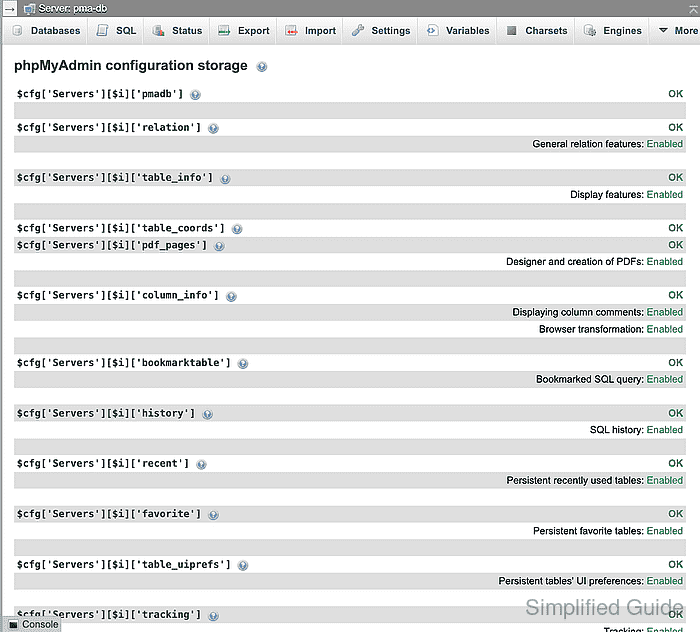
For a login page at https://admin.example.com/phpmyadmin/, the matching route URL is https://admin.example.com/phpmyadmin/index.php?route=/check-relations.
- Confirm every configuration-storage mapping shows OK and every listed advanced-feature group shows Enabled.
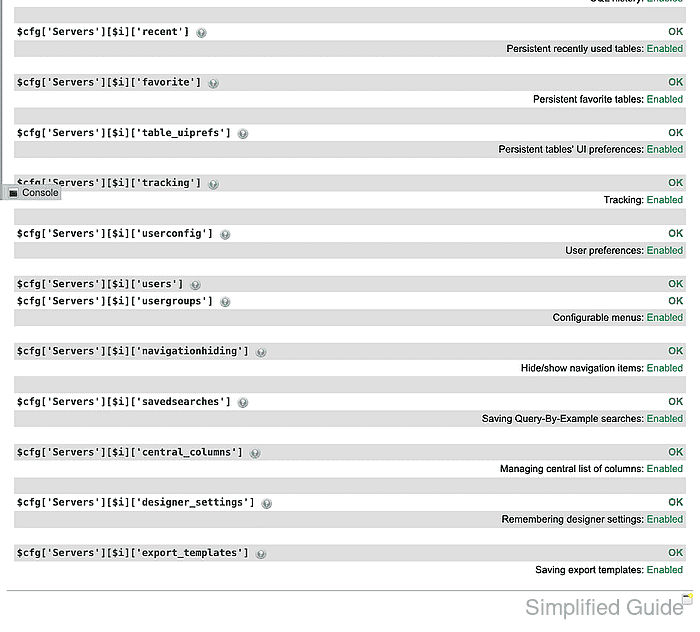
A not OK row identifies the table mapping that still needs correction.

Mohd Shakir Zakaria is a cloud architect with deep roots in software development and open-source advocacy. Certified in AWS, Red Hat, VMware, ITIL, and Linux, he specializes in designing and managing robust cloud and on-premises infrastructures.


