phpMyAdmin places a database administration interface behind a web request, so an exposed endpoint should accept sign-ins only from network paths that administrators actually use. Its per-server AllowDeny policy can combine a database username with a client IP address and reject every unlisted combination.

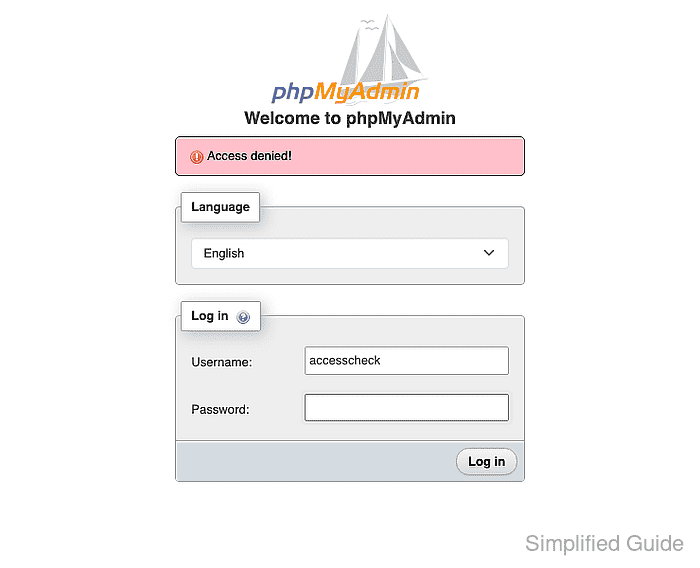
With cookie authentication, an excluded client may still see the login form because phpMyAdmin evaluates the rule when a username is submitted. The explicit order is the strictest mode: a username-address pair must appear in an allow rule and must not match any deny rule.
phpMyAdmin normally reads the address reported by the web server. A reverse proxy changes that boundary, so TrustedProxies should name only a proxy you control and its client-address header; trusting an arbitrary proxy or forwarded header lets clients spoof the value. Keep console access and a temporary backup until an allowed login succeeds and an excluded source is denied.
Steps to restrict phpMyAdmin access by IP address:
- Select the database username-address pair that phpMyAdmin should accept.
The address must match the route seen by the phpMyAdmin web server, which may be a public IPv4 address, public IPv6 address, VPN exit, or internal address.
Tool: Check My IP Address - Locate the active phpMyAdmin configuration file for the protected endpoint.
The common package path is /etc/phpmyadmin/config.inc.php. The official container override path is /etc/phpmyadmin/config.user.inc.php.
Related: phpMyAdmin configuration files - Create a temporary backup of the active phpMyAdmin configuration file.
$ sudo cp /etc/phpmyadmin/config.inc.php /etc/phpmyadmin/config.inc.php.access-backup
The command uses the common Debian and Ubuntu package path; other layouts require the active path identified earlier.
- Add an explicit allow rule for the trusted database username-address pair to the selected server block.
$cfg['Servers'][$i]['AllowDeny']['order'] = 'explicit';
$cfg['Servers'][$i]['AllowDeny']['rules'] = [
    'allow db_operator from 203.0.113.25',
];
db_operator and 203.0.113.25 are documentation values. The latter belongs to TEST-NET-3 and must be replaced with the real client address or the smallest required CIDR. One rule per permitted username-address pair is narrower than the wildcard username.
- Define a trusted proxy mapping only when phpMyAdmin receives requests through a controlled reverse proxy.
$cfg['TrustedProxies'] = [
    '192.0.2.10' => 'HTTP_X_FORWARDED_FOR',
];
192.0.2.10 is a documentation address that represents the proxy itself, not an allowed client. A broad proxy range or an untrusted forwarded header lets clients spoof the address evaluated by AllowDeny.
- Validate the edited phpMyAdmin configuration file for PHP syntax errors.
$ php -l /etc/phpmyadmin/config.inc.php
No syntax errors detected in /etc/phpmyadmin/config.inc.php
The corresponding edited path for the official container is /etc/phpmyadmin/config.user.inc.php.
- Log in to phpMyAdmin with the allowed username from the allowed client address.
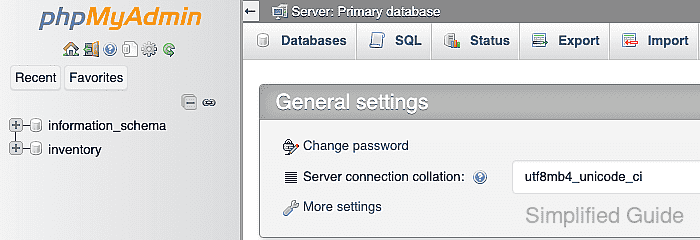
- Attempt the same phpMyAdmin login from an address outside the allow rule.
- Remove the temporary configuration backup after both client checks pass.
$ sudo rm -- /etc/phpmyadmin/config.inc.php.access-backup

Mohd Shakir Zakaria is a cloud architect with deep roots in software development and open-source advocacy. Certified in AWS, Red Hat, VMware, ITIL, and Linux, he specializes in designing and managing robust cloud and on-premises infrastructures.


